Task
● Install Initial Config basic.ip.addressing on R1-R10
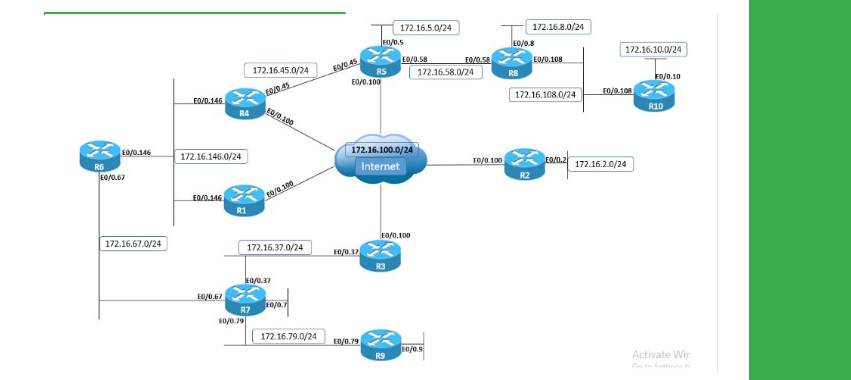
● Configure R4 and R5 with IPv4 static routes to each other’s Loopback0 prefixes via the Ethernet segment between them.
● Configure R4 and R5 with IPv4 static routes for 10.1.0.0/16 prefix via the DMVPN cloud.
● Ensure that traffic between R4's and R5’s Loopback0 prefixes is primarily routed over the Ethernet segment, and DMVPN cloud is used only if Ethernet link is DOWN.
Explanation
IPv4 routing logic uses longest match routing to determine which entry to use from the routing table for forwarding. This principle can be used to achieve both redundancy and traffic engineering, as is the case for traffic routed between Loopback0 prefixes of R4 and R5.
When R5 performs a lookup on the final destination 10.1.4.4, the longest match is 10.1.4.4/32 out Ethernet0/0.45. Although technically there are multiple routes to this destination, 10.1.4.4/32 and 10.1.0.0/16, the /32 route wins. For any other destination from 10.1.0.0/16 range, such as 10.1.3.3, the longest match will be 10.1.0.0/16 via 172.16.0.4.
This allows traffic for a portion of the IP address space to be routed one way, and traffic for a different portion of the IP address space to be routed another way:
R5
show ip route 10.1.4.4
traceroute 10.1.4.4
Redundancy is accomplished in this example when the Ethernet link between R4 and R5 fails. As long as this link is UP and associated IPv4 static routes can be installed in the routing table, the 10.1.4.4/32 route will be installed in the routing table.
However, if the GigabitEthernet0/0.45 link is in the UP/DOWN or DOWN/DOWN states, it cannot be installed in the routing table; the same goes for any routes that recurse to GigabitEthernet0/0.45. The result is that when the link is down, traffic between Loopbacks of R4 and R5 is rerouted out the DMVPN cloud using the 10.1.0.0/16 prefix as the longest match.
R5
configure terminal
Enter configuration commands, one per line. End with CNTL/Z.
interface GigabitEthernet0/0.45
shutdown
show ip route 10.1.4.4
traceroute 10.1.4.4
Configuration
R4:ip route 10.1.5.5 255.255.255.255 GigabitEthernet0/0.45
ip route 10.1.0.0 255.255.0.0 172.16.0.5
R5
ip route 10.1.4.4 255.255.255.255 GigabitEthernet0/0.45
ip route 10.1.4.4 255.255.255.255 GigabitEthernet0/0.45


