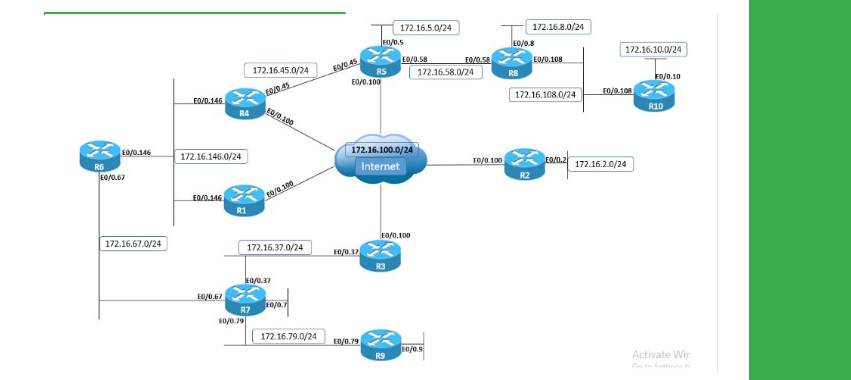
● Install Initial Config basic.ip.addressing on R1-R10
● Configure R1 with a IPv4 static route for R4’s Loopback0 prefix, using only the next-hop with a value of R4.
● Configure R1 with a IPv4 static route for R6’s Loopback0 prefix, using only R1's Ethernet outgoing interface.
● Disable Proxy ARP on R6’s connections to VLAN 146.
● Ensure that R1 can ping the Loopback0 interfaces of R4 and R6.
● Modify R1’s ARP table so that it still has IPv4 reachability to the Loopback0 interface of R6.
When the router needs to route a packet that matches an entry in the routing table with a next-hop value, it performs Layer 3 to Layer 2 resolution for the next-hop address.
If it matches an entry in the routing table with just the outgoing/exit local interface, without a next-hop value, it performs Layer 3 to Layer 2 resolution for the final destination of the IP packet. In this particular case, this means that R1 will ARP and use the MAC address of next-hop 172.16.146.4 to reach 10.1.4.4, but will ARP for the address 10.1.6.6 to reach 10.1.6.6.
Because all routers have Proxy ARP enabled by default on all interfaces, when R1 sends an ARP Request for 10.1.6.6, R6 will reply with its own MAC address from VLAN 146:
R1:
show arp
Protocol Address Age (min) Hardware Addr Type Interface Internet 172.16.146.4 10 aabb.cc00.e200 ARPA GigabitEthernet0/0 Internet 172.16.146.5 - aabb.cc00.b200 ARPA GigabitEthernet0/0 |
ping 10.1.4.4
Type escape sequence to abort. Sending 5, 100-byte ICMP Echos to 10.1.4.4, timeout is 2 seconds: !!!!! Success rate is 100 percent (5/5), round-trip min/avg/max = 1/1/1 ms! |
ping 10.1.6.6
Type escape sequence to abort. Sending 5, 100-byte ICMP Echos to 10.1.6.6, timeout is 2 seconds: !!!!! Success rate is 100 percent (5/5), round-trip min/avg/max = 1/1/1 ms! |
show arp
Protocol Address Age (min) Hardware Addr Type Interface Internet 172.16.146.4 27 aabb.cc00.e200 ARPA GigabitEthernet0/0 Internet 172.16.146.5 - aabb.cc00.b200 ARPA GigabitEthernet0/0 Internet 172.16.146.6 3 aabb.cc00.6200 ARPA GigabitEthernet0/0 |
When Proxy ARP is disabled on R6, R1 cannot resolve the destination 10.1.6.6 through ARP. This is seen from the encapsulation failed message that R1 generates in the debug IP packet detail output.
Encapsulation failed means that the router does not know the destination Layer 2 MAC address to use for building the Layer 2 frame. Depending on the platform and IOS code message may be different, as in this case, where the relevant message does not provide enough info to forward via fib:
R1
clear arp
debug arp
ping 10.1.6.6 repeat 1
Type escape sequence to abort. Sending 1, 100-byte ICMP Echos to 10.1.6.6, timeout is 2 seconds: ! Success rate is 100 percent (1/1), round-trip min/avg/max = 1/1/1 ms Sending 1, 100-byte ICMP Echos to 10.1.6.6, timeout is 2 seconds: Success rate is 0 percent (0/1) ! ! IP: s=172.16.146.1 (local), d=10.1.6.6, len 100, local feature ICMP type=8, code=0, feature skipped, Logical MN local(14), rtype 0, forus FALSE, sendself FALSE, mtu 0, fwdchk FALSE FIBipv4-packet-proc: route packet from (local) src 172.16.146.1 dst 10.1.6.6 FIBfwd-proc: Default:10.1.6.6/32 process level forwarding FIBfwd-proc: depth 0 first_idx 0 paths 1 long 0(0) FIBfwd-proc: try path 0 (of 1) v4-ap-GigabitEthernet0/0.146 first short ext 0(-1) FIBfwd-proc: v4-ap-GigabitEthernet0/0.146 valid FIBfwd-proc: GigabitEthernet0/0.146 no nh type 3 - deag FIBfwd-proc: ip_pak_table 0 ip_nh_table 65535 if GigabitEthernet0/0.146 nh none deag 1 chg_if 0 via fib 0 path type attached prefix FIBfwd-proc: Default:10.1.6.6/32 not enough info to forward via fib (GigabitEthernet0/0.146 none) FIBipv4-packet-proc: packet routing failed IP: tableid=0, s=172.16.146.1 (local), d=10.1.6.6 (GigabitEthernet0/0.146), routed via RIB IP: s=172.16.146.1 (local), d=10.1.6.6 (GigabitEthernet0/0.146), len 100, sending ICMP type=8. code=0 IP ARP: creating incomplete entry for IP address: 10.1.6.6 interface GigabitEthernet0/0.146 IP ARP: sent req src 172.16.146.1 0050.568d.2e27, dst 10.1.6.6 0000.0000.0000 GigabitEthernet0/0.146 |
There are two ways to resolve this problem: either change the static routing configuration on R1 so that it does not ARP for the final destination from the IP header, or statically configure the ARP cache of R1 so that it knows which MAC address to use when it sends the packet to 10.1.6.6:
R1
configure terminal
Enter configuration commands, one per line. End with CNTL/Z. R1(config)#arp 10.1.6.6 aabb.cc00.6200 arp |
show arp
Protocol Address Age (min) Hardware Addr Type Interface Internet 10.1.6.6 - aabb.cc00.6200 ARPA Internet 172.16.146.4 16 aabb.cc00.e200 ARPA Ethernet0/0 Internet 172.16.146.5 - aabb.cc00.b200 ARPA Ethernet0/0 Internet 172.16.146.6 16 aabb.cc00.6200 ARPA Ethernet0/0! |
ping 10.1.6.6
Type escape sequence to abort. Sending 5, 100-byte ICMP Echos to 10.1.6.6, timeout is 2 seconds: !!!!! Success rate is 100 percent (5/5), round-trip min/avg/max = 1/1/1 ms |
From a design perspective, the ideal solution for this problem is to never configure a static route to point out a multipoint interface. Static routes should either point to the next-hop value of the neighbor on the multipoint interface or point to an interface only if it is point-to-point, such as a GRE tunnel, PPP or HDLC link.
R1
ip route 10.1.4.4 255.255.255.255 172.16.146.4
ip route 10.1.6.6 255.255.255.255 GigabitEthernet0/0.146
!
arp 10.11.6.6 0011.93da.bf40 arpa
R2
interface GigabitEthernet0/0
mac-address 0011.93da.bf40
!
interface GigabitEthernet0/0.146
no ip proxy-arp