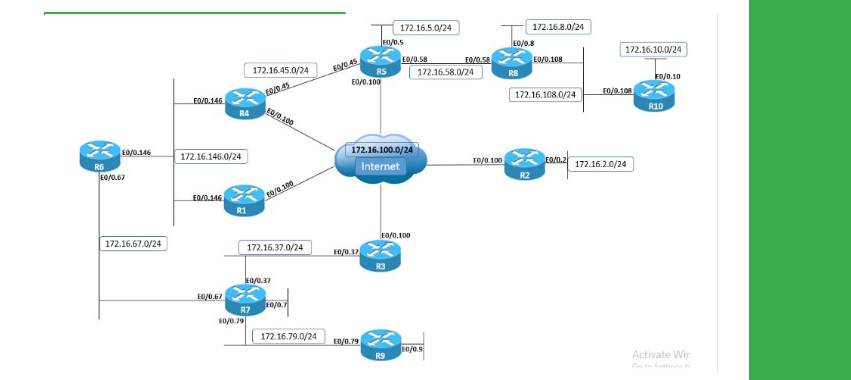
Task
● Create a GRE tunnel between R1 and R3 using the IPv4 addresses 172.16.0.Y/24, where Y is the router number.
● The tunnel should be sourced from and destined to these devices’ VLAN 13 IPv4 addresses.
● Configure static routes so that traffic between R1 and R3 Loopback0 networks is routed over the tunnel.
● Use traceroute on R1 and R3 to verify that this configuration is functional.
Explanation
Generic Routing Encapsulation (GRE) tunneling is used to take another protocol payload, such as IPv4, IPv6, IPX, etc., and tunnel it over an IPv4 or IPv6 transit network, by using IP protocol number 47.
In this case, GRE is used to tunnel IPv4 packets between the Loopback0 networks of R1 and R3. Because the GRE tunnel is configured as point-to-point, static routes can be configured to point out the Tunnel directly, and a next-hop address is not required.
We can verify that traffic between these networks is going out the tunnel because the traceroute output shows only one hop between the networks, which is the GRE tunnel.
R1
show ip route 10.1.3.3
traceroute 10.1.3.3
R3
show ip route 10.1.1.1
traceroute 10.1.1.1
Verify the GRE tunnel state and encapsulation, and notice that MTU has been automatically lowered to accommodate the new IP header of 20 bytes and GRE header of 4 bytes.
R3
show interfaces tunnel13
To verify that packets are GRE encapsulated, we can use the embedded packet capture feature.
R1
monitor capture GRE match any interface GigabitEthernet0/0.13 both
monitor capture GRE start
!
ping 10.1.3.3 source loopback0
monitor capture GRE stop
!
show monitor capture GRE buffer brief
R1
no monitor capture GRE
Configuration
R1
interface Tunnel13
ip address 172.16.0.1 255.255.255.0
tunnel mode gre ip
tunnel source 172.16.13.1
tunnel destination 172.16.13.3
no shutdown
!
ip route 10.1.3.3 255.255.255.255 Tunnel13
R3:
interface Tunnel13
ip address 172.16.0.3 255.255.255.0
tunnel mode gre ip
tunnel source 172.16.13.3
tunnel destination 172.16.13.1
no shutdown
!
ip route 10.1.1.1 255.255.255.255 Tunnel13


