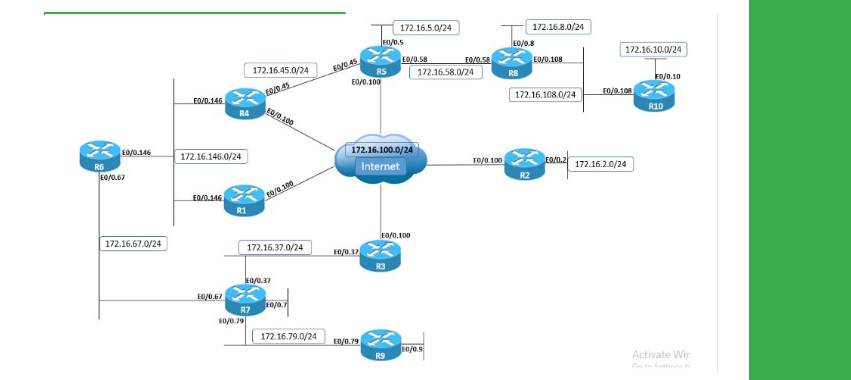
Task
● Configure R1 with IPv4 static route for R4’s Loopback0 prefix through the DMVPN cloud.
● Configure R5 with IPv4 static routes for R1's and R4's Loopback0 prefixes through the DMVPN cloud.
● Configure R4 with a primary IPv4 static route for R1’s Loopback0 prefix via its VLAN146 Ethernet connection.
● use SLA and Object Tracking to ensure the route is valid as long as ICMP connectivity exists between R1 and R4's Ethernet connection.
● configure R4 to verify connectivity each 5 seconds.
● ensure R1 replies within 2 seconds.
● Configure R4 with a backup IPv4 static route for R1’s Loopback0 prefix through the DMVPN cloud using administrative distance of 2.
Explanation
Although R1 and R4 are on the same Layer 2 segment in VLAN 146, their physical Ethernet interfaces are not on the same Layer 1 network; there is no back-to-back Ethernet cable between the two routers, connectivity is achieved through a switching infrastructure.
This means that the Layer 1 link status of R1’s connection to VLAN 146 is independent of R4’s Layer 1 link status, and vice-versa. From a static routing redundancy design point of view, the possible problem with this scenario is that routers have no way of detecting the other peer link failure, which may result in traffic being blackholed and silently dropped in the transit path.
To visualize this, before implementing the tracking functionality for the static route let's shutdown R1's Ethernet interface, which will still keep the primary route in the routing table, however IPv4 connectivity will fail:
R1
ping 10.1.4.4 source 10.1.1.1
interface GigabitEthernet0/0.146
shutdown
R4
show ip route 10.1.1.1
R1
ping 10.1.4.4 source 10.1.1.1
To fix the problem, we need to actively monitor IPv4 connectivity between R1 and R4 on the Ethernet segment and mark the primary static route as invalid for being installed in the routing table when connectivity fails.
For this scope, IP Service Level Agreement (SLA) and Enhanced Object Tracking features is used. First, R4 is configured with a SLA instance that actively monitors IPv4 connnectivity with R1 over the Ethernet link by sending ICMP Echo Request packets each 5 seconds.
SLA will consider connectivity to be functional through the Return Code of OK as long as ICMP Echo Reply is received within the configured 2 seconds timeout window; otherwise the Return Code will be Timeout:
R4
configure terminal
Enter configuration commands, one per line. End with CNTL/Z.
ip sla 1
icmp-echo 172.16.146.1 source-interface GigabitEthernet0/0.146
frequency 5
timeout 2000
exit
ip sla schedule 1 life forever start-time now
!
show ip sla configuration 1
show ip sla statistics
Next, a Enhanced Object Tracking is created that monitors the IP SLA instance Return Code. If SLA Return Code is OK, the tracking state is UP, while if the SLA Return Code has any other value, the tracking state is DOWN:
R4
configure terminal
Enter configuration commands, one per line. End with CNTL/Z.
track 1 ip sla 1 state
!
show track
Next the primary static route is configured with the tracking object attached as a condition. This will instruct the router to consider the route as valid for being entered in the routing table as long as the tracking state is UP. Also note that tracking now shows it is attached to static routing:
R4
ip route 10.1.1.1 255.255.255.255 172.16.146.1 track 1
!
show track
show ip route static | b Gateway
We simulate the same network failure, however due to tracking being configured for the primary route, once R4 will detect loss of IPv4 connectivity with R1, it will mark the primary route as invalid and inject the backup route in the routing table:
R4
traceroute 10.1.1.1 source 10.1.4.4
debug track state
debug ip routing
R1
configure terminal
Enter configuration commands, one per line. End with CNTL/Z.
interface GigabitEthernet0/0.146
shutdown
R4
traceroute 10.1.1.1 source 10.1.4.4
show ip route 10.1.1.1
Verify the SLA and tracking states:
show ip sla statistics 1
show track
When we re-activate R1's VLAN 146 Ethernet connection, the SLA instance reports itself as back up, the tracking instance reports itself as back up, and the static route with the lower administrative distance is re-installed in the routing table:
R1
configure terminal
Enter configuration commands, one per line. End with CNTL/Z.
interface GigabitEthernet0/0.146
no shutdown
Configuration
R1:
ip route 10.1.4.4 255.255.255.255 172.16.0.4
R4:
ip sla 1
icmp-echo 172.16.146.1 source-interface GigabitEthernet0/0.146
threshold 2000
timeout 2000
frequency 5
ip sla schedule 1 life forever start-time now
!
track 1 ip sla 1 state
!
ip route 10.1.1.1 255.255.255.255 172.16.146.1 track 1
ip route 10.1.1.1 255.255.255.255 172.16.0.1 2
R5
ip route 10.1.1.1 255.255.255.255 172.16.0.1
ip route 10.1.4.4 255.255.255.255 172.16.0.4


