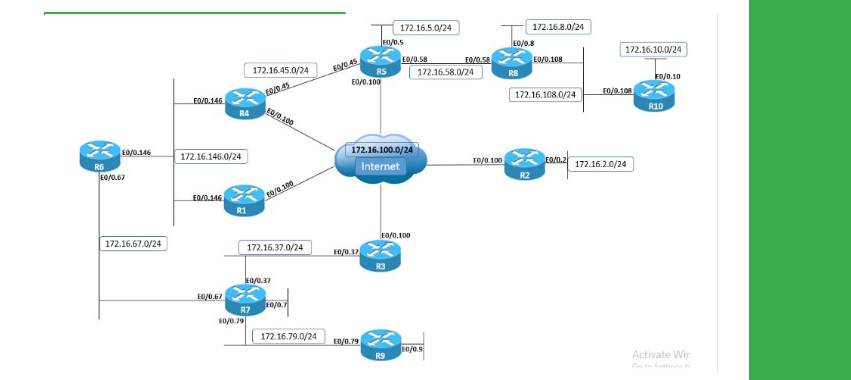
● Install Initial Config basic.ip.addressing on R1-R10
● Configure R1 and R2 with IPv4 default routes through the DMVPN cloud with a next-hop of R5.
● Ensure that the route is valid as long as the Tunnel interface is in the UP state.
● Configure R5 with IPv4 static routes for R1’s and R2's Loopback0 prefixes through the DMPVN cloud.
● Ensure that R1, R2, and R5 can all ping each other’s Loopback0 interfaces.
Explanation
When configuring a static route, the following options are available:
Specify only the next-hop value; the route is valid as long as a route exists for the next-hop value.
Specify only the local outgoing interface; the route is valid as long as the interface is in the UP/UP state.
Specify both the next-hop value and the local outgoing interface.
When the third option is selected, the local outgoing interface behaves like a condition for the next-hop value and should be read like: this static route is valid only if the configured next-hop value is reachable over the configured interface, which means as long as the interface is in the UP/UP state and has nothing to do with IP/ARP/NHRP functionality with the next-hop. Check connectivity between the Loopback0 interfaces of the routers:
R1
ping 10.1.5.5
Type escape sequence to abort.
Sending 5, 100-byte ICMP Echos to 10.1.5.5, timeout is 2 seconds:
!!!!!
Success rate is 100 percent (5/5), round-trip min/avg/max = 56/64/88 ms
ping 10.1.2.2
Type escape sequence to abort.
Sending 5, 100-byte ICMP Echos to 10.1.2.2, timeout is 2 seconds:
!!!!!
Success rate is 100 percent (5/5), round-trip min/avg/max = 1/1/4 ms
R2
ping 10.1.5.5
Type escape sequence to abort.
Sending 5, 100-byte ICMP Echos to 10.1.5.5, timeout is 2 seconds:
!!!!!
Success rate is 100 percent (5/5), round-trip min/avg/max = 56/59/60 ms
ping 10.1.1.1
Type escape sequence to abort.
Sending 5, 100-byte ICMP Echos to 10.1.1.1, timeout is 2 seconds:
!!!!!
Success rate is 100 percent (5/5), round-trip min/avg/max = 1/1/4 ms
R5
ping 10.1.1.1
Type escape sequence to abort.
Sending 5, 100-byte ICMP Echos to 10.1.1.1, timeout is 2 seconds:
!!!!!
Success rate is 10 percent (5/5), round-trip min/avg/max = 56/58/60 ms
ping 10.1.2.2
Type escape sequence to abort.
Sending 5, 100-byte ICMP Echos to 10.1.2.2, timeout is 2 seconds:
!!!!!
Success rate is 100 percent (5/5), round-trip min/avg/max = 1/1/2 ms
DMVPN Phase 2 and Phase 3 use a multipoint GRE (mGRE) interface on both hubs and spokes; read more on this in the DMVPN section of the workbook. When configuring static routes over mGRE interfaces in DMVPN, the following restrictions apply:
On spokes, all three options outlined above are available: next-hop value, local outgoing interface, or both.
On hubs, you must specify the next-hop value at all times, so using only the local outgoing interface is not a functional solution.
When traffic is routed over the mGRE interface of the DMVPN cloud, the router must perform GRE encapsulation, so it needs to know the source IP address (which is identified from the configured tunnel source command) and destination IP address (NBMA IP address of the remote spoke/hub, which is determined through NHRP unless statically configured), so ARP has no role in this process.
Given the dynamic, built-in design of DMVPN, the only static NHRP mappings are configured on spokes for the hub, to allow spokes to successfully and dynamically register their NBMA and tunnel IP addresses with the hub. When a DMVPN member needs to resolve an NBMA address dynamically, it sends an NHRP Resolution Request to the NHS (Next-Hop-Server), which is always the hub.
For this reason, because the hub is the only NHS in the cloud and it cannot query itself, static routing with only the local outgoing interface on the hub is not functional. To better understand the process, let's first configure static routing on the spokes with only the outgoing exit interface; make sure to first remove the routes provided by the solution on the spokes.
R1
ip route 0.0.0.0 0.0.0.0 Tunnel0
R2
ip route 0.0.0.0 0.0.0.0 Tunnel0
Before generating any traffic, note that on spokes, only the static NHRP mappings for the hub exist.
R1
show ip nhrp
172.16.0.5/32 via 172.16.0.5
Tunnel0 created 00:42:45, never expire
Type: static, Flags: used
NBMA address: 169.254.100.5
R2
show ip nhrp
172.16.0.5/32 via 172.16.0.5
Tunnel0 created 00:43:15, never expire
Type: static, Flags: used
NBMA address: 169.254.100.5
Generate traffic between Loopbck0 interfaces of spokes and notice the newly created NHRP entries; the first packet is dropped until the NHRP Resolution Request process is successful.
R1
ping 10.1.2.2
Type escape sequence to abort.
Sending 5, 100-byte ICMP Echos to 10.1.2.2, timeout is 2 seconds:
.!!!!
Success rate is 80 percent (4/5), round-trip min/avg/max = 1/1/2 ms
R2
ping 10.1.1.1
Type escape sequence to abort.
Sending 5, 100-byte ICMP Echos to 10.1.1.1, timeout is 2 seconds:
.!!!!
Success rate is 80 percent (4/5), round-trip min/avg/max = 1/1/2 ms
R1
show ip nhrp
172.16.0.1/32 via 172.16.0.1
Tunnel0 created 00:00:04, expire 00:04:55
Type: dynamic, Flags: router unique local
NBMA address: 169.254.100.1
(no-socket)
172.16.0.2/32 via 172.16.0.2
Tunnel0 created 00:00:04, expire 00:04:55
Type: dynamic, Flags: router implicit used nhop
NBMA address: 169.254.100.2
172.16.0.5/32 via 172.16.0.5
Tunnel0 created 00:29:30, never expire
Type: static, Flags: used
NBMA address: 169.254.100.5
172.16.2.2/32 via 172.16.2.2
Tunnel0 created 00:00:11, expire 00:02:53
Type: dynamic, Flags: used temporary
NBMA address: 169.254.100.5
Now configure the static routes on the hub using only the outgoing interface, to see that packets are dropped due to NHRP failure; make sure to first remove the routes provided by the solution on the hub.
R5
ip route 10.1.1.1 255.255.255.255 Tunnel0
ip route 10.1.2.2 255.255.255.255 Tunnel0
Before generating any traffic, note that on the hub, dynamic NHRP entries exist as all spokes have registered to the hub.
R5
show ip nhrp
172.16.0.1/32 via 172.16.0.1
Tunnel0 created 00:35:29, expire 00:04:31
Type: dynamic, Flags: unique registered used nhop
NBMA address: 169.254.100.1
172.16.0.2/32 via 172.16.0.2
Tunnel0 created 00:05:17, expire 00:04:42
Type: dynamic, Flags: unique registered used nhop
NBMA address: 169.254.100.2
172.16.0.3/32 via 172.16.0.3
Tunnel0 created 01:28:56, expire 00:04:01
Type: dynamic, Flags: unique registered used nhop
NBMA address: 169.254.100.3
172.16.0.4/32 via 172.16.0.4
Tunnel0 created 01:28:56, expire 00:03:21
Type: dynamic, Flags: unique registered used nhop
NBMA address: 169.254.100.4
Generate traffic to Loopback0 interfaces of R1 or R2, and note the debug output and that traffic is not functional as the tunnel destination cannot be resolved through NHRP (no NHS to query).
R5
debug nhrp
NHRP protocol debugging is on
debug ip packet detail
IP packet debugging is on (detailed)
ping 10.1.1.1 repeat 1
Type escape sequence to abort.
Sending 1, 100-byte ICMP Echos to 10.1.1.1, timeout is 2 seconds:
Success rate is 0 percent (0/1)
!
NHRP: nhrp_ifcache: Avl Root:7F498830D308
NHRP: NHRP could not map 10.1.1.1 to NBMA, cache entry not found
Although the technically correct solution is to fix the static routing by using a next-hop value, a static NHRP mapping can be configured on the hub for both R1 and R2 Loopback0 prefixes.
R5
interface Tunnel0
ip nhrp map 10.1.2.2 169.254.100.2
ip nhrp map 10.1.1.1 169.254.100.1
Test IPv4 connectivity again and note the added static NHRP mappings on the hub.
ping 10.1.1.1
Type escape sequence to abort.
Sending 5, 100-byte ICMP Echos to 10.1.1.1, timeout is 2 seconds:
!!!!!
Success rate is 100 percent (5/5), round-trip min/avg/max = 1/2/6 ms
ping 10.1.2.2
Type escape sequence to abort.
Sending 5, 100-byte ICMP Echos to 10.1.2.2, timeout is 2 seconds:
!!!!!
Success rate is 100 percent (5/5), round-trip min/avg/max = 1/1/3 ms
show ip nhrp static
10.1.1.1/32 via 10.1.1.1
Tunnel0 created 00:01:02, never expire
Type: static, Flags:
NBMA address: 169.254.100.1
10.1.2.2/32 via 10.1.2.2
Tunnel0 created 00:01:32, never expire
Type: static, Flags:
NBMA address: 169.254.100.2
For a better understanding, verify the CEF entries on the hub.