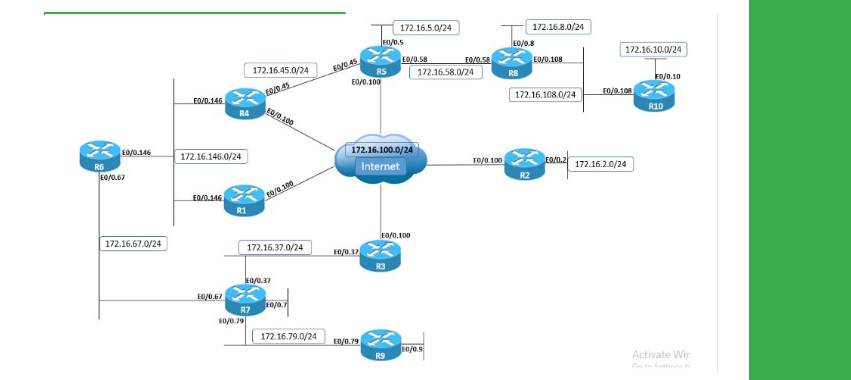
Task
● Configure R4 and R5 with identical IPv4 static routes for each other's Loopback0 prefixes through both the directly connected Ethernet segment and the DMVPN cloud.
● Use administrative distance to ensure that traffic is primarily routed over the Ethernet segment, but is rerouted through the DMVPN cloud if the Ethernet link is down.
Explanation
When a router receives identical routes (prefix and prefix-length) through multiple routing protocols (static or dynamic), the decision regarding which one gets installed in the routing table is based on the lowest administrative distance; lower AD values have higher preference.
With static routing, this principle can be used for simple redundancy by configuring a backup route with a higher administrative distance than the primary route. In this example, R5 installs the route to 10.1.4.4/32 via GigabitEthernet0/0.45 with an administrative distance of 10.
When the link GigabitEthernet0/0.45 is down, the route with the next-lowest administrative distance, 10.1.4.4/32 via 172.16.0.4 with a distance of 20, is installed. The result is that traffic is routed out Ethernet link unless it is down, in which case traffic is rerouted out the DMVPN cloud.
Verify the active route in the routing table, as well as the RIB entries.
R5
show ip route 10.1.4.4
show ip static route
Use traceroute to verify the active path of the traffic, before and after disabling the Ethernet link.
R5
traceroute 10.1.4.4
configure terminal
Enter configuration commands, one per line. End with CNTL/Z.
interface GigabitEthernet0/0.45
shutdown
!
show ip route 10.1.4.4
traceroute 10.1.4.4
Configuration
R4
ip route 10.1.5.5 255.255.255.255 GigabitEthernet0/0.45 10
ip route 10.1.5.5 255.255.255.255 155.16.0.5 20
R5
ip route 10.1.4.4 255.255.255.255 GigabitEthernet0/0.45 10
ip route 10.1.4.4 255.255.255.255 172.16.0.4 20


