Tree topology in networking is a hierarchical structure that combines features of both star and bus topologies. In a tree topology, devices are connected in a branching pattern that starts with a central backbone (the trunk) and extends into multiple sub-branches. This configuration resembles an inverted tree. It is commonly used in large and scalable networks due to its flexibility and organized design, making it ideal for complex network architectures that require easy expansion and efficient management.
This article explains what tree topology is in computer networks, describes its hierarchical structure, and highlights its key uses, advantages, and disadvantages for building scalable and efficient network architectures.
Also, if you are interested in building a career in computer networking and want to learn different skills or get training for certifications, you should check out our IT Networks Courses.
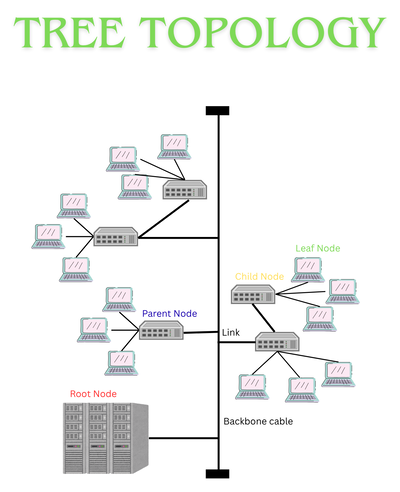
Components of Tree Topology
A tree network will consist of:
1. Root Node
The root node sits at the top of the tree topology. It is usually a central server, main hub, or backbone switch that connects and manages the entire network. All data flowing between branches ultimately passes through this central point.
2. Parent Nodes
Parent nodes are devices like switches or hubs that are directly connected to the root node. They act as central points for their respective branches and manage communication between the root and the lower-level nodes.
3. Child Nodes
Child nodes connect to parent nodes and can either be end devices or additional switches. When switches are used as child nodes, they extend the hierarchy by creating sub-branches with more connected devices.
4. Leaf Nodes
Leaf nodes are the final devices in the network structure. These include workstations, printers, and other end-user devices. They sit at the outermost ends of the branches and do not connect to any further nodes.
5. Links
Links are the physical or wireless connections that join nodes across different levels of the topology. These connections ensure data can travel between the root, parent, child, and leaf nodes efficiently.
CCNA Training with CertificateComplete our CCNA training course and gain certificate upon completion.Explore course

How Does Tree Topology Work and How is Data Transmitted?
Tree topology operates on a hierarchical structure where data flows through parent nodes that act as traffic controllers. When devices within the same branch communicate, data is transmitted directly through their local parent node, similar to a star topology. For communication between different branches, the data moves upward through intermediate nodes until it reaches a common ancestor (often the root or core switch), then routes downward to the destination branch.
The process typically follows these steps:
1. The source device creates a data packet with source and destination addresses.
2. The packet is sent to the local parent node (switch or hub).
3. If the destination is in the same branch, the packet is delivered directly.
4. If not, the packet moves upward through higher-level nodes until it reaches a common parent.
5. The common parent determines the correct path and forwards the packet downward.
6. The destination branch’s parent node delivers the packet to the target device.
7. Protocols like CSMA/CD or token passing ensure smooth communication and prevent collisions.
Different Types of Tree Topology
Tree topology has several variations designed for different network needs:
1. Bus Tree Topology
Combines multiple star-configured networks connected through a single backbone cable. It uses less cabling and is easy to expand, but the backbone can become a traffic bottleneck. Failure in the main bus affects the entire network.
2. Cluster Tree Topology
Adds redundancy by connecting star clusters to a central core switch with multiple links. This design ensures failover paths, reduces downtime, and eliminates single points of failure, but requires advanced hardware and configuration.
3. Spanning Tree Topology
A logical topology created using the Spanning Tree Protocol (STP) over a physical mesh. It prevents loops by disabling certain ports and activating backup links when primary ones fail, ensuring reliable and loop-free communication.
Where is Tree Topology Used?
A classic example of tree topology, which most people don't notice, is an Internet Service Provider (ISP) network. Imagine the ISP's national backbone (root node) connecting to major regional hubs (parent nodes) in different cities. Each regional hub then branches out to local central offices (further parent nodes) in neighborhoods. Finally, these local offices connect directly to individual customer homes or businesses (leaf nodes).
Data from your home flows up through the local office, then the regional hub, and onto the national backbone to reach the wider internet, and vice versa. This hierarchical structure allows the ISP to efficiently manage and scale its network to serve thousands of customers across vast geographic areas. Cable TV providers often use a similar tree structure.
Other Applications of Tree Topology in Modern Networks
● In schools and universities, tree topology connects buildings, classrooms, and labs to shared resources like servers, printers, and internet access.
● Data centers use a similar structure with core, distribution, and access layers to improve performance, manage traffic, and increase reliability.
● In cloud and hybrid IT environments, tree structures help organize virtual networks, subnets, and gateways. This allows for clear control paths, security policies, and separation between services.
● Tree topology is also used in smart buildings, industrial systems, and city infrastructure to manage sensors, devices, and subsystems from a central location.
Advantages of Tree Topology
The following are the main advantages:
● Tree topology is highly scalable because new devices or entire branches can be added without disrupting the existing network.● Helps in better management and troubleshooting.
● Its layered design allows centralized control at higher levels while maintaining local control in branches. This simplifies troubleshooting and network administration.
● Combining star and bus topologies provides flexibility to create custom layouts for different departments or network segments, ensuring efficient resource allocation.
● Issues in one branch do not affect the entire network. If a hub or switch fails, only that segment is impacted, reducing downtime and improving reliability.
Disadvantages of Tree Topology
● Setting up a tree topology requires careful planning because of its hierarchical structure. Each level must be properly configured to ensure smooth communication, which can increase setup time and cost.
● The root node or backbone cable is critical for the entire network. If it fails, all connected branches lose connectivity, making the network highly dependent on this central component.
● Compared to simpler topologies like bus or star, tree topology needs more cabling to connect multiple layers and branches.
● As the network grows, identifying and fixing issues becomes challenging. Problems in higher-level nodes can affect multiple branches, requiring advanced diagnostic tools and skilled personnel.
Tree Topology vs Other Topologies
| Feature | Tree Topology | Star Topology | Bus Topology | Mesh Topology |
|---|---|---|---|---|
| Structure | Hierarchical, combines star & bus | Central hub with connected devices | Single backbone cable with all devices | Every device connected to every other |
| Scalability | High, easy to add branches | Moderate, limited by hub capacity | Low, adding devices increases collisions | Very high, but complex |
| Cost | Moderate to high (more cabling & switches) | Moderate | Low | Very high (lots of cabling) |
| Fault Tolerance | Partial (branch failure isolated) | Hub failure affects entire network | Backbone failure affects entire network | Excellent (multiple paths) |
| Performance | Efficient for large networks | Good for small networks | Poor under heavy traffic | Excellent |
| Use Cases | Large organizations, ISPs, universities | Small offices, LAN setups | Simple, temporary networks | Mission-critical systems |
Conclusion
Tree topology stands out as a robust and scalable network architecture that supports structured expansion and efficient traffic management. While it requires more planning and investment than simpler topologies, its hierarchical structure makes it ideal for larger and more complex networks.
Understanding how tree topology works, along with its pros and cons, is essential for designing modern, resilient network infrastructures

Gautam Kumar
Linkedin Profile: https://www.linkedin.com/in/gautam-sharma-068336173/ Gautam Kumar is a senior network engineer having more than 7 years of experience in different companies in India. His work experience in network support and operation and maintaining of any network makes him one of the most valuable IT professional in industry. He has ...
More... | Author`s Bog | Book a MeetingRelated Articles
#Explore latest news and articles
 7 Jul 2026
Difference Between LAN, MAN and WAN Networks Explained
Explore the key differences between LAN, MAN, and WAN networks with clear examples and diagrams. Understand how each network type operates & its unique ...
 8 Nov 2025
Types of Networks in Computer Networking - LAN, Private, Wired, etc
Learn about different categories of computer networks and their types. Discover types of computer networks like LAN, MAN, WAN, etc.
 8 May 2025
What is Dynamic Routing in Networking? Dynamic Routing Protocols
Learn about dynamic routing in networking, its protocols like OSPF and RIP, and how it optimizes data flow by adapting to network changes.
FAQ
What is the importance of tree topology?
Tree topology is important for organizing large networks with multiple levels. It supports scalability, easy management, and fault isolation, making it ideal for institutions and enterprises.
Is tree topology expensive?
Yes, tree topology can be expensive due to its complex cabling and hardware requirements. It’s best suited for large networks where structured hierarchy and scalability are needed.
How is tree topology applied in cloud and hybrid environments?
In cloud-based systems, tree topology is used logically to structure networks with access layers, routing rules, and segmented control paths. It enhances manageability and security by isolating virtual subnets and services.
What are some real-world examples of tree topology?
Tree topology is found in enterprise LANs, campus networks, ISP distribution networks, smart buildings, factory automation systems, and city infrastructure systems, where centralized control over multiple zones or departments is needed.
Comments (0)


Popular posts


What are the Different Types of Network ...
29 Jul 2026
What is the Syllabus for CCNA ...
17 Jul 2026
Transmission Media and Its Types in ...
6 Jun 2026
CCNA Exam Fees and Expenses Breakdown
25 Aug 2025Recent posts

18 Types of Cyber Crime: definition, ...
7 Aug 2026
What are the Different Types of Network ...
29 Jul 2026
Understanding Cisco Firepower - A Secure ...
23 Jul 2026
Understanding VLAN Trunking Protocol ...
23 Jul 2026
Benefits and Drawbacks of Virtualization ...
17 Jul 2026Upcoming batches






Contact learning advisor