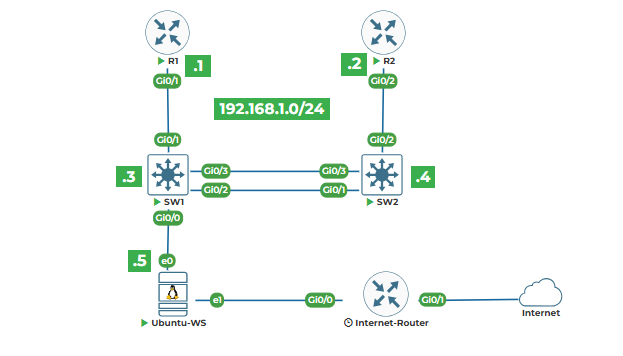
Task 1: Creating IP Address Objects
Task 2: Subnet Calculations and Validations
Task 3: Checking if IP is in a Specific Subnet
Task 4: Network Summarization
Task 5: Creating an IP Address Management Tool
Task 1: Creating IP Address Objects
Let's work with the ipaddress module. This module helps with IP address calculations. First, import it. Create a file ip_objects.py.
# Creating IP address objects
print("WORKING WITH IP ADDRESS OBJECTS")
print("=" * 70)
import ipaddress
Now let's create an IP address object for Router1's IP:
# Create an IPv4 address object
router1_ip = ipaddress.IPv4Address("192.168.1.1")
print(f"Router1 IP: {router1_ip}")
print(f"Type: {type(router1_ip)}")
ipaddress.IPv4Address("192.168.1.1") creates an IP address object. This is not just a string - it's a special object that understands IP addresses.
Now let's create IP objects for all our lab devices:
# Create IP objects for all lab devices
lab_ips = [
ipaddress.IPv4Address("192.168.1.1"), # Router1
ipaddress.IPv4Address("192.168.1.2"), # Router2
ipaddress.IPv4Address("192.168.1.3"), # Switch1
ipaddress.IPv4Address("192.168.1.4"), # Switch2
ipaddress.IPv4Address("192.168.1.5") # Ubuntu Server
]
print("\nLab IP Address Objects:")
for ip in lab_ips:
print(f" {ip}")
Now let's do some operations with IP objects:
print("\n" + "=" * 70)
print("IP ADDRESS OPERATIONS")
print("=" * 70)
# Get the next IP address
print("Getting next IP address:")
router1_ip = ipaddress.IPv4Address("192.168.1.1")
next_ip = router1_ip + 1
print(f"Router1 IP: {router1_ip}")
print(f"Next IP: {next_ip}")
print()
# Compare IP addresses
print("Comparing IP addresses:")
ip1 = ipaddress.IPv4Address("192.168.1.1")
ip2 = ipaddress.IPv4Address("192.168.1.2")
print(f"IP1: {ip1}")
print(f"IP2: {ip2}")
print(f"IP1 < IP2: {ip1 < ip2}")
print(f"IP1 == IP2: {ip1 == ip2}")
IP objects can do math. router1_ip + 1 gives 192.168.1.2.
Now let's create network objects:
print("\n" + "=" * 70)
print("NETWORK OBJECTS")
print("=" * 70)
# Create a network object for our lab subnet
lab_network = ipaddress.IPv4Network("192.168.1.0/24")
print(f"Lab network: {lab_network}")
print(f"Network address: {lab_network.network_address}")
print(f"Broadcast address: {lab_network.broadcast_address}")
print(f"Netmask: {lab_network.netmask}")
print(f"Number of addresses: {lab_network.num_addresses}")
ipaddress.IPv4Network("192.168.1.0/24") creates a network object. This represents the entire subnet.
Task 2: Subnet Calculations and Validations
Let's do subnet calculations. Create a file subnet_calc.py.
# Subnet calculations and validations
print("SUBNET CALCULATIONS")
print("=" * 70)
import ipaddress
First, let's validate if an IP is in our lab subnet:
# Our lab network
lab_net = ipaddress.IPv4Network("192.168.1.0/24")
# Test IPs
test_ips = [
"192.168.1.1", # Router1 - should be in subnet
"192.168.1.10", # Should be in subnet
"192.168.2.1", # Different subnet
"10.0.0.1" # Different network
]
print(f"Lab network: {lab_net}")
print("\nChecking if IPs are in lab subnet:")
print("-" * 40)
for ip_str in test_ips:
ip = ipaddress.IPv4Address(ip_str)
in_subnet = ip in lab_net
if in_subnet:
print(f"✓ {ip} is in {lab_net}")
else:
print(f"✗ {ip} is NOT in {lab_net}")
The in operator checks if an IP is in a network. ip in lab_net returns True or False.
Now let's calculate subnets:
print("\n" + "=" * 70)
print("SUBNET CALCULATIONS")
print("=" * 70)
# Create a larger network
large_network = ipaddress.IPv4Network("10.0.0.0/16")
print(f"Large network: {large_network}")
print(f"Total IPs: {large_network.num_addresses}")
print()
# Divide into smaller subnets
subnets = list(large_network.subnets(prefixlen_diff=2))
print(f"Dividing /16 into /18 subnets:")
print(f"Number of subnets created: {len(subnets)}")
print()
for i, subnet in enumerate(subnets[:4], 1): # Show first 4
print(f"Subnet {i}: {subnet}")
print(f" Usable hosts: {subnet.num_addresses - 2}")
subnets(prefixlen_diff=2) divides the network. prefixlen_diff=2 means increase prefix length by 2 (from /16 to /18).
Now let's calculate for our lab:
print("\n" + "=" * 70)
print("LAB SUBNET CALCULATIONS")
print("=" * 70)
# Our lab is /24, let's see what it contains
lab_subnet = ipaddress.IPv4Network("192.168.1.0/24")
print(f"Lab subnet: {lab_subnet}")
print(f"Network IP: {lab_subnet.network_address}")
print(f"Broadcast IP: {lab_subnet.broadcast_address}")
print(f"Usable IPs: {lab_subnet.num_addresses - 2}")
print(f"First usable: {lab_subnet.network_address + 1}")
print(f"Last usable: {lab_subnet.broadcast_address - 1}")
Now let's check each lab device's IP:
print("\nLab device IP analysis:")
print("-" * 40)
lab_devices = {
"Router1": "192.168.1.1",
"Router2": "192.168.1.2",
"Switch1": "192.168.1.3",
"Switch2": "192.168.1.4",
"Ubuntu_Server": "192.168.1.5"
}
for device, ip_str in lab_devices.items():
ip = ipaddress.IPv4Address(ip_str)
if ip in lab_subnet:
print(f"✓ {device:15} {ip:15} - Valid lab IP")
else:
print(f"✗ {device:15} {ip:15} - NOT in lab subnet")
Task 3: Checking if IP is in a Specific Subnet
Let's create a function to check IPs against subnets. Create ip_checking.py.
# Checking if IP is in specific subnet
print("IP SUBNET MEMBERSHIP CHECKING")
print("=" * 70)
import ipaddress
First, let's define our network segments:
# Define our network segments
networks = {
"management": ipaddress.IPv4Network("192.168.1.0/24"),
"users": ipaddress.IPv4Network("10.10.10.0/24"),
"servers": ipaddress.IPv4Network("10.10.20.0/24"),
"voice": ipaddress.IPv4Network("10.10.30.0/24")
}
print("Network segments:")
for name, net in networks.items():
print(f" {name:12} {net}")
Now let's check where an IP belongs:
def find_ip_network(ip_str):
"""Find which network an IP belongs to"""
try:
ip = ipaddress.IPv4Address(ip_str)
except ValueError:
return None, "Invalid IP address"
for network_name, network in networks.items():
if ip in network:
return network_name, network
return None, "IP not in any defined network"
print("\n" + "=" * 70)
print("FINDING IP NETWORKS")
print("=" * 70)
# Test IPs
test_ips = [
"192.168.1.1", # Router1 - management
"192.168.1.5", # Ubuntu Server - management
"10.10.10.100", # User PC
"10.10.20.50", # Server
"192.168.2.1" # Unknown network
]
print("Checking IP network membership:")
print("-" * 40)
for ip_str in test_ips:
network_name, result = find_ip_network(ip_str)
if network_name:
print(f"✓ {ip_str:15} → {network_name:12} network")
else:
print(f"✗ {ip_str:15} → {result}")
This function checks an IP against all defined networks.
Now let's check all our lab IPs:
print("\n" + "=" * 70)
print("CHECKING ALL LAB IPs")
print("=" * 70)
lab_ips = {
"Router1": "192.168.1.1",
"Router2": "192.168.1.2",
"Switch1": "192.168.1.3",
"Switch2": "192.168.1.4",
"Ubuntu_Server": "192.168.1.5"
}
print("Lab device network analysis:")
print("-" * 40)
for device, ip_str in lab_ips.items():
network_name, _ = find_ip_network(ip_str)
if network_name == "management":
print(f"✓ {device:15} {ip_str:15} - Management network")
else:
print(f"✗ {device:15} {ip_str:15} - Wrong network ({network_name})")
Now let's check if an IP is valid for a specific network:
print("\n" + "=" * 70)
print("VALIDATING IP FOR SPECIFIC NETWORK")
print("=" * 70)
def validate_ip_for_network(ip_str, network_name):
"""Check if IP is valid for a specific network"""
if network_name not in networks:
return False, f"Network '{network_name}' not defined"
network = networks[network_name]
try:
ip = ipaddress.IPv4Address(ip_str)
except ValueError:
return False, "Invalid IP address"
if ip in network:
# Check if it's not network or broadcast address
if ip == network.network_address:
return False, "Cannot use network address"
elif ip == network.broadcast_address:
return False, "Cannot use broadcast address"
else:
return True, "Valid IP for network"
else:
return False, f"IP not in {network_name} network"
# Test validation
test_cases = [
("192.168.1.1", "management", True),
("192.168.1.0", "management", False), # Network address
("192.168.1.255", "management", False), # Broadcast address
("10.10.10.100", "users", True),
("192.168.1.100", "users", False) # Wrong network
]
print("IP validation tests:")
print("-" * 40)
for ip_str, network_name, should_pass in test_cases:
is_valid, message = validate_ip_for_network(ip_str, network_name)
status = "✓" if is_valid == should_pass else "✗"
print(f"{status} {ip_str:15} for {network_name:12}: {message}")
Task 4: Network Summarization
Let's work with network summarization. Create network_summary.py.
python
# Network summarization
print("NETWORK SUMMARIZATION")
print("=" * 70)
import ipaddress
First, let's create some networks:
python
# Create some networks
networks = [
ipaddress.IPv4Network("192.168.1.0/24"),
ipaddress.IPv4Network("192.168.2.0/24"),
ipaddress.IPv4Network("192.168.3.0/24"),
ipaddress.IPv4Network("192.168.4.0/24")
]
print("Original networks:")
for net in networks:
print(f" {net}")
Now let's summarize them:
python
print("\n" + "=" * 70)
print("SUMMARIZING NETWORKS")
print("=" * 70)
# Summarize the networks
try:
summarized = ipaddress.collapse_addresses(networks)
summarized_list = list(summarized)
print(f"Original networks: {len(networks)}")
print(f"Summarized to: {len(summarized_list)} network(s)")
print()
for net in summarized_list:
print(f" {net}")
except Exception as e:
print(f"Error summarizing: {e}")
collapse_addresses() tries to combine networks into larger summaries.
Now let's work with our lab topology networks:
python
print("\n" + "=" * 70)
print("LAB NETWORK ANALYSIS")
print("=" * 70)
# Simulated networks in our lab
lab_networks = [
ipaddress.IPv4Network("192.168.1.0/24"), # Management
ipaddress.IPv4Network("10.10.10.0/24"), # Users
ipaddress.IPv4Network("10.10.20.0/24"), # Servers
ipaddress.IPv4Network("10.10.30.0/24") # Voice
]
print("Lab networks:")
for net in lab_networks:
print(f" {net}")
print(f" Usable hosts: {net.num_addresses - 2}")
These networks can't be summarized (they're in different ranges). Let's create networks that can be summarized:
python
print("\n" + "=" * 70)
print("SUMMARIZABLE NETWORKS")
print("=" * 70)
# Networks that can be summarized
summary_networks = [
ipaddress.IPv4Network("10.10.10.0/24"),
ipaddress.IPv4Network("10.10.11.0/24"),
ipaddress.IPv4Network("10.10.12.0/24"),
ipaddress.IPv4Network("10.10.13.0/24")
]
print("Networks to summarize:")
for net in summary_networks:
print(f" {net}")
# Summarize
summarized = list(ipaddress.collapse_addresses(summary_networks))
print(f"\nSummarized to: {len(summarized)} network(s)")
for net in summarized:
print(f" {net}")
print(f" Covers: {2**(net.prefixlen - 24)} /24 networks")
Now let's check if networks overlap:
python
print("\n" + "=" * 70)
print("CHECKING NETWORK OVERLAPS")
print("=" * 70)
def check_overlap(net1_str, net2_str):
"""Check if two networks overlap"""
net1 = ipaddress.IPv4Network(net1_str)
net2 = ipaddress.IPv4Network(net2_str)
overlap = net1.overlaps(net2)
print(f"Network 1: {net1}")
print(f"Network 2: {net2}")
if overlap:
print(" ✗ Networks OVERLAP")
else:
print(" ✓ Networks do NOT overlap")
print()
return overlap
# Test network overlaps
test_pairs = [
("192.168.1.0/24", "192.168.2.0/24"), # No overlap
("192.168.1.0/24", "192.168.1.128/25"), # Overlap (second is subnet of first)
("10.0.0.0/8", "10.1.0.0/16"), # Overlap (second is subnet of first)
("172.16.0.0/16", "172.17.0.0/16") # No overlap
]
print("Checking network overlaps:")
print("-" * 40)
for net1_str, net2_str in test_pairs:
check_overlap(net1_str, net2_str)
overlaps() checks if networks overlap.
Task 5: Creating an IP Address Management Tool
Let's create a simple IPAM tool. Create ipam_tool.py.
python
# IP Address Management Tool
print("SIMPLE IP ADDRESS MANAGEMENT TOOL")
print("=" * 70)
import ipaddress
First, let's create a subnet and track used IPs:
python
# Create a subnet for management
mgmt_subnet = ipaddress.IPv4Network("192.168.1.0/24")
print(f"Management subnet: {mgmt_subnet}")
print(f"Total IPs: {mgmt_subnet.num_addresses}")
print(f"Usable IPs: {mgmt_subnet.num_addresses - 2}")
print()
# Track used IPs
used_ips = set()
# Add our lab devices
lab_devices = {
"Router1": "192.168.1.1",
"Router2": "192.168.1.2",
"Switch1": "192.168.1.3",
"Switch2": "192.168.1.4",
"Ubuntu_Server": "192.168.1.5"
}
print("Lab device IPs:")
print("-" * 40)
for device, ip_str in lab_devices.items():
ip = ipaddress.IPv4Address(ip_str)
if ip in mgmt_subnet:
used_ips.add(ip)
print(f"✓ {device:15} {ip:15} - Added to used IPs")
else:
print(f"✗ {device:15} {ip:15} - Not in management subnet")
print(f"\nUsed IPs: {len(used_ips)}")
Now let's find available IPs:
python
print("\n" + "=" * 70)
print("FINDING AVAILABLE IPS")
print("=" * 70)
def find_available_ips(subnet, used_ips, count=5):
"""Find available IPs in subnet"""
available = []
# Start from first usable IP
current_ip = subnet.network_address + 1
while len(available) < count and current_ip < subnet.broadcast_address:
if current_ip not in used_ips:
available.append(current_ip)
current_ip += 1
return available
print("Finding available IPs in management subnet...")
available = find_available_ips(mgmt_subnet, used_ips, count=10)
print(f"\nFirst 10 available IPs:")
for i, ip in enumerate(available, 1):
print(f"{i:2}. {ip}")
This function finds unused IPs in the subnet.
Now let's check if an IP is available:
python
print("\n" + "=" * 70)
print("CHECKING IP AVAILABILITY")
print("=" * 70)
def check_ip_availability(ip_str, subnet, used_ips):
"""Check if an IP is available"""
try:
ip = ipaddress.IPv4Address(ip_str)
except ValueError:
return False, "Invalid IP address"
# Check if in subnet
if ip not in subnet:
return False, f"IP not in {subnet}"
# Check if network or broadcast address
if ip == subnet.network_address:
return False, "Network address (not usable)"
if ip == subnet.broadcast_address:
return False, "Broadcast address (not usable)"
# Check if already used
if ip in used_ips:
return False, "IP already in use"
return True, "IP is available"
# Test IP availability
test_ips = [
"192.168.1.1", # Router1 - used
"192.168.1.6", # Should be available
"192.168.1.0", # Network address
"192.168.1.255", # Broadcast address
"192.168.2.1" # Wrong subnet
]
print("Checking IP availability:")
print("-" * 40)
for ip_str in test_ips:
available, message = check_ip_availability(ip_str, mgmt_subnet, used_ips)
status = "✓" if available else "✗"
print(f"{status} {ip_str:15} - {message}")
Now let's allocate an IP:
python
print("\n" + "=" * 70)
print("ALLOCATING AN IP ADDRESS")
print("=" * 70)
def allocate_ip(device_name, ip_str, subnet, used_ips):
"""Allocate an IP address to a device"""
# Check availability
available, message = check_ip_availability(ip_str, subnet, used_ips)
if not available:
return False, message
# Allocate the IP
ip = ipaddress.IPv4Address(ip_str)
used_ips.add(ip)
return True, f"Allocated {ip} to {device_name}"
# Try to allocate some IPs
allocation_tests = [
("New_Router", "192.168.1.6"),
("New_Switch", "192.168.1.1"), # Already used
("Test_Device", "192.168.1.100")
]
print("Allocating IPs to devices:")
print("-" * 40)
for device, ip_str in allocation_tests:
success, message = allocate_ip(device, ip_str, mgmt_subnet, used_ips)
status = "✓" if success else "✗"
print(f"{status} {device:15} {ip_str:15} - {message}")
print(f"\nTotal used IPs: {len(used_ips)}")
Now let's create a simple IPAM class:
python
print("\n" + "=" * 70)
print("SIMPLE IPAM CLASS")
print("=" * 70)
class SimpleIPAM:
"""Simple IP Address Management"""
def __init__(self, subnet_str):
self.subnet = ipaddress.IPv4Network(subnet_str)
self.used_ips = set()
self.allocations = {} # device_name -> ip
def allocate(self, device_name, ip_str=None):
"""Allocate an IP to a device"""
# If no IP specified, find one
if ip_str is None:
ip = self.find_next_available()
if ip is None:
return False, "No available IPs"
else:
# Check specified IP
ip = ipaddress.IPv4Address(ip_str)
if ip not in self.subnet:
return False, f"IP not in {self.subnet}"
if ip == self.subnet.network_address:
return False, "Cannot use network address"
if ip == self.subnet.broadcast_address:
return False, "Cannot use broadcast address"
if ip in self.used_ips:
return False, "IP already allocated"
# Allocate
self.used_ips.add(ip)
self.allocations[device_name] = ip
return True, f"Allocated {ip} to {device_name}"
def find_next_available(self):
"""Find next available IP"""
current_ip = self.subnet.network_address + 1
while current_ip < self.subnet.broadcast_address:
if current_ip not in self.used_ips:
return current_ip
current_ip += 1
return None
def show_allocations(self):
"""Show all allocations"""
print(f"\nSubnet: {self.subnet}")
print(f"Total IPs: {self.subnet.num_addresses}")
print(f"Used IPs: {len(self.used_ips)}")
print(f"Available: {self.subnet.num_addresses - 2 - len(self.used_ips)}")
print()
print("Device allocations:")
print("-" * 40)
for device, ip in self.allocations.items():
print(f"{device:20} {ip}")
# Test the IPAM class
print("Testing SimpleIPAM class...")
# Create IPAM for management subnet
ipam = SimpleIPAM("192.168.1.0/24")
# Allocate IPs to lab devices
devices_to_allocate = [
("Router1", "192.168.1.1"),
("Router2", "192.168.1.2"),
("Switch1", "192.168.1.3"),
("Switch2", "192.168.1.4"),
("Ubuntu_Server", "192.168.1.5")
]
print("\nAllocating IPs to lab devices:")
print("-" * 40)
for device, ip in devices_to_allocate:
success, message = ipam.allocate(device, ip)
print(f"{'✓' if success else '✗'} {message}")
# Allocate a new device with auto IP
print("\nAllocating new device with auto IP:")
success, message = ipam.allocate("New_Switch")
print(f"{'✓' if success else '✗'} {message}")
# Show all allocations
ipam.show_allocations()
This SimpleIPAM class manages IP allocations in a subnet.
Each script focuses on one aspect of IP address management. The functions are small and do one thing. You can combine these to build more complex IP management tools.
Key points:
1.Use ipaddress module for IP calculations
2.Validate IPs before using them
3.Track used IPs to avoid conflicts
4.Check network boundaries
5.Create reusable functions for common tasks