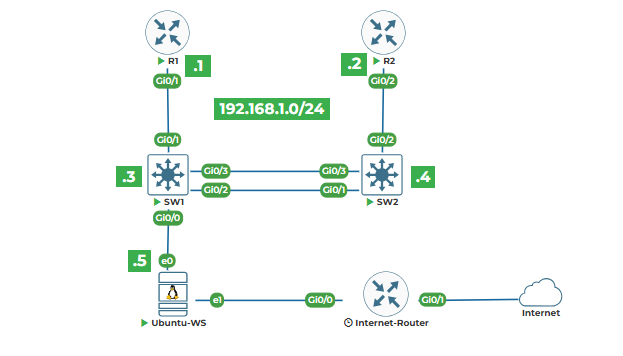
Task 1: Creating Device Dictionary (hostname, IP, platform)
Task 2: Nested Dictionaries for Interface Configurations
Task 3: Accessing and Modifying Dictionary Values
Task 4: Looping Through Dictionaries
Task 5: Creating VLAN Database Dictionary
Task 1: Creating Device Dictionary (hostname, IP, platform)
Let's understand what a dictionary is in Python. Think of a dictionary like a detailed inventory record for each network device. While a list is like a simple column of device names, a dictionary is like a complete row in a spreadsheet with multiple columns: hostname, IP, platform, location, etc. Create a new file called dictionaries_intro.py.
# Creating device dictionaries for network inventory
print("WORKING WITH DICTIONARIES FOR NETWORK DEVICES")
print("=" * 70)
# Method 1: Creating a dictionary with curly braces
router1 = {
"hostname": "Router1",
"ip_address": "192.168.1.1",
"device_type": "cisco_ios",
"platform": "ISR4331",
"location": "Main_Rack",
"mgmt_vlan": "1"
}
print("Method 1 - Direct dictionary creation:")
print(f"Router1 dictionary: {router1}")
print(f"Type: {type(router1)}")
print(f"Number of attributes: {len(router1)}")
print()
Run this with python3 dictionaries_intro.py. The curly braces {} create a dictionary. Inside, we have "key": "value" pairs separated by commas. The key is like a column header, and the value is the data in that column for this device. The type() function confirms this is a dictionary, and len() tells us how many key-value pairs it contains.
Now let me show you another way to create dictionaries, which is useful when building them dynamically:
# Method 2: Creating empty dictionary and adding values
switch1 = {} # Empty dictionary
print("Method 2 - Building dictionary incrementally:")
print(f"Starting with empty dictionary: {switch1}")
# Adding key-value pairs
switch1["hostname"] = "Switch1"
print(f"After adding hostname: {switch1}")
switch1["ip_address"] = "192.168.1.3"
print(f"After adding IP address: {switch1}")
switch1["device_type"] = "cisco_ios"
switch1["platform"] = "Catalyst 9300"
switch1["location"] = "Main_Rack"
print(f"After adding more attributes: {switch1}")
print()
The square brackets [] after the dictionary variable are used to access or add values. switch1["hostname"] = "Switch1" creates a key called "hostname" with value "Switch1" if it doesn't exist, or updates it if it does.
Now let's create dictionaries for all devices in our lab topology:
# Creating dictionaries for all lab devices
print("Our Lab Topology Device Dictionaries:")
print("-" * 70)
# Router1 from our topology
router1 = {
"hostname": "Router1",
"ip_address": "192.168.1.1",
"device_type": "router",
"platform": "Cisco ISR",
"interfaces": {
"Gi0/0": "Connected to Switch1 Gi0/1",
"Gi0/1": "Connected to Internet"
},
"config": {
"hostname": "Router1",
"mgmt_ip": "192.168.1.1/24",
"default_gateway": "192.168.1.5"
}
}
# Switch1 from our topology
switch1 = {
"hostname": "Switch1",
"ip_address": "192.168.1.3",
"device_type": "switch",
"platform": "Cisco Catalyst",
"interfaces": {
"Gi0/0": "Connected to Ubuntu Server",
"Gi0/1": "Connected to Router1 Gi0/1",
"Gi0/2": "Connected to Switch2 Gi0/1",
"Gi0/3": "Connected to Switch2 Gi0/3"
},
"config": {
"hostname": "Switch1",
"mgmt_ip": "192.168.1.3/24",
"default_gateway": "192.168.1.1"
}
}
print(f"Router1 details:\n{router1}")
print(f"\nSwitch1 details:\n{switch1}")
Notice something interesting here: the values for "interfaces" and "config" are themselves dictionaries! This is called nested dictionaries. It allows us to organize complex data in a structured way, just like having tables within tables in a database.
Task 2: Nested Dictionaries for Interface Configurations
Let's dive deeper into nested dictionaries, which are perfect for network configurations because devices have interfaces, and each interface has its own configuration. Create a new file nested_dicts.py:
# Nested dictionaries for interface configurations
print("NESTED DICTIONARIES FOR INTERFACE CONFIGURATIONS")
print("=" * 70)
# A switch with detailed interface configurations
switch1_detailed = {
"hostname": "Switch1",
"ip_address": "192.168.1.3",
"device_type": "switch",
# Nested dictionary for interfaces
"interfaces": {
"Gi0/0": {
"description": "Link to Ubuntu Server",
"status": "up",
"vlan": "1",
"speed": "1000",
"duplex": "full",
"connected_device": "Ubuntu_Server",
"connected_port": "eth0"
},
"Gi0/1": {
"description": "Uplink to Router1",
"status": "up",
"vlan": "1",
"speed": "1000",
"duplex": "full",
"connected_device": "Router1",
"connected_port": "Gi0/1"
},
"Gi0/2": {
"description": "Trunk to Switch2",
"status": "up",
"vlan": "trunk",
"native_vlan": "1",
"allowed_vlans": "1,10,20,30",
"connected_device": "Switch2",
"connected_port": "Gi0/1"
}
}
}
print("Switch1 with detailed interface configurations:")
print(f"Hostname: {switch1_detailed['hostname']}")
print(f"Management IP: {switch1_detailed['ip_address']}")
print(f"Number of interfaces configured: {len(switch1_detailed['interfaces'])}")
print()
Now let's access the nested data. This is important because in real automation, we need to get specific configuration details:
# Accessing nested dictionary values
print("Accessing specific interface details:")
print("-" * 70)
# Access Gi0/0 details
gi0_0_details = switch1_detailed["interfaces"]["Gi0/0"]
print(f"Gi0/0 full details: {gi0_0_details}")
print()
# Access individual values
print("Individual interface attributes:")
print(f"Gi0/0 description: {switch1_detailed['interfaces']['Gi0/0']['description']}")
print(f"Gi0/0 status: {switch1_detailed['interfaces']['Gi0/0']['status']}")
print(f"Gi0/0 VLAN: {switch1_detailed['interfaces']['Gi0/0']['vlan']}")
print(f"Gi0/0 connected to: {switch1_detailed['interfaces']['Gi0/0']['connected_device']}")
print()
The syntax switch1_detailed['interfaces']['Gi0/0']['description'] works like this: First, get the "interfaces" dictionary from switch1_detailed, then from that get the "Gi0/0" dictionary, then from that get the "description" value. It's like navigating folders: interfaces → Gi0/0 → description.
Now let's create a complete lab topology using nested dictionaries:
# Complete lab topology as nested dictionaries
print("\n" + "=" * 70)
print("COMPLETE LAB TOPOLOGY AS NESTED DICTIONARIES")
print("=" * 70)
lab_topology = {
"Router1": {
"device_type": "router",
"mgmt_ip": "192.168.1.1",
"interfaces": {
"Gi0/1": {
"ip_address": "192.168.1.1",
"subnet_mask": "255.255.255.0",
"connected_to": "Switch1 Gi0/1",
"description": "Link to Switch1"
}
}
},
"Router2": {
"device_type": "router",
"mgmt_ip": "192.168.1.2",
"interfaces": {
"Gi0/2": {
"ip_address": "192.168.1.2",
"subnet_mask": "255.255.255.0",
"connected_to": "Switch2 Gi0/2",
"description": "Link to Switch2"
}
}
},
"Switch1": {
"device_type": "switch",
"mgmt_ip": "192.168.1.3",
"interfaces": {
"Gi0/0": {
"mode": "access",
"vlan": "1",
"connected_to": "Ubuntu_Server eth0",
"description": "Link to Ubuntu Server"
},
"Gi0/1": {
"mode": "access",
"vlan": "1",
"connected_to": "Router1 Gi0/1",
"description": "Link to Router1"
},
"Gi0/2": {
"mode": "trunk",
"native_vlan": "1",
"connected_to": "Switch2 Gi0/1",
"description": "Trunk to Switch2"
},
"Gi0/3": {
"mode": "trunk",
"native_vlan": "1",
"connected_to": "Switch2 Gi0/3",
"description": "Trunk to Switch2"
}
}
},
"Switch2": {
"device_type": "switch",
"mgmt_ip": "192.168.1.4",
"interfaces": {
"Gi0/1": {
"mode": "trunk",
"native_vlan": "1",
"connected_to": "Switch1 Gi0/2",
"description": "Trunk to Switch1"
},
"Gi0/2": {
"mode": "access",
"vlan": "1",
"connected_to": "Router2 Gi0/2",
"description": "Link to Router2"
},
"Gi0/3": {
"mode": "trunk",
"native_vlan": "1",
"connected_to": "Switch1 Gi0/3",
"description": "Trunk to Switch1"
}
}
},
"Ubuntu_Server": {
"device_type": "server",
"mgmt_ip": "192.168.1.5",
"interfaces": {
"eth0": {
"ip_address": "192.168.1.5",
"subnet_mask": "255.255.255.0",
"connected_to": "Switch1 Gi0/0",
"description": "Link to Switch1"
},
"eth1": {
"ip_address": "DHCP",
"subnet_mask": "255.255.255.0",
"connected_to": "Internet",
"description": "Internet Connection"
}
}
}
}
print(f"Total devices in topology: {len(lab_topology)}")
print("Device list:", list(lab_topology.keys()))
The list(lab_topology.keys()) gets all the keys (device names) from the lab_topology dictionary and converts them to a list. This is useful when you need to process all devices.
Task 3: Accessing and Modifying Dictionary Values
Now let's learn how to work with dictionary data. Create a new file dict_operations.py:
# Accessing and modifying dictionary values
print("DICTIONARY OPERATIONS FOR NETWORK MANAGEMENT")
print("=" * 70)
# Router1 configuration dictionary
router1_config = {
"hostname": "Router1",
"ios_version": "16.9.5",
"mgmt_ip": "192.168.1.1",
"subnet_mask": "255.255.255.0",
"default_gateway": "192.168.1.5",
"interfaces": ["Gi0/0", "Gi0/1", "Gi0/2"],
"routing_protocol": "OSPF",
"area": "0"
}
print("Initial Router1 configuration:")
for key, value in router1_config.items():
print(f" {key}: {value}")
print()
The .items() method returns both key and value for each item in the dictionary. The for key, value in router1_config.items(): loop unpacks them into two variables.
Now let's access and modify values:
# Accessing values
print("Accessing specific values:")
print(f"Router1 hostname: {router1_config['hostname']}")
print(f"Router1 IOS version: {router1_config['ios_version']}")
print(f"Router1 management IP: {router1_config['mgmt_ip']}")
print()
# Alternative way using get() method - safer
print("Using get() method (safer access):")
print(f"Router1 hostname: {router1_config.get('hostname')}")
print(f"Router1 location: {router1_config.get('location', 'Not specified')}")
print()
The .get() method is safer than direct bracket access. If the key doesn't exist, .get() returns None or a default value you specify, while direct access like router1_config['location'] would cause an error.
Now let's modify the dictionary:
# Modifying values
print("Modifying configuration:")
print(f"Current IOS version: {router1_config['ios_version']}")
# Update IOS version
router1_config["ios_version"] = "17.3.2"
print(f"Updated IOS version: {router1_config['ios_version']}")
# Add new key-value pair
router1_config["location"] = "Main Data Center Rack A1"
print(f"Added location: {router1_config['location']}")
# Update multiple values
router1_config.update({
"snmp_community": "public",
"syslog_server": "192.168.1.5",
"ntp_server": "pool.ntp.org"
})
print(f"Added SNMP community: {router1_config['snmp_community']}")
print(f"Added syslog server: {router1_config['syslog_server']}")
print()
The .update() method is useful for adding or updating multiple key-value pairs at once. It takes a dictionary as an argument.
Now let's remove items:
# Removing items
print("Removing configuration items:")
# Remove using pop() - removes and returns value
removed_value = router1_config.pop("area", "Not found")
print(f"Removed 'area': {removed_value}")
# Remove using del keyword
if "routing_protocol" in router1_config:
del router1_config["routing_protocol"]
print("Removed 'routing_protocol' using del")
# Remove last inserted item (Python 3.7+)
router1_config["temporary"] = "This will be removed"
removed_item = router1_config.popitem()
print(f"Removed last item: {removed_item}")
print()
# Check what remains
print(f"Remaining keys: {list(router1_config.keys())}")
print(f"Number of configuration items: {len(router1_config)}")
The .pop() method removes a key and returns its value. The second parameter "Not found" is the default value to return if the key doesn't exist.
del router1_config["routing_protocol"] deletes the key-value pair directly.
.popitem() removes and returns the last inserted key-value pair (in Python 3.7+, dictionaries maintain insertion order).
Task 4: Looping Through Dictionaries
Looping through dictionaries is essential for processing all devices or configurations. Let's create practical examples. Create a new file dict_loops.py:
# Looping through dictionaries
print("LOOPING THROUGH NETWORK DEVICE DICTIONARIES")
print("=" * 70)
# Dictionary of all lab devices with basic info
lab_devices = {
"Router1": {
"type": "router",
"ip": "192.168.1.1",
"vendor": "Cisco",
"model": "ISR4331"
},
"Router2": {
"type": "router",
"ip": "192.168.1.2",
"vendor": "Cisco",
"model": "ISR4321"
},
"Switch1": {
"type": "switch",
"ip": "192.168.1.3",
"vendor": "Cisco",
"model": "Catalyst 9300"
},
"Switch2": {
"type": "switch",
"ip": "192.168.1.4",
"vendor": "Cisco",
"model": "Catalyst 9200"
},
"Ubuntu_Server": {
"type": "server",
"ip": "192.168.1.5",
"vendor": "Canonical",
"model": "Ubuntu 20.04"
}
}
print(f"Total devices in lab: {len(lab_devices)}")
print()
Now let's loop through this dictionary in different ways:
# Method 1: Loop through keys only
print("Method 1 - Looping through keys:")
print("-" * 40)
for device_name in lab_devices.keys():
print(f"Device: {device_name}")
print()
# Method 2: Loop through values only
print("Method 2 - Looping through values:")
print("-" * 40)
for device_info in lab_devices.values():
print(f"Device type: {device_info['type']}, IP: {device_info['ip']}")
print()
.keys() gives us just the device names. .values() gives us just the device information dictionaries.
The most common and useful way is to loop through both:
# Method 3: Loop through keys and values together
print("Method 3 - Looping through keys and values:")
print("-" * 40)
for device_name, device_info in lab_devices.items():
print(f"{device_name}:")
print(f" Type: {device_info['type']}")
print(f" IP Address: {device_info['ip']}")
print(f" Vendor: {device_info['vendor']}")
print(f" Model: {device_info['model']}")
print()
This is the pattern you'll use most often: for key, value in dictionary.items():. It gives you both the device name and its details in one loop.
Now let's create a practical example - generating configuration for all devices:
# Practical example: Generate configuration commands
print("\n" + "=" * 70)
print("GENERATING CONFIGURATION FOR ALL DEVICES")
print("=" * 70)
# Template for device configuration
config_template = """
! Configuration for {hostname}
!
hostname {hostname}
!
ip domain-name lab.local
!
! Management interface
interface vlan 1
ip address {ip} 255.255.255.0
no shutdown
!
! Default gateway for layer 2 devices
ip default-gateway 192.168.1.1
!
end
"""
print("Configuration files to generate:")
print("-" * 40)
for device_name, device_info in lab_devices.items():
# Skip servers from this config template
if device_info["type"] == "server":
print(f"Skipping {device_name} (server device)")
continue
# Generate configuration
config = config_template.format(
hostname=device_name,
ip=device_info["ip"]
)
# Create filename
filename = f"{device_name}_config.txt"
# Write to file
with open(filename, "w") as f:
f.write(config)
print(f"Generated: {filename}")
The continue statement skips the rest of the loop for the current item and moves to the next. So when we encounter a server, we skip the configuration generation.
Now let's do something more advanced - check device status and generate reports:
print("\n" + "=" * 70)
print("DEVICE STATUS REPORT")
print("=" * 70)
# Simulated device status (in real scenario, this would come from actual checks)
device_status = {
"Router1": "up",
"Router2": "up",
"Switch1": "up",
"Switch2": "down", # Simulating a down device
"Ubuntu_Server": "up"
}
print("Current Device Status:")
print("-" * 40)
# Check each device against status dictionary
for device_name, device_info in lab_devices.items():
status = device_status.get(device_name, "unknown")
if status == "up":
status_symbol = "✓"
action = "Monitor"
elif status == "down":
status_symbol = "✗"
action = "INVESTIGATE IMMEDIATELY"
else:
status_symbol = "?"
action = "Check connectivity"
print(f"{status_symbol} {device_name:15} ({device_info['type']:8}) - {device_info['ip']:15} - Status: {status:8} - Action: {action}"
The :15 and :8 in the f-string are formatting options. They specify minimum width, so all columns align nicely.
Task 5: Creating VLAN Database Dictionary
Let's create a practical network automation example - a VLAN database manager. VLANs are perfect for dictionaries because each VLAN has multiple attributes. Create a new file vlan_database.py:
# VLAN database using dictionaries
print("VLAN DATABASE MANAGEMENT SYSTEM")
print("=" * 70)
# Starting with an empty VLAN database
vlan_db = {}
print("Initial VLAN database:", vlan_db)
print()
# Add VLANs one by one
print("Adding VLANs to database:")
print("-" * 40)
# VLAN 1 - default VLAN
vlan_db[1] = {
"name": "default",
"description": "Default VLAN - Management",
"subnet": "192.168.1.0/24",
"gateway": "192.168.1.1",
"ports": ["Gi0/0", "Gi0/1", "Gi0/2", "Gi0/3"],
"purpose": "Management and infrastructure"
}
print(f"Added VLAN 1: {vlan_db[1]['name']}")
# VLAN 10 - User VLAN
vlan_db[10] = {
"name": "Users",
"description": "User workstations",
"subnet": "10.10.10.0/24",
"gateway": "10.10.10.1",
"ports": ["Gi1/0", "Gi1/1", "Gi1/2", "Gi1/3"],
"purpose": "Regular user devices"
}
print(f"Added VLAN 10: {vlan_db[10]['name']}")
# VLAN 20 - Servers VLAN
vlan_db[20] = {
"name": "Servers",
"description": "Server farm",
"subnet": "10.10.20.0/24",
"gateway": "10.10.20.1",
"ports": ["Gi2/0", "Gi2/1"],
"purpose": "Internal servers"
}
print(f"Added VLAN 20: {vlan_db[20]['name']}")
# VLAN 30 - Voice VLAN
vlan_db[30] = {
"name": "Voice",
"description": "IP Phones",
"subnet": "10.10.30.0/24",
"gateway": "10.10.30.1",
"ports": ["Gi1/4", "Gi1/5", "Gi1/6", "Gi1/7"],
"purpose": "VoIP telephony"
}
print(f"Added VLAN 30: {vlan_db[30]['name']}")
print(f"\nTotal VLANs in database: {len(vlan_db)}")
Notice that I'm using VLAN numbers as dictionary keys. This is perfect because VLAN numbers are unique, and dictionary keys must be unique. Now let's work with this VLAN database:
# Display complete VLAN database
print("\n" + "=" * 70)
print("COMPLETE VLAN DATABASE")
print("=" * 70)
print(f"{'VLAN':^6} {'Name':^15} {'Description':^20} {'Subnet':^18} {'Purpose':^20}")
print("-" * 85)
for vlan_id, vlan_info in vlan_db.items():
print(f"{vlan_id:^6} {vlan_info['name']:^15} {vlan_info['description'][:20]:^20} {vlan_info['subnet']:^18} {vlan_info['purpose'][:20]:^20}")
The [:20] after strings is slicing - it takes only the first 20 characters. This keeps our table neat.
Now let's create functions to manage the VLAN database:
# VLAN management functions
print("\n" + "=" * 70)
print("VLAN MANAGEMENT FUNCTIONS")
print("=" * 70)
def add_vlan(vlan_id, name, description, subnet, gateway, purpose):
"""Add a new VLAN to the database"""
if vlan_id in vlan_db:
print(f"Error: VLAN {vlan_id} already exists!")
return False
vlan_db[vlan_id] = {
"name": name,
"description": description,
"subnet": subnet,
"gateway": gateway,
"ports": [], # Start with empty port list
"purpose": purpose
}
print(f"Success: VLAN {vlan_id} ({name}) added to database")
return True
def remove_vlan(vlan_id):
"""Remove a VLAN from the database"""
if vlan_id not in vlan_db:
print(f"Error: VLAN {vlan_id} does not exist!")
return False
if vlan_id == 1:
print("Error: Cannot remove default VLAN 1!")
return False
vlan_name = vlan_db[vlan_id]["name"]
del vlan_db[vlan_id]
print(f"Success: VLAN {vlan_id} ({vlan_name}) removed from database")
return True
def assign_port_to_vlan(vlan_id, port):
"""Assign a switch port to a VLAN"""
if vlan_id not in vlan_db:
print(f"Error: VLAN {vlan_id} does not exist!")
return False
if port in vlan_db[vlan_id]["ports"]:
print(f"Note: Port {port} is already in VLAN {vlan_id}")
return True
vlan_db[vlan_id]["ports"].append(port)
print(f"Success: Port {port} assigned to VLAN {vlan_id}")
return True
# Test the functions
print("Testing VLAN management functions:")
print("-" * 40)
# Add a new VLAN
add_vlan(40, "Guest", "Guest WiFi network", "10.10.40.0/24", "10.10.40.1", "Guest access")
# Try to add duplicate VLAN
add_vlan(10, "Duplicate", "Should fail", "10.0.0.0/24", "10.0.0.1", "Test")
# Assign ports to VLANs
assign_port_to_vlan(10, "Gi1/8")
assign_port_to_vlan(10, "Gi1/9")
assign_port_to_vlan(20, "Gi2/2")
assign_port_to_vlan(30, "Gi1/10")
# Try to remove default VLAN
remove_vlan(1)
# Remove a VLAN
remove_vlan(40)
Now let's generate switch configuration from our VLAN database:
# Generate switch configuration from VLAN database
print("\n" + "=" * 70)
print("GENERATING SWITCH CONFIGURATION FROM VLAN DB")
print("=" * 70)
def generate_vlan_config():
"""Generate VLAN configuration commands"""
config_lines = []
config_lines.append("! VLAN Configuration")
config_lines.append("! Generated from Python VLAN database")
config_lines.append("!")
for vlan_id, vlan_info in sorted(vlan_db.items()):
config_lines.append(f"vlan {vlan_id}")
config_lines.append(f" name {vlan_info['name']}")
config_lines.append("!")
return "\n".join(config_lines)
def generate_interface_config():
"""Generate interface configuration based on port assignments"""
config_lines = []
config_lines.append("\n! Interface Configuration")
config_lines.append("! Port to VLAN assignments")
config_lines.append("!")
# First, let's find all ports and their VLANs
port_vlan_map = {}
for vlan_id, vlan_info in vlan_db.items():
for port in vlan_info["ports"]:
port_vlan_map[port] = vlan_id
# Generate config for each port
for port, vlan_id in sorted(port_vlan_map.items()):
config_lines.append(f"interface {port}")
config_lines.append(" switchport mode access")
config_lines.append(f" switchport access vlan {vlan_id}")
config_lines.append(f" description VLAN {vlan_id} - {vlan_db[vlan_id]['name']}")
config_lines.append("!")
return "\n".join(config_lines)
# Generate complete configuration
print("Switch Configuration:")
print("-" * 40)
vlan_config = generate_vlan_config()
interface_config = generate_interface_config()
print(vlan_config)
print(interface_config)
# Save to file
with open("switch_vlan_config.txt", "w") as f:
f.write(vlan_config)
f.write(interface_config)
print("\nConfiguration saved to switch_vlan_config.txt")
Finally, let's create a comprehensive device configuration dictionary for our lab:
print("\n" + "=" * 70)
print("COMPREHENSIVE LAB DEVICE CONFIGURATION DICTIONARY")
print("=" * 70)
# Complete device configuration for our lab
lab_configs = {
"Router1": {
"hostname": "Router1",
"interfaces": {
"Gi0/1": {
"ip_address": "192.168.1.1",
"subnet_mask": "255.255.255.0",
"description": "Link to Switch1",
"config_lines": [
"interface GigabitEthernet0/1",
" ip address 192.168.1.1 255.255.255.0",
" no shutdown",
" description Link to Switch1"
]
}
},
"routing": {
"static_routes": [
"ip route 0.0.0.0 0.0.0.0 192.168.201.1"
]
}
},
"Switch1": {
"hostname": "Switch1",
"vlans": vlan_db, # Using our VLAN database
"interfaces": {
"Gi0/0": {
"vlan": 1,
"description": "Link to Ubuntu Server",
"config_lines": [
"interface GigabitEthernet0/0",
" switchport mode access",
" switchport access vlan 1",
" no shutdown",
" description Link to Ubuntu Server"
]
},
"Gi0/1": {
"vlan": 1,
"description": "Link to Router1",
"config_lines": [
"interface GigabitEthernet0/1",
" switchport mode access",
" switchport access vlan 1",
" no shutdown",
" description Link to Router1"
]
}
}
}
}
# Display configuration for Router1
print("Router1 Configuration Summary:")
print("-" * 40)
print(f"Hostname: {lab_configs['Router1']['hostname']}")
print("\nInterface Configurations:")
for intf_name, intf_config in lab_configs['Router1']['interfaces'].items():
print(f"\n{intf_name}:")
print(f" IP: {intf_config['ip_address']}")
print(f" Description: {intf_config['description']}")
print("\nReady Configuration Lines:")
for intf_name, intf_config in lab_configs['Router1']['interfaces'].items():
for line in intf_config['config_lines']:
print(f" {line}")
print(f"\nTotal devices in configuration database: {len(lab_configs)}")
This completes Lab 4. You've learned how dictionaries provide structured data storage perfect for network devices, interfaces, and configurations. The key-value pair structure mirrors how we think about network devices: each device has attributes (hostname, IP, type), and each interface has its own attributes. In the next lab, we'll learn about conditionals for making decisions in our automation scripts.