Task 1: String Concatenation for Interface Names
Task 2: F-strings for Configuration Templates
Task 3: Converting IP Addresses between string and integer
Task 4: Basic Input/Output Operations
Task 5: Writing Your First Network Configuration Generator
Task 1: String Concatenation for Interface Names
Let's open a new Python file. In VS Code, create a new file and save it as string_operations.py. We're going to work with strings - text data - which is fundamental for network configurations because router commands, interface names, and IP addresses are all text.
First, let me show you what concatenation means. It's a fancy word for "joining together". In networking, we often need to build interface names like "GigabitEthernet0/1" or create configuration lines. Type this:
# String concatenation examples
print("STRING CONCATENATION FOR NETWORKING")
print("=" * 50)
# Basic concatenation with plus sign
interface_type = "GigabitEthernet"
interface_number = "0/1"
full_interface_name = interface_type + interface_number
print("Basic concatenation:")
print("Interface type:", interface_type)
print("Interface number:", interface_number)
print("Full interface name:", full_interface_name)
print()
Run this script with python3 string_operations.py. See how the plus sign + joins the two strings together? But there's a problem - there's no space between "GigabitEthernet" and "0/1". Let me fix that:
# Adding space between words
full_interface_name = interface_type + " " + interface_number
print("With space added:")
print("Full interface name:", full_interface_name)
print()
Now you see "GigabitEthernet 0/1". That space in quotes is important. But what if we're building Cisco commands? They usually don't have spaces in interface names. Let me show you another way:
# Building Cisco interface configuration
interface_type = "interface GigabitEthernet"
slot = "0"
port = "1"
interface_command = interface_type + slot + "/" + port
print("Building interface command:")
print("Interface command:", interface_command)
print()
Notice how I broke it down: "interface GigabitEthernet" + "0" + "/" + "1". The slash / is in quotes because it's text, not division. This builds "interface GigabitEthernet0/1".
Let's create a more practical example. Network engineers often configure multiple interfaces. Add this:
# Configuring multiple interfaces
print("Configuring multiple interfaces:")
print("-" * 40)
base_command = "interface GigabitEthernet"
interfaces_to_config = ["0/1", "0/2", "0/3", "1/0", "1/1"]
for interface in interfaces_to_config:
command = base_command + interface
print(command)
print(" description Configured by Python")
print(" no shutdown")
print()
The for interface in interfaces_to_config: line creates a loop. For each item in the list, it creates a variable interface with that value. So first time, interface is "0/1", then "0/2", etc. The indentation (4 spaces) is crucial - everything indented under the for line runs inside the loop.
Task 2: F-strings for Configuration Templates
Now let's learn about f-strings, which is a much cleaner way to build strings. F-strings start with f before the quotes and let you put variables inside {}. Create a new section in your file:
print("\n" + "=" * 50)
print("F-STRINGS FOR CONFIGURATION TEMPLATES")
print("=" * 50)
# Basic f-string example
device_name = "Router1"
ip_address = "192.168.1.1"
subnet_mask = "255.255.255.0"
config_line = f"interface vlan 1"
ip_config = f"ip address {ip_address} {subnet_mask}"
print("Using f-strings for configuration:")
print(config_line)
print(ip_config)
print()
Run this to see the output. The {ip_address} and {subnet_mask} get replaced with their actual values. Much cleaner than using + signs everywhere!
Now let's create a complete interface template. Add this:
# Complete interface template
interface_name = "GigabitEthernet0/1"
description = "Link to Switch1"
vlan = "10"
ip_addr = "10.10.10.1"
subnet = "255.255.255.0"
interface_config = f"""
interface {interface_name}
description {description}
switchport access vlan {vlan}
!
interface {interface_name}
description {description}
ip address {ip_addr} {subnet}
no shutdown
"""
print("Complete interface configuration:")
print(interface_config)
Notice the triple quotes """ - this creates a multi-line string. The f before it makes it an f-string. This is perfect for configuration templates because network configs are multi-line.
Let me show you something even more powerful - expressions inside f-strings:
# Calculations inside f-strings
base_ip = "192.168.1."
starting_host = 10
subnet_mask = "255.255.255.0"
print("Creating IP addresses dynamically:")
print("-" * 40)
for i in range(5): # Create 5 IP addresses
host_ip = f"{base_ip}{starting_host + i}"
print(f"IP Address {i+1}: {host_ip} {subnet_mask}")
The range(5) creates numbers 0 through 4. starting_host + i calculates 10+0, 10+1, etc. So we get IPs 192.168.1.10 through 192.168.1.14.
Task 3: Converting IP Addresses between string and integer
This is important for network calculations. IP addresses are usually strings, but for calculations, we need them as numbers. Create a new section:
print("\n" + "=" * 50)
print("IP ADDRESS CONVERSIONS")
print("=" * 50)
# IP address as string
ip_string = "192.168.1.10"
print(f"IP as string: {ip_string}")
print(f"Type: {type(ip_string)}") # Shows the data type
print()
# Split IP into octets
octets = ip_string.split(".")
print("After splitting by '.':")
print(f"Octets: {octets}")
print(f"Type of octets: {type(octets)}")
print(f"First octet: {octets[0]}, Type: {type(octets[0])}")
print()
The .split(".") method splits the string wherever it finds a dot. So "192.168.1.10" becomes ["192", "168", "1", "10"]. This is a list. octets[0] gets the first item (Python starts counting at 0).
Now let's convert these strings to integers:
# Convert octets to integers print()
octet1_int = int(octets[0])
octet2_int = int(octets[1])
octet3_int = int(octets[2])
octet4_int = int(octets[3])
print("After converting to integers:")
print(f"Octet 1: {octet1_int}, Type: {type(octet1_int)}")
print(f"Octet 2: {octet2_int}, Type: {type(octet2_int)}")
# Convert back to string
ip_reconstructed = f"{octet1_int}.{octet2_int}.{octet3_int}.{octet4_int}"
print("Reconstructed IP:")
print(f"IP: {ip_reconstructed}, Type: {type(ip_reconstructed)}")
print()
The int() function converts a string to an integer. Once they're integers, we can do math with them. Let me show you:
# IP address calculations
print("IP Address Calculations:")
print("-" * 40)
# Calculate network address (simple example - last octet set to 0)
network_addr = f"{octet1_int}.{octet2_int}.{octet3_int}.0"
print(f"IP: {ip_string}")
print(f"Network (last octet zero): {network_addr}")
# Calculate next IP
next_ip = f"{octet1_int}.{octet2_int}.{octet3_int}.{octet4_int + 1}"
print(f"Next IP: {next_ip}")
# Calculate broadcast (simple - last octet 255)
broadcast = f"{octet1_int}.{octet2_int}.{octet3_int}.255"
print(f"Broadcast: {broadcast}")
This is a simplified calculation. Real subnet calculations are more complex, but this shows the concept: convert to numbers, do math, convert back to string.
Task 4: Basic Input/Output Operations
Now let's make our scripts interactive. Users can input data, and our script responds. Add a new section:
print("\n" + "=" * 50)
print("INPUT/OUTPUT OPERATIONS")
print("=" * 50)
# Basic input
print("Device Configuration Generator")
print("-" * 40)
# Get input from user
hostname = input("Enter device hostname: ")
ip_address = input("Enter management IP address: ")
subnet_mask = input("Enter subnet mask: ")
default_gateway = input("Enter default gateway: ")
The input() function displays the prompt and waits for the user to type something. Whatever they type becomes a string.
Now let's use this input to generate configuration:
# Generate configuration
print("\n" + "=" * 40)
print(f"Configuration for {hostname}")
print("=" * 40)
config = f"""
enable
configure terminal
!
hostname {hostname}
!
interface vlan 1
ip address {ip_address} {subnet_mask}
no shutdown
exit
!
ip default-gateway {default_gateway}
!
end
copy running-config startup-config
"""
print(config)
Save and run this script. Type values when prompted. For example:
Hostname: R1
IP: 192.168.1.100
Mask: 255.255.255.0
Gateway: 192.168.1.1
The script generates a complete configuration. But what if the user makes a mistake? Let's add validation:
# Input with validation
print("\n" + "-" * 40)
print("Input with basic validation")
print("-" * 40)
# Keep asking until we get valid input
while True:
interface_type = input("Enter interface type (FastEthernet/GigabitEthernet/TenGigabitEthernet): ")
# Convert to lowercase for easier comparison
interface_type_lower = interface_type.lower()
if interface_type_lower in ["fastethernet", "gigabitethernet", "tengigabitethernet"]:
# Capitalize first letter of each word
interface_type_proper = interface_type.title()
break # Exit the loop
else:
print("Error: Please enter FastEthernet, GigabitEthernet, or TenGigabitEthernet")
print()
# Get interface number
interface_num = input(f"Enter {interface_type_proper} interface number (e.g., 0/1): ")
print(f"\nConfiguration for {interface_type_proper}{interface_num}:")
print(f"interface {interface_type_proper}{interface_num}")
print(" description Configured via Python")
print(" no shutdown")
The while True: creates an infinite loop. We only break out when we get valid input. The .lower() converts text to lowercase, so "GigabitEthernet", "gigabitethernet", and "GIGABITETHERNET" all become "gigabitethernet". The .title() capitalizes the first letter of each word.
Task 5: Writing Your First Network Configuration Generator
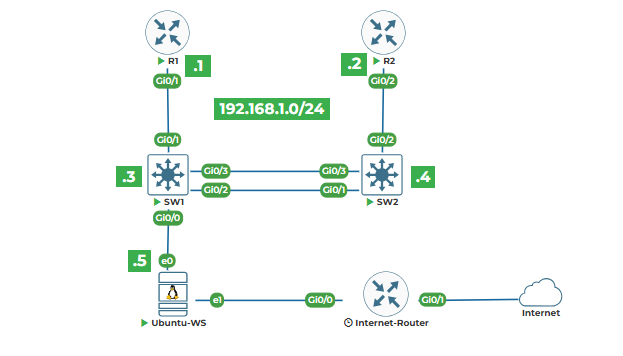
Let's create a practical script that generates real configurations for our lab topology. Create a new file called config_generator.py:
#!/usr/bin/env python3
"""
Network Configuration Generator
Generates basic configuration for lab devices
"""
def generate_router_config(hostname, mgmt_ip, subnet_mask):
"""Generate basic router configuration"""
config = f"""
!
! Basic configuration for {hostname}
!
hostname {hostname}
!
! Enable secret password
enable secret cisco123
!
! Console line
line con 0
password cisco
login
!
! VTY lines for remote access
line vty 0 4
password cisco
login
transport input ssh
!
! Management interface
interface vlan 1
ip address {mgmt_ip} {subnet_mask}
no shutdown
!
! SSH configuration for secure access
ip domain-name lab.local
crypto key generate rsa modulus 1024
username admin privilege 15 secret cisco123
!
ip ssh version 2
!
end
"""
return config
def generate_switch_config(hostname, mgmt_ip, subnet_mask):
"""Generate basic switch configuration"""
config = f"""
!
! Basic configuration for {hostname}
!
hostname {hostname}
!
! Enable secret password
enable secret cisco123
!
! Console line
line con 0
password cisco
login
!
! VTY lines for remote access
line vty 0 15
password cisco
login
transport input ssh
!
! Management interface
interface vlan 1
ip address {mgmt_ip} {subnet_mask}
no shutdown
!
! Default gateway
ip default-gateway 192.168.1.1
!
! SSH configuration
ip domain-name lab.local
crypto key generate rsa modulus 1024
username admin privilege 15 secret cisco123
!
ip ssh version 2
!
! Trunk ports (adjust based on your topology)
interface range gigabitethernet0/1-2
description TRUNK_PORTS
switchport mode trunk
switchport trunk native vlan 999
switchport trunk allowed vlan 1,10,20,30
!
end
"""
return config
def main():
"""Main function"""
print("NETWORK CONFIGURATION GENERATOR")
print("=" * 60)
# Our lab devices
devices = [
{"type": "router", "hostname": "Router1", "ip": "192.168.1.1", "mask": "255.255.255.0"},
{"type": "router", "hostname": "Router2", "ip": "192.168.1.2", "mask": "255.255.255.0"},
{"type": "switch", "hostname": "Switch1", "ip": "192.168.1.3", "mask": "255.255.255.0"},
{"type": "switch", "hostname": "Switch2", "ip": "192.168.1.4", "mask": "255.255.255.0"},
]
# Generate config for each device
for device in devices:
print(f"\n{'=' * 60}")
print(f"Configuration for {device['hostname']}")
print(f"{'=' * 60}")
if device["type"] == "router":
config = generate_router_config(device["hostname"], device["ip"], device["mask"])
else:
config = generate_switch_config(device["hostname"], device["ip"], device["mask"])
print(config)
# Also save to file
filename = f"{device['hostname']}_config.txt"
with open(filename, "w") as file:
file.write(config)
print(f"Configuration saved to {filename}")
print(f"\n{'=' * 60}")
print("All configurations generated successfully!")
print(f"{'=' * 60}")
if __name__ == "__main__":
main()
Let me explain key parts. The def generate_router_config(...): defines a function. Functions are reusable blocks of code. The text in triple quotes under it is a docstring - it explains what the function does.
The with open(filename, "w") as file: opens a file for writing. The "w" means write mode. file.write(config) writes the configuration to the file. The with statement automatically closes the file when done.
Run this script. It generates configurations for all our lab devices and saves them to separate files: Router1_config.txt, Router2_config.txt, etc.
Now let's add one more feature - let the user customize the configuration. Add this function before main():
def get_device_info():
"""Get device information from user"""
print("\nEnter device details:")
print("-" * 40)
device_type = ""
while device_type not in ["router", "switch"]:
device_type = input("Device type (router/switch): ").lower()
if device_type not in ["router", "switch"]:
print("Please enter 'router' or 'switch'")
hostname = input("Hostname: ")
ip_address = input("Management IP: ")
subnet_mask = input("Subnet mask: ")
return {
"type": device_type,
"hostname": hostname,
"ip": ip_address,
"mask": subnet_mask
}
And modify the main() function to give users a choice:
def main():
"""Main function"""
print("NETWORK CONFIGURATION GENERATOR")
print("=" * 60)
print("\nChoose an option:")
print("1. Generate config for lab devices (automatic)")
print("2. Generate config for custom device")
choice = input("\nEnter choice (1 or 2): ")
if choice == "1":
# Original code for lab devices
devices = [
{"type": "router", "hostname": "Router1", "ip": "192.168.1.1", "mask": "255.255.255.0"},
{"type": "router", "hostname": "Router2", "ip": "192.168.1.2", "mask": "255.255.255.0"},
{"type": "switch", "hostname": "Switch1", "ip": "192.168.1.3", "mask": "255.255.255.0"},
{"type": "switch", "hostname": "Switch2", "ip": "192.168.1.4", "mask": "255.255.255.0"}
]
else:
# Get custom device info
devices = [get_device_info()]
# Rest of the code remains the same..
Now run the script again. Choose option 2 and enter information for a new device. The script will generate a customized configuration.
This completes Lab 2. You've learned how to manipulate text, which is essential for network automation. Remember:
1.Use + for simple concatenation
2.Use f-strings for cleaner code with variables
3.Convert between strings and integers for calculations
4.Use input() to make scripts interactive
5.Always validate user input
In the next lab, we'll work with lists to manage collections of network devices.