Task 1: Creating Lists of Network Devices
Task 2: Accessing List Elements (devices, interfaces)
Task 3: Looping Through Devices with For Loops
Task 4: List Methods for Device Management
Task 5: Generating Interface Lists from Ranges
Task 1: Creating Lists of Network Devices
Let's start by understanding what a list is in Python. Think of a list like a spreadsheet column or a table in a database. It's a collection of items in a specific order. In networking, we often need to manage multiple devices, interfaces, or IP addresses together. Create a new file called lists_intro.py.
# Creating lists of network devices
print("WORKING WITH LISTS FOR NETWORK MANAGEMENT")
print("=" * 60)
# Method 1: Creating a list with square brackets
devices = ["Router1", "Router2", "Switch1", "Switch2", "Ubuntu_Server"]
print("Method 1 - Direct list creation:")
print(f"Devices list: {devices}")
print(f"Number of devices: {len(devices)}")
print()
Run this script with python3 lists_intro.py. The square brackets [] create a list. Each item is separated by commas. The len() function tells us how many items are in the list - just like show inventory | count in Cisco CLI.
Now let me show you another way to create lists:
# Method 2: Creating an empty list and adding items
devices2 = [] # Empty list
print("Method 2 - Building list incrementally:")
print(f"Starting with empty list: {devices2}")
# Adding devices one by one
devices2.append("Router1")
print(f"After adding Router1: {devices2}")
devices2.append("Router2")
print(f"After adding Router2: {devices2}")
devices2.append("Switch1")
print(f"After adding Switch1: {devices2}")
print()
The .append() method adds an item to the end of a list. This is useful when you're building a list dynamically, like when you discover devices on the network.
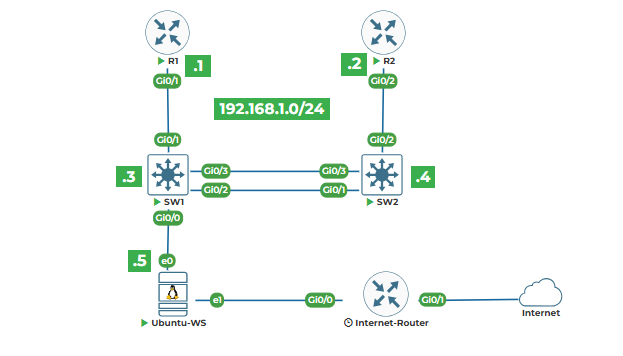
Now let's create a list based on our actual lab topology:
# Creating lists from our lab topology
print("Our Lab Topology Devices:")
print("-" * 40)
# Devices with their types
routers = ["Router1", "Router2"]
switches = ["Switch1", "Switch2"]
servers = ["Ubuntu_Server"]
print(f"Routers: {routers}")
print(f"Switches: {switches}")
print(f"Servers: {servers}")
print()
# Combine all devices
all_devices = routers + switches + servers
print(f"All devices combined: {all_devices}")
print(f"Total devices in lab: {len(all_devices)}")
The plus sign + when used with lists combines them. So routers + switches creates a new list with all router items followed by all switch items.
Task 2: Accessing List Elements (devices, interfaces)
Now that we have lists, let's learn how to access individual items. In networking, we often need to work with specific devices or interfaces. Add this to your file:
print("\n" + "=" * 60)
print("ACCESSING LIST ELEMENTS")
print("=" * 60)
# Our network devices list
network_devices = ["Router1", "Router2", "Switch1", "Switch2", "Ubuntu_Server"]
print(f"Complete list: {network_devices}")
print()
# Accessing by position (index)
print("Accessing individual devices:")
print(f"First device (index 0): {network_devices[0]}")
print(f"Second device (index 1): {network_devices[1]}")
print(f"Third device (index 2): {network_devices[2]}")
print(f"Last device (index 4): {network_devices[4]}")
print()
Important: Python lists start counting at 0, not 1. So network_devices[0] gets the first item, network_devices[1] gets the second, and so on. This is called zero-based indexing.
What if we want the last item but don't know how many items are in the list?
# Accessing from the end
print("Accessing from the end of list:")
print(f"Last device: {network_devices[-1]}")
print(f"Second to last: {network_devices[-2]}")
print(f"Third to last: {network_devices[-3]}")
print()
Negative indexes count from the end. -1 is the last item, -2 is second to last, etc. This is very useful when you don't know the list length.
Now let's work with interface lists, which are common in networking:
# Interface lists
print("Working with Interface Lists:")
print("-" * 40)
# Interfaces on a switch
switch_interfaces = ["Gi0/0", "Gi0/1", "Gi0/2", "Gi0/3", "Gi1/0", "Gi1/1"]
print(f"Switch interfaces: {switch_interfaces}")
print()
# Access range of interfaces (slicing)
print("Accessing ranges of interfaces:")
print(f"First 3 interfaces: {switch_interfaces[0:3]}")
print(f"Interfaces 2 through 4: {switch_interfaces[1:4]}")
print(f"Last 2 interfaces: {switch_interfaces[-2:]}")
print(f"All interfaces except first: {switch_interfaces[1:]}")
print(f"All interfaces except last: {switch_interfaces[:-1]}")
The colon : inside brackets is for slicing. [0:3] means "start at index 0, go up to but not including index 3". So we get items at positions 0, 1, and 2.
Let me show you a practical example from our topology:
# Based on our lab topology
print("\nOur Lab Topology Connections:")
print("-" * 40)
# Switch1 interfaces from topology
switch1_interfaces = ["Gi0/0", "Gi0/1", "Gi0/2", "Gi0/3"]
print(f"Switch1 interfaces: {switch1_interfaces}")
print()
# Access specific connections from topology
print("Topology connections:")
print(f"Gi0/0 connects to Ubuntu Server: {switch1_interfaces[0]}")
print(f"Gi0/1 connects to Router1: {switch1_interfaces[1]}")
print(f"Gi0/2 connects to Switch2 Gi0/1: {switch1_interfaces[2]}")
print(f"Gi0/3 connects to Switch2 Gi0/3: {switch1_interfaces[3]}")
Task 3: Looping Through Devices with For Loops
Now let's learn how to process each item in a list. This is where automation really starts. Create a new file called loops.py:
# Looping through network devices
print("LOOPING THROUGH NETWORK DEVICES")
print("=" * 60)
# Our lab devices with IP addresses
lab_devices = [
"Router1 - 192.168.1.1",
"Router2 - 192.168.1.2",
"Switch1 - 192.168.1.3",
"Switch2 - 192.168.1.4",
"Ubuntu Server - 192.168.1.5"
]
print("Lab Devices:")
print("-" * 40)
# Basic for loop
for device in lab_devices:
print(f"Device: {device}")
Run this script. The for device in lab_devices: line creates a loop. Python takes each item from lab_devices, puts it in the variable device, and executes the indented code below. Then it moves to the next item. Everything indented under the for line runs for each item.
Now let's make this more useful by separating device names from IPs:
print("\n" + "-" * 40)
print("Processing devices with split:")
print("-" * 40)
for device_info in lab_devices:
# Split the string at " - "
parts = device_info.split(" - ")
device_name = parts[0]
ip_address = parts[1]
print(f"Checking {device_name} at IP {ip_address}")
print(f" Ping command: ping {ip_address}")
print(f" SSH command: ssh admin@{ip_address}")
print()
The .split(" - ") method divides the string wherever it finds " - ". So "Router1 - 192.168.1.1" becomes ["Router1", "192.168.1.1"]. Then parts[0] gets "Router1" and parts[1] gets "192.168.1.1".
Let's create a practical network task - checking connectivity:
# Simulating connectivity check
print("\n" + "=" * 60)
print("SIMULATED CONNECTIVITY CHECK")
print("=" * 60)
# Devices with their actual IPs from topology
devices_ips = [
("Router1", "192.168.1.1"),
("Router2", "192.168.1.2"),
("Switch1", "192.168.1.3"),
("Switch2", "192.168.1.4"),
("Ubuntu Server", "192.168.1.5")
]
print("Starting connectivity tests...")
print()
import time # We'll use this to simulate delays
for device_name, ip_address in devices_ips:
print(f"Testing {device_name} ({ip_address})...")
# Simulate ping test (in real script, we'd actually ping)
time.sleep(0.5) # Wait half second
# Simulate different results
if "Router" in device_name:
status = "✓ REACHABLE"
elif "Switch" in device_name:
status = "✓ REACHABLE"
else:
status = "✓ REACHABLE"
print(f" Status: {status}")
print()
The for device_name, ip_address in devices_ips: line works because each item in devices_ips is a tuple with two parts. Python unpacks them into device_name and ip_address.
The time.sleep(0.5) pauses execution for half a second. This simulates network delay. In real automation, we'd use actual ping commands.
The if "Router" in device_name: checks if the word "Router" appears anywhere in the device name string.
Task 4: List Methods for Device Management
Python lists have built-in methods that make device management easier. Let's explore them. Create a new file list_methods.py:
# List methods for network device management
print("LIST METHODS FOR DEVICE MANAGEMENT")
print("=" * 60)
# Starting with an empty device list
managed_devices = []
print(f"Starting with empty list: {managed_devices}")
print()
# Method 1: append() - add single device
print("1. Adding devices with append():")
managed_devices.append("Router1")
managed_devices.append("Switch1")
managed_devices.append("Router2")
print(f" After appending: {managed_devices}")
print()
# Method 2: extend() - add multiple devices
print("2. Adding multiple devices with extend():")
new_devices = ["Switch2", "Firewall1", "AP1"]
managed_devices.extend(new_devices)
print(f" After extending: {managed_devices}")
print()
The .extend() method adds all items from one list to another. It's different from .append() which adds the entire list as a single item.
Now let's organize our devices:
# Method 3: insert() - add at specific position
print("3. Inserting device at specific position:")
# We forgot to add Ubuntu Server between Switch2 and Firewall1
managed_devices.insert(4, "Ubuntu_Server")
print(f" After inserting Ubuntu_Server at position 4: {managed_devices}")
print()
# Method 4: remove() - remove a device
print("4. Removing a device:")
# Firewall1 is not in our actual topology
managed_devices.remove("Firewall1")
print(f" After removing Firewall1: {managed_devices}")
print()
.insert(4, "Ubuntu_Server") inserts "Ubuntu_Server" at position 4 (remember, counting starts at 0). All items from position 4 onward shift right.
.remove("Firewall1") finds and removes the first occurrence of "Firewall1". If the item doesn't exist, it raises an error.
Let's see more methods:
# Method 5: pop() - remove and get last device
print("5. Removing last device with pop():")
last_device = managed_devices.pop()
print(f" Removed device: {last_device}")
print(f" Remaining devices: {managed_devices}")
print()
# Method 6: index() - find position of device
print("6. Finding device position:")
switch1_position = managed_devices.index("Switch1")
print(f" Switch1 is at position: {switch1_position}")
print()
# Method 7: count() - count occurrences
print("7. Counting device occurrences:")
# Add a duplicate for demonstration
managed_devices.append("Router1")
router1_count = managed_devices.count("Router1")
print(f" Router1 appears {router1_count} time(s) in list")
print()
.pop() removes and returns the last item. You can also specify an index: .pop(2) removes item at position 2.
.index("Switch1") finds the position of "Switch1" in the list.
.count("Router1") counts how many times "Router1" appears.
Now let's sort our devices:
# Method 8: sort() - organize devices
print("8. Sorting devices alphabetically:")
managed_devices.sort()
print(f" Sorted devices: {managed_devices}")
print()
# Method 9: reverse() - reverse order
print("9. Reversing device order:")
managed_devices.reverse()
print(f" Reversed devices: {managed_devices}")
print()
# Method 10: copy() - create backup of list
print("10. Creating backup copy:")
devices_backup = managed_devices.copy()
print(f" Original: {managed_devices}")
print(f" Backup: {devices_backup}")
print()
.sort() arranges items in ascending order. For strings, this is alphabetical order.
.copy() creates a new list with the same items. This is important because if you just do backup = original, both variables point to the same list. Changing one changes the other.
Task 5: Generating Interface Lists from Ranges
In networking, we often need to work with interface ranges like "GigabitEthernet0/0-23". Let's create a script for this. New file interface_ranges.py:
# Generating interface lists from ranges
print("GENERATING INTERFACE LISTS")
print("=" * 60)
# Method 1: Manual list for small ranges
print("Method 1 - Manual list:")
interfaces_manual = ["Gi0/0", "Gi0/1", "Gi0/2", "Gi0/3"]
print(f" Interfaces: {interfaces_manual}")
print()
# Method 2: Using range() for numbered interfaces
print("Method 2 - Using range() function:")
print(" Interfaces 0 through 9:")
for i in range(10): # 0 to 9
print(f" Gi0/{i}", end=" ")
print("\n")
The range(10) generates numbers 0 through 9. The end=" " in the print statement tells Python to end with a space instead of a newline, so all interfaces appear on one line.
Now let's create actual interface lists:
# Create a list of 24 port switch interfaces
print("Creating 24-port switch interfaces:")
switch_ports = []
for port in range(24): # 0 to 23
interface = f"Gi0/{port}"
switch_ports.append(interface)
print(f" Switch ports: {switch_ports}")
print(f" Total ports: {len(switch_ports)}")
print()
# Select specific ranges
print("Selecting interface ranges:")
# Ports 0-7 (first 8 ports)
first_8_ports = switch_ports[0:8]
print(f" First 8 ports (0-7): {first_8_ports}")
# Ports 8-15 (next 8 ports)
next_8_ports = switch_ports[8:16]
print(f" Ports 8-15: {next_8_ports}")
# Last 4 ports
last_4_ports = switch_ports[-4:]
print(f" Last 4 ports (20-23): {last_4_ports}")
Now let's apply this to our actual lab topology. Based on the description, Switch1 has interfaces Gi0/0 through Gi0/3 that are connected:
print("\n" + "=" * 60)
print("OUR LAB TOPOLOGY INTERFACES")
print("=" * 60)
# Switch1 from our topology
print("Switch1 Interface Assignments:")
print("-" * 40)
switch1_interfaces = ["Gi0/0", "Gi0/1", "Gi0/2", "Gi0/3"]
connections = [
"Ubuntu Server (192.168.1.5)",
"Router1 Gi0/1 (192.168.1.1)",
"Switch2 Gi0/1",
"Switch2 Gi0/3"
]
# Display connections
for i in range(len(switch1_interfaces)):
interface = switch1_interfaces[i]
connection = connections[i]
print(f" {interface}: Connected to {connection}")
The range(len(switch1_interfaces)) generates numbers 0, 1, 2, 3. We use i to get both the interface and its corresponding connection.
Let's create a practical script that generates interface configurations:
print("\n" + "=" * 60)
print("AUTOMATIC INTERFACE CONFIGURATION GENERATOR")
print("=" * 60)
# Generate interfaces for a 48-port switch
print("Generating configuration for 48-port switch...")
base_config = """
interface {}
description {}
switchport mode access
switchport access vlan {}
switchport voice vlan {}
spanning-tree portfast
"""
# Create interfaces
interfaces = []
for slot in range(2): # 2 slots: 0 and 1
for port in range(24): # 24 ports per slot
interface = f"Gi{slot}/{port}"
interfaces.append(interface)
print(f"Total interfaces generated: {len(interfaces)}")
# Configure first 5 interfaces as example
print("\nConfiguration for first 5 interfaces:")
print("-" * 40)
for i in range(5):
interface = interfaces[i]
# Assign VLANs based on port number
if i < 2:
vlan = "10" # First 2 ports in VLAN 10
description = "VLAN10_User_Ports"
elif i < 4:
vlan = "20" # Next 2 ports in VLAN 20
description = "VLAN20_User_Ports"
else:
vlan = "30" # Next ports in VLAN 30
description = "VLAN30_User_Ports"
voice_vlan = "100"
# Generate config using f-string
config = f"""interface {interface}
description {description}
switchport mode access
switchport access vlan {vlan}
switchport voice vlan {voice_vlan}
spanning-tree portfast
"""
print(config)
This script shows nested loops: for slot in range(2): and inside it for port in range(24):. This generates all combinations: Gi0/0 through Gi0/23, then Gi1/0 through Gi1/23.
Now let's create one final practical example - a script that manages our entire lab device inventory:
print("\n" + "=" * 60)
print("LAB DEVICE INVENTORY MANAGER")
print("=" * 60)
# Comprehensive device list with details
lab_inventory = []
# Add Router1 details
router1 = {
"name": "Router1",
"type": "router",
"ip": "192.168.1.1",
"interfaces": ["Gi0/0", "Gi0/1", "Gi0/2"],
"connected_to": ["Switch1 Gi0/1", "Internet", "DMZ"]
}
lab_inventory.append(router1)
# Add Router2 details
router2 = {
"name": "Router2",
"type": "router",
"ip": "192.168.1.2",
"interfaces": ["Gi0/0", "Gi0/1", "Gi0/2"],
"connected_to": ["Switch2 Gi0/2", "Branch", "Backup"]
}
lab_inventory.append(router2)
# Add Switch1 details
switch1 = {
"name": "Switch1",
"type": "switch",
"ip": "192.168.1.3",
"interfaces": ["Gi0/0", "Gi0/1", "Gi0/2", "Gi0/3"],
"connected_to": ["Ubuntu Server", "Router1", "Switch2 Gi0/1", "Switch2 Gi0/3"]
}
lab_inventory.append(switch1)
# Display inventory
print("Lab Device Inventory:")
print("-" * 60)
for device in lab_inventory:
print(f"\nDevice: {device['name']}")
print(f" Type: {device['type']}")
print(f" Management IP: {device['ip']}")
print(f" Interfaces: {', '.join(device['interfaces'])}")
print(f" Connections: {', '.join(device['connected_to'])}")
print(f"\nTotal devices in inventory: {len(lab_inventory)}")
The .join() method is useful here. ', '.join(device['interfaces']) takes the list of interfaces and joins them with ", " between each item.
This completes Lab 3. You've learned how to create, access, and manipulate lists - essential skills for managing multiple network devices. In the next lab, we'll work with dictionaries for more structured network data.