Palo Alto Firewall Automation - Hands-On Labs
Learn Palo Alto firewall automation with hands-on labs using PAN-OS API, XML, Python, and Ansible. Build real-world automation skills.
in Palo Alto
Created by
Deepak Sharma
Last Updated: Aug/2026
Language: English
24:00 Hours
Last Updated: Aug/2026
Language: English
Duration: 24:00 Hours
What you will learn?
Configure Palo Alto firewalls using console, web UI, and management workstation setup
Master XML and REST APIs to retrieve data and automate configuration changes
Write Python scripts using pan-os-python SDK to manage multiple firewalls
Create Ansible playbooks for declarative, idempotent firewall automation
Build monitoring dashboards and health check systems with automated reporting
Implement backup and restore procedures with version comparison and scheduling
About this course
This comprehensive, hands-on lab course is designed for absolute beginners with no prior experience in automation, Python, Linux, or Ansible. Starting from the ground up,
You'll learn how to automate Palo Alto firewall configuration, monitoring, and management using multiple automation approaches.
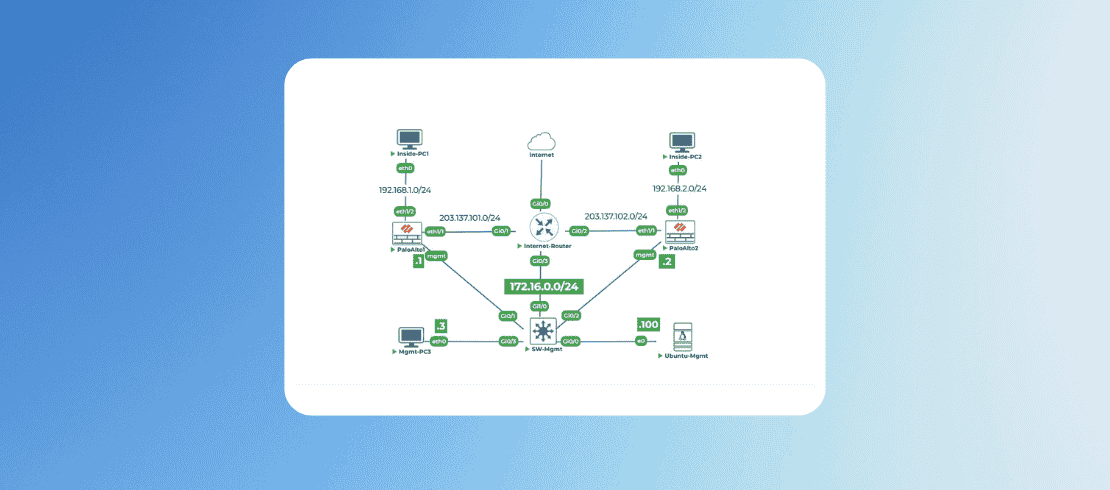
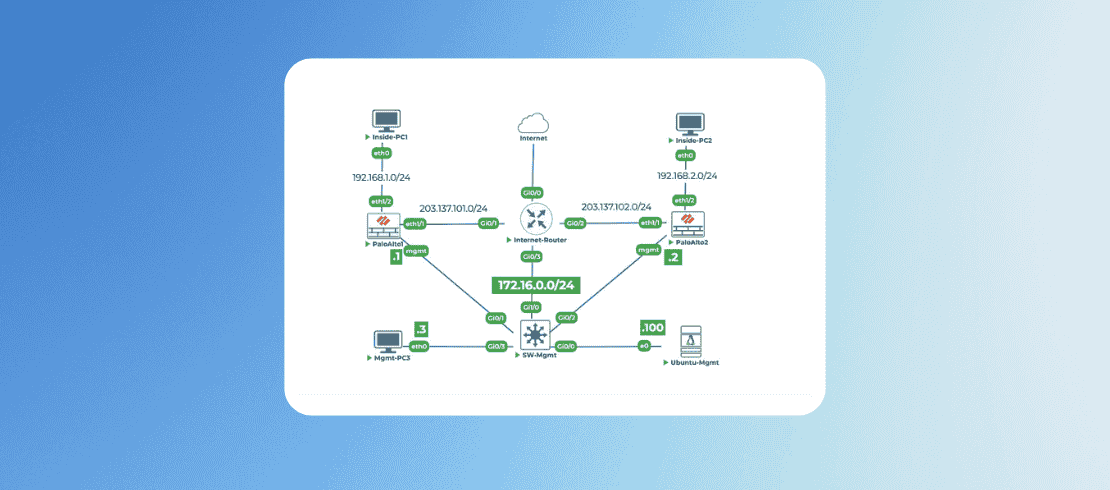
Through 18 carefully structured labs based on a realistic network topology, you'll progress from manual configuration to enterprise-grade automation, gaining practical skills that you can immediately apply in real-world environments.
The course takes a unique "verbal instruction" approach—every command, every script, and every concept is explained step-by-step as if an instructor is guiding you personally.
You'll build a complete automation toolkit including XML API, REST API, Python scripting with the pan-os-python SDK, and Ansible playbooks, while working with two Palo Alto firewalls in a practical network setup.
In case you need any clarification on this Palo Alto Firewall Automation Hands-On Lab course, feel free to contact our learning advisor.
What makes this course different?
● No prior knowledge required – Start from absolute zero
● Learn by doing – 18 progressive labs with real equipment
● Multiple automation methods – XML API, REST API, Python, and Ansible
● Production-ready skills – Monitoring, backup/restore, threat intelligence integration
● Step-by-step explanations – Every line of code is explained in plain language
By the end of the course, you will be able to design and implement automation workflows to manage Palo Alto firewalls efficiently in enterprise environments.
Suggested by top companies
Top companies suggest this course to their employees and staff.


Requirements
Basic Palo Alto firewall experience – Familiarity with web UI, address objects, and security policies
Networking fundamentals – Understanding of IP addresses, subnets, and routing concepts
Basic command line exposure – No Linux expertise required, but willingness to type commands
Prerequisites


Similar Courses
.png)


FAQ
What versions of PAN-OS are supported?
The lab uses PAN-OS 11.0, but all techniques work with PAN-OS 9.0 and above. XML API methods are backward compatible to version 8.1
How long will it take to complete the entire lab course?
Most students complete this lab course in 5 days, spending appx 8 hours a day. The self-paced format lets you learn at your own speed.
Will I be ready for real-world automation after this course?
Yes! By the end, you'll have built production-ready tools for configuration management, monitoring, backup/restore, and threat intelligence integration.
What if I get stuck on a lab?
The lab course is designed to be self-explanatory with step-by-step instructions. Alternatively you can book instructors time for one to one session. Though this is a paid service.
How to access the lab?
Login to www.uninets.com and check your purchased lab course, click on it. A learning page will open in another tab where you'll have your lab guide. Here you need to click on GO TO LAB option buy to access your lab topology.
How to extend lab duration and lab validity?
On the lab course learning page when you click on GO TO LAB, there will be a popup where you see an option for lab hours and lab validity extension. Once you paid for the required amount, your additional lab hours and validity days will be added in your lab.
How to get lab support?
Email support@uninets.com (Level 1), or escalate via phone/WhatsApp at +91 8527916751 (Level 2) or at +91 9818239009 (Level 3 for corporate only), with standard support available Mon-Sat 10am-7pm IST and 24x7 corporate support.
Comments (0)
Lab Support Guidelines and Network Topology Details
2 Parts
- 0:15 Hr
Lab 1: Initial Network Configuration via Console
1 Parts
- 0:30 Hr
Physically configure the management IP addresses on both Palo Alto firewalls and the Ubuntu management PC.
30 Min
Attachments:
Lab 2: Basic Firewall Setup via Web Interface
1 Parts
- 0:30 Hr
Access Palo Alto firewall GUI from Ubuntu-Mgmt and configure basics initial setup like hostname and timezone.
30 Min
Attachments:
Lab 3: Exploring Palo Alto Configuration in XML
1 Parts
- 0:30 Hr
Navigating Configuration in XML
Extracting configuration and understand basic XML structure for automation.
30 Min
Attachments:
Lab 4: Generating and Using API Key in Palo Alto
1 Parts
- 0:30 Hr
Obtain API Key from Palo Alto Firewall
Create a dedicated account and generate an API key from Palo Alto firewall to use it.
30 Min
Attachments:
Lab 5: Your First XML API Call
1 Parts
- 0:30 Hr
Get Started with Your XML API Call
Learn about Curl command and extracting Palo Alto firewall information via XML API Calls.
30 Min
Attachments:
Lab 6: Creating Address Objects via XML API
1 Parts
- 0:30 Hr
Address Objects on Palo Alto via XML API
Find the XPath using API browser and creating address objects using XML API
30 Min
Attachments:
Lab 7: Creating Security Policies via XML API
1 Parts
- 0:30 Hr
Security Policies on Palo Alto via XML API
Finding the correct XPATH and creating security policies via API browser.
30 Min
Attachments:
Lab 8: Python Environment Setup and First Script
1 Parts
- 1:00 Hr
First Python script to interact with PaloAlto
Python is the industry standard for network automation. It's more powerful, easier to read, and has extensive libraries specifically designed to work with Palo Alto firewalls.
60 Min
Attachments:
Lab 9: Using Python to Retrieve Firewall Information
1 Parts
- 0:50 Hr
Creating Python Script to Retrieve PaloAlto Details
Use the pan-os-python SDK to programmatically connect to both firewalls and retrieve system information (hostname, model, version)
50 Min
Attachments:
Lab 10: Using Python to Configure Address Objects
1 Parts
- 1:00 Hr
pan-os-python SDK for creating address objects
Use the pan-os-python SDK to programmatically create address objects on both firewalls.
60 Min
Attachments:
Lab 11: Using REST API
1 Parts
- 1:00 Hr
Understanding both XML and REST APIs
Generate a REST API key, make simple calls to retrieve data in JSON format, and compare it to the XML API.
60 Min
Attachments:
Lab 12: Configuring via REST API
1 Parts
- 1:00 Hr
Creating Security Policy Using REST API
REST API to create an address object and a security policy on the firewalls.
60 Min
Attachments:
Lab 13: Ansible Environment Setup
1 Parts
- 1:00 Hr
Create the basic Ansible directory structure
Ansible is an Infrastructure as Code (IaC) tool that uses simple YAML files (playbooks).
60 Min
Attachments:
Lab 14: Ansible Playbook for Configuration
1 Parts
- 1:00 Hr
Create Ansible Playbook to Configure Address Objects
Create Ansible playbooks to configure address objects and security policies on both firewalls.
60 Min
Attachments:
Lab 15: Ansible Playbook for Security Policies
1 Parts
- 1:00 Hr
Create Ansible Playbooks to Configure Security Policies
Create Ansible playbooks to configure security policies (rules) on both firewalls. We'll create rules that use the address.
60 Min
Attachments:
Lab 16: Bulk Configuration Deployment with CSV
1 Parts
- 1:00 Hr
Automate the deployment of multiple firewalls
This simulates a real-world scenario where you might need to configure hundreds of firewalls with similar but slightly different settings.
60 Min
Attachments:
Lab 17: Monitoring and Reporting
1 Parts
- 1:00 Hr
Create scripts to monitor firewall health
Create scripts to monitor firewall health, collect operational data, and generate reports. We'll track sessions, system health, and configuration compliance.
60 Min
Attachments:
Lab 18: Backup and Restore Configuration
1 Parts
- 1:00 Hr
Create automated backup and restore procedures
Create automated backup and restore procedures for firewall configurations. Learn to schedule backups, store them securely, and restore when needed.
60 Min
Attachments:

4.75
1 Reviews