Linux For Network Engineer-Hands-On Labs
Hands-on Linux labs for network engineers. Learn Linux for networking with real-world commands, tools, and scenarios designed for network engineers.
in Linux
Created by
Deepak Sharma
Last Updated: Aug/2026
Language: English
24:00 Hours
Last Updated: Aug/2026
Language: English
Duration: 24:00 Hours
What you will learn?
Master essential Linux commands for network discovery and device management in real-world scenarios.
Secure and organize configuration repositories using best practices and version control tools like Git.
Analyze device logs effectively to troubleshoot network issues and maintain system health.
Automate configuration backups and streamline repetitive tasks using Linux scripting techniques.
Gain hands-on experience with Ansible for declarative network automation and configuration management.
Learn to push configurations to switches and control network services with Linux-based tools.
Configure Ubuntu as a router to build cost-effective, flexible network environments for testing and deployment.
About this course
If you're a network engineer aiming for automation and AI in the future, you need to build up fundamentals of Linux skills, this hands-on lab is ideal for you. Featuring 15 practical lab scenarios, it covers Linux fundamentals, essentials for modern automation in networking. You'll dive into configuration management to automate settings across systems and learn log analysis for effective troubleshooting and enhancing network performance.
You'll also gain experience with tools like Python, Git and Ansible, crucial for version control and automation in network operations. The immersive virtual environment simulates real-world scenarios, making the learning process engaging and relevant.
By the end of the lab, you'll have the strong foundation on Linux fundamentals to elevate your career. Whether you’re starting or looking to sharpen your skills, this lab is a comprehensive pathway to improving your networking automation proficiency. Are you ready to level up?
Start your journey today, enroll now, and master Linux fundamentals for network engineering!
Why Choose This Lab Course?
1. Hands-On Experience: Learn Linux through 15 practical labs designed for real-world network engineering tasks.
2. Automation Skills: Master tools like Ansible and scripting to automate network configurations and backups.
3. Version Control Expertise: Gain proficiency in Git for managing and securing network configuration repositories.
4. Career-Ready Skills: Build in-demand Linux and automation skills to stay ahead in modern networking roles.
5. Virtual Lab Environment: Practice safely in a pre-configured virtual machine, with no setup hassles required.
Why Network Engineers Should Learn and Practice Linux?
Linux powers most networking systems, servers, and automation tools. By learning Linux, network engineers can manage configurations, troubleshoot issues, and streamline tasks efficiently. It’s a core skill for modern networking environments.
Practicing Linux helps engineers master scripting, automation, and tools like Git and Ansible. These skills reduce manual work, improve reliability, and prepare you for advanced roles in network automation and cloud networking.
Start building your Linux skills today. Enroll now and take your networking career to the next level!
What Makes This Linux Lab Course Unique?
1. Practice Linux tasks that network engineers perform daily, from configs to automation.
2. No setup hassle. You get a ready-to-use environment for hands-on learning.
3. Beginner-friendly labs that gradually build advanced Linux and networking skills.
4. Gain practical expertise in Linux, scripting, and automation for modern networking roles.
Who Should Attend?
● Network Engineers and Administrators working in multi-platform environments
● IT professionals transitioning into network automation or DevOps
● Students preparing for certifications like CCNA, CCNP, or Linux-based exams.
Benefits of Linux Training for Network Engineers
1. Stronger earning potential: U.S. network engineer compensation commonly spans from about $79K to $122K, based on multi-source data. Linux and automation skills can help you move toward the top of this range.
2. Positive salary momentum: Senior network security engineers recorded an average year-over-year pay increase of 1.4 percent in 2026, reflecting steady value for upskilled talent.
3. High-demand skill set: Employers consistently seek professionals with Linux, automation, and version control capabilities for modern network infrastructure and cloud initiatives.
4. Operational efficiency gains: Using Linux scripting, Git, and Ansible helps reduce manual work, improve reliability, and streamline configuration management and backups. These efficiencies free engineers to focus on higher-impact projects.
5. Career resilience in evolving environments: Proficiency in Linux supports transitions to cloud, hybrid, and AI-driven networks, keeping your skills relevant as technology priorities shift.
Suggested by top companies
Top companies suggest this course to their employees and staff.


Requirements
Basic understanding of networking concepts like IP addressing and connectivity.
Familiarity with command-line interfaces (CLI) is helpful but not mandatory.
Willingness to learn Linux fundamentals and apply them to network engineering tasks.
Similar Courses



FAQ
What topics are covered in the labs?
The labs cover essential Linux tasks for network engineers, including network discovery, securing configs, analyzing logs, automating backups, using Git for version control, Python and Ansible fundamentals. You’ll also learn to push configurations to switches and turn Ubuntu into a router.
How long does the course take to complete?
The course includes 15 hands-on labs, each lasting about 2+ hours. You can complete the entire lab course in approximately 35-40 hours, making it easy to fit into your schedule while gaining practical Linux skills for network engineering.
Is this course useful for network automation?
Absolutely. The labs teach Linux fundamentals and introduce automation tools like Ansible and Git. These are essential for modern network automation workflows, making this course a great starting point for engineers moving toward automation.
Why should network engineers learn Linux?
Linux is widely used in networking for automation, configuration management, and troubleshooting. Learning Linux helps network engineers manage devices, analyze logs, and implement scripts efficiently. It’s a critical skill for modern network operations and automation workflows.
Is this course beginner-friendly for network engineers?
Yes, the labs start with basic Linux commands and gradually move to advanced topics like automation and version control. Even if you’re new to Linux, you’ll learn step by step with practical exercises.
How to access the lab?
Login to www.uninets.com and check your purchased lab course, click on it. A learning page will open in another tab where you'll have your lab guide. Here you need to click on GO TO LAB option buy to access your lab topology.
How to extend lab duration and lab validity?
On the lab course learning page when you click on GO TO LAB, there will be a popup where you see an option for lab hours and lab validity extension. Once you paid for the required amount, your additional lab hours and validity days will be added in your lab.
How to get lab support?
Email support@uninets.com (Level 1), or escalate via phone/WhatsApp at +91 8527916751 (Level 2) or at +91 9818239009 (Level 3 for corporate only), with standard support available Mon-Sat 10am-7pm IST and 24x7 corporate support.
Comments (0)
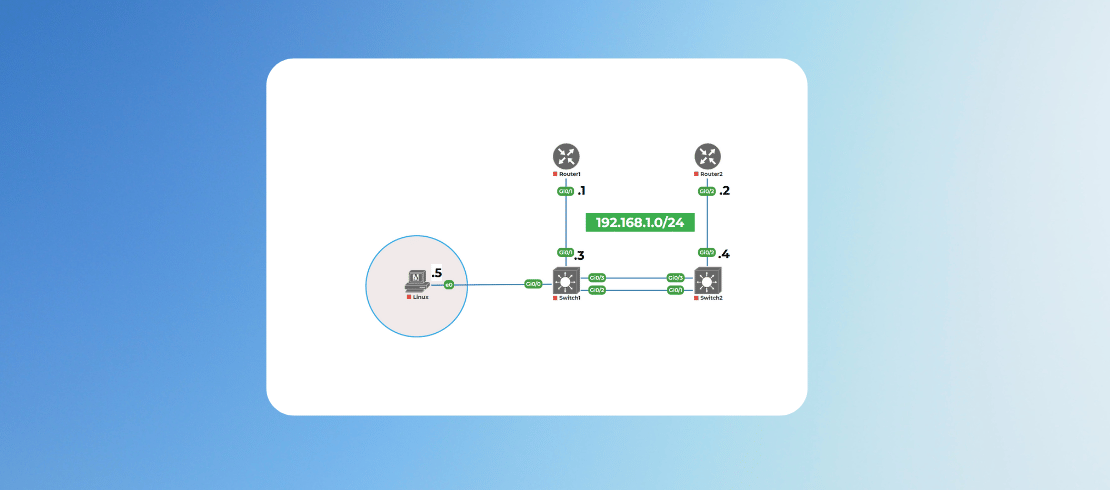
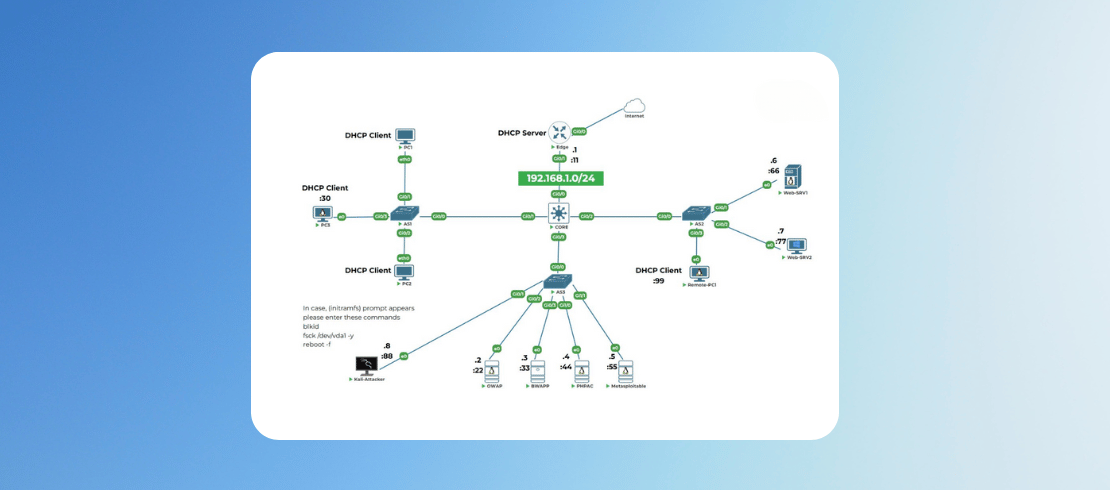
Lab Support Guidelines and Network Topology Details
2 Parts
- 0:05 Hr
Lab 1: Establish Basic Devices Connectivity
1 Parts
- 1:00 Hr
Establish Device Reachability on the Topology.
60 Min
Attachments:
Lab 2: Creating Your First Config Snippets
1 Parts
- 0:45 Hr
Creating Your First Config Snippets
45 Min
Attachments:
Lab 3: File System Archaeology - Device Configs
1 Parts
- 1:30 Hr
Finding and Managing Device Configs
90 Min
Attachments:
Lab 4: Securing Your Config Repository
1 Parts
- 0:15 Hr
Securing Your Config Repository
15 Min
Attachments:
Lab 5: Analyzing Device Logs
1 Parts
- 1:30 Hr
Analyzing Device Logs
Analyzing Device Logs
90 Min
Attachments:
Lab 6: Extracting Interface Status
1 Parts
- 1:30 Hr
Extracting Interface Status
Extracting Interface Status
90 Min
Attachments:
Lab 7: Setting Up Your Toolbox
1 Parts
- 1:30 Hr
Setting Up Your Toolbox
Setting Up Your Toolbox
90 Min
Attachments:
Lab 8: Controlling Network Services
1 Parts
- 1:30 Hr
Controlling Network Services
Controlling Network Services
90 Min
Attachments:
Lab 9: Automating Device Configuration Backups
1 Parts
- 1:30 Hr
Automating Device Configuration Backups
Automating Device Configuration Backups
90 Min
Attachments:
Lab 10: Version Control for Network Configs
1 Parts
- 1:30 Hr
Version Control for Network Configs
Version Control for Network Configs
90 Min
Attachments:
Lab 11: Your First Interactive Config Script
1 Parts
- 2:00 Hr
Your First Interactive Config Script
Your First Interactive Config Script
120 Min
Attachments:
Lab 12: Pushing Configs to a Switch
1 Parts
- 2:00 Hr
Pushing Configs to a Switch
Pushing Configs to a Switch
120 Min
Attachments:
Lab 13: Advanced Git - Collaboration and Recovery
1 Parts
- 2:00 Hr
Advanced Git - Collaboration and Recovery
Advanced Git - Collaboration and Recovery
120 Min
Attachments:
Lab 14: Ansible Fundamentals - Declarative Configuration
1 Parts
- 2:00 Hr
Ansible Fundamentals - Declarative Configuration
Ansible Fundamentals - Declarative Configuration
120 Min
Attachments:
Lab 15: Turning Ubuntu into a Router
1 Parts
- 2:00 Hr
Turning Ubuntu into a Router
Turning Ubuntu into a Router
120 Min
Attachments:
Lab 16: Docker and Containers for Network Engineers
1 Parts
- 2:00 Hr
Docker and Containers for Network Engineers
Docker and Containers for Network Engineers
120 Min
Attachments:

4.75
2 Reviews
.png)