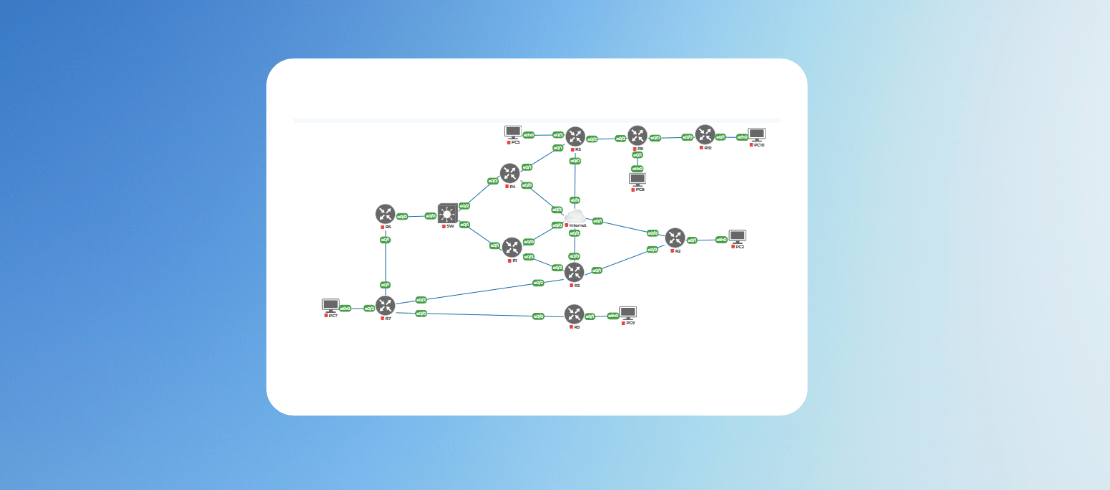
Ultimate EIGRP Labs for CCIE Enterprise Exam
Master EIGRP with 22 hands-on remote labs covering route filtering, summarization, stub routing, and traffic engineering. Ideal for CCIE learners.
in Cisco Enterprise
Created by
Gautam Kumar
Last Updated: Aug/2026
Language: English
24:00 Hours
Last Updated: Aug/2026
Language: English
Duration: 23:58 Hours
What you will learn?
Understand EIGRP auto-summarization and its impact on routing tables.
Configure EIGRP Multi-AF mode to support both IPv4 and IPv6.
Implement secure EIGRP authentication using MD5 and SHA-256.
Set up key chain rotation for dynamic security management.
Perform traffic engineering using metric weights and unequal cost load balancing.
Control route advertisements with stub routing and filtering using prefix lists, access lists, and administrative distance.
Apply advanced summarization techniques, including leak maps and default routes.
About this course
Welcome to the EIGRP Remote Lab, a hands-on, scenario-driven lab environment designed to help networking professionals master EIGRP (Enhanced Interior Gateway Routing Protocol) in real-world enterprise setups.
This course offers 22 structured labs that progressively build your skills from foundational concepts like auto-summary to advanced filtering techniques using administrative distance and offset lists.
Whether you're preparing for CCIE certification or refining your routing expertise, this lab series provides the practical experience needed to confidently configure, troubleshoot, and optimize EIGRP in diverse network topologies.
Lab Features
● 22 Labs covering beginner to advanced EIGRP topics
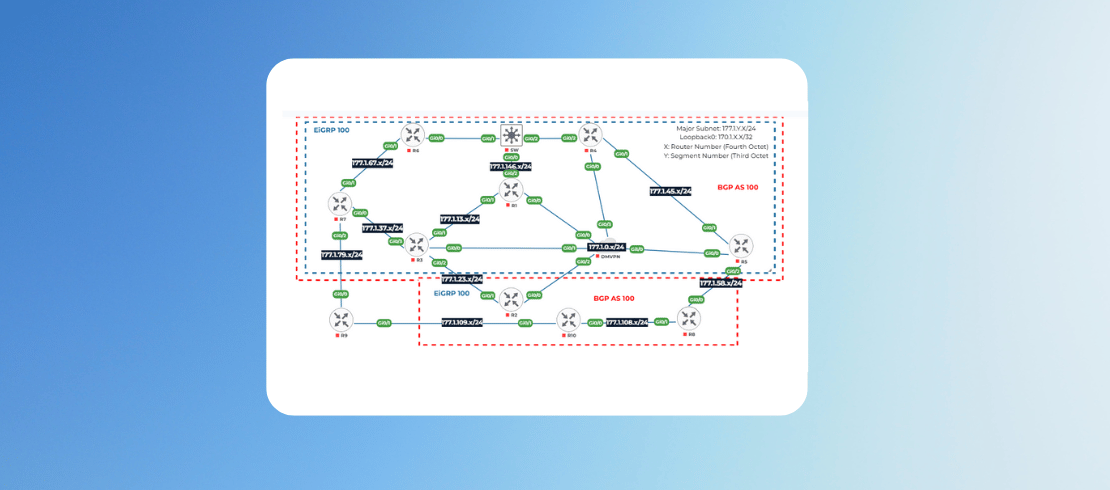
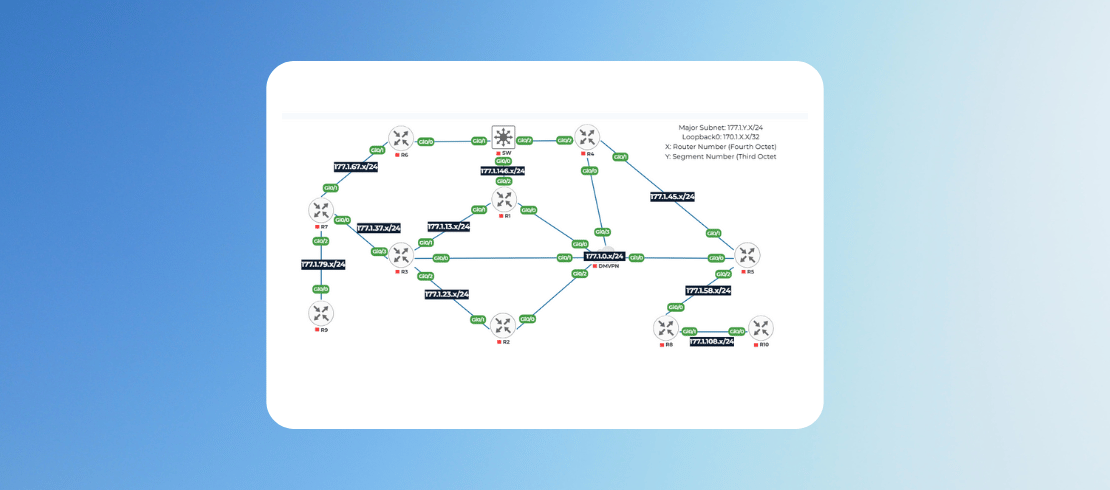
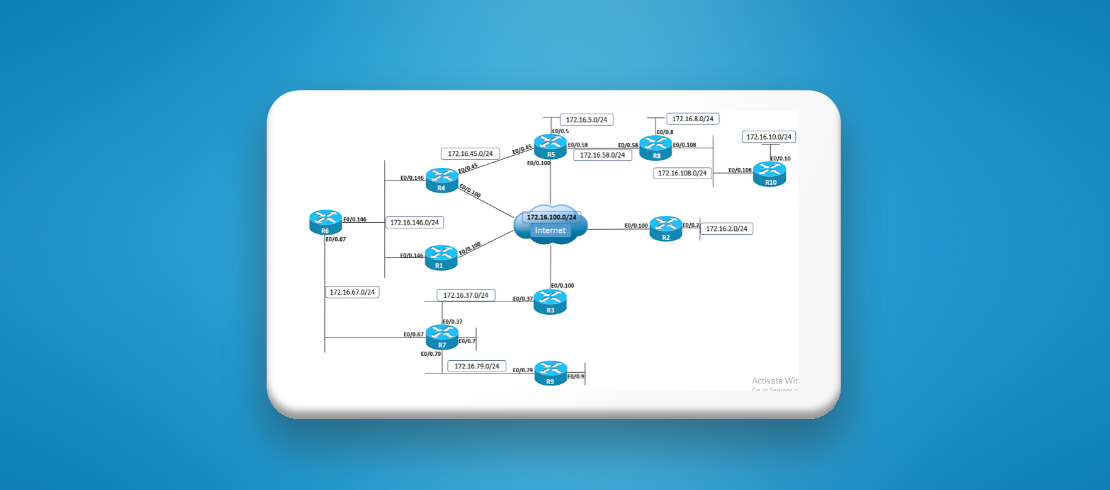
● Realistic topologies with multi-router setups
● Remote access to lab devices
● Step-by-step instructions with guided configurations
● Scenario-based challenges to reinforce learning
Each lab is designed to simulate actual enterprise routing scenarios, helping you understand not only how to configure EIGRP but also why each feature matters in production environments.
Who Should Enroll?
This lab series is ideal for:
● CCIE candidates looking to deepen their EIGRP knowledge
● Network engineers working in enterprise environments
● Students and professionals preparing for advanced Cisco certifications
● Anyone seeking hands-on experience with EIGRP beyond theory
Whether you're a learner aiming to pass exams or a practitioner solving real-world routing problems, this course is tailored to meet your goals.
Benefits of Remote EIGRP Lab
● No physical setup required. UniNets uses virtualization to provide remote access to all devices.
● Practice at your own pace with 24/7 availability.
● Build confidence through real-time troubleshooting.
● Apply concepts immediately in simulated enterprise networks.
● Track progress and revisit labs as needed.
This remote lab experience bridges the gap between textbook learning and practical application, making it easier to retain knowledge and apply it in job roles or certification exams.
Requirements
Have a solid understanding of IP addressing, subnetting, and basic routing concepts.
Familiarity with EIGRP neighbor relationships, metric calculation, and basic configuration is essential.
Ability to configure and troubleshoot routers and switches using the command-line interface.
Similar Courses

Text course






FAQ
What is the Ultimate EIGRP Labs course for CCIE Enterprise?
The Ultimate EIGRP Labs course is designed for CCIE Enterprise candidates to master advanced EIGRP concepts through hands-on virtual labs. It covers topics like authentication, summarization, filtering, and traffic engineering, ensuring you gain practical skills required to configure and troubleshoot complex enterprise networks.
Why should I learn EIGRP for CCIE Enterprise certification?
EIGRP is a key routing protocol tested in CCIE Enterprise exams. Learning EIGRP helps you understand advanced routing features like metric tuning, load balancing, and route filtering. Mastering these concepts ensures you can design and optimize enterprise networks efficiently, which is critical for passing the CCIE exam.
What skills will I gain from this EIGRP lab course?
You will learn to configure EIGRP authentication, implement summarization techniques, optimize routing with metric weights, and apply filtering using access lists and prefix lists. These skills prepare you for real-world enterprise network design and troubleshooting, making you confident for CCIE Enterprise certification and advanced networking roles.
Do I need prior experience before taking this EIGRP lab course?
Yes, you should have a strong understanding of networking fundamentals, IP addressing, and basic EIGRP concepts. Familiarity with Cisco CLI is essential. This course is ideal for CCNP-certified professionals or those preparing for CCIE Enterprise, as it focuses on advanced EIGRP configurations and troubleshooting techniques.
How are the EIGRP labs structured in this course?
The course includes 22 hands-on labs covering topics like auto-summarization, Multi-AF mode, authentication, key chain rotation, traffic engineering, and filtering. Each lab is time-bound and designed to simulate real CCIE exam scenarios, giving you practical experience and confidence to tackle complex enterprise network challenges.
How much time will it take to complete the EIGRP labs?
The course includes 22 labs, each ranging from 30 minutes to 1 hour. On average, you can complete the entire course in 34–40 hours. The flexible structure allows you to learn at your own pace while gaining hands-on experience with real CCIE-level EIGRP scenarios.
Do I need physical hardware for this EIGRP course?
No, physical hardware is not required. We provide access to a virtual lab environment using platforms like GNS3 or EVE-NG. This ensures you can practice advanced EIGRP configurations without investing in expensive routers or switches, making the learning process cost-effective and convenient.
How to access the lab?
Login to www.uninets.com and check your purchased lab course, click on it. A learning page will open in another tab where you'll have your lab guide. Here you need to click on GO TO LAB option buy to access your lab topology.
How to extend lab duration and lab validity?
On the lab course learning page when you click on GO TO LAB, there will be a popup where you see an option for lab hours and lab validity extension. Once you paid for the required amount, your additional lab hours and validity days will be added in your lab.
How to get lab support?
Email support@uninets.com (Level 1), or escalate via phone/WhatsApp at +91 8527916751 (Level 2) or at +91 9818239009 (Level 3 for corporate only), with standard support available Mon-Sat 10am-7pm IST and 24x7 corporate support.
Comments (0)
Lab 1: EIGRP Auto-Summary
3 Parts
- 1:10 Hr
Configure EIGRP AS 100, enable auto-summary, disable split-horizon on R5 tunnel, and verify IPv4 reachability across the topology.
60 Min
Attachments:
Download Topology and Labs Summary
Download the lab topology and labs listing summary
525.65 KB
Lab Support Details
10 Min
Attachments:
Lab 2: EIGRP Multi-AF Mode
1 Parts
- 1:00 Hr
Configure Named EIGRP (MULTI-AF) with AS 100, advertise networks, disable split-horizon on R5, and verify full IPv4 reachability.
60 Min
Attachments:
Lab 3: EIGRP MD5 & SHA-256 Authentication
1 Parts
- 1:00 Hr
Configure EIGRP with AS 100, enable authentication, disable split-horizon, and ensure full IPv4 reachability across all routers.
60 Min
Attachments:
Lab 4: EIGRP Key Chain Rotation
1 Parts
- 0:30 Hr
Configure EIGRP with AS 100, enable NTP, apply key rotation authentication, and ensure seamless DMVPN connectivity without adjacency loss.
30 Min
Attachments:
Lab 5: EIGRP Unicast Updates
1 Parts
- 0:30 Hr
Configure EIGRP Classic and Multi-AF with AS 100, enable DMVPN, NTP sync, and unicast EIGRP between R4 and R5.
30 Min
Attachments:
Lab 6: EIGRP Summarization
1 Parts
- 1:00 Hr
EIGRP Summarization
Configure EIGRP Classic and Named modes, enable routing on key networks, redistribute loopbacks, and implement summarization.
60 Min
Attachments:
Lab 7: EIGRP Summarization with Default Routing
1 Parts
- 0:30 Hr
EIGRP Summarization with Default Routing
Configure EIGRP Classic and Named modes, enable routing, redistribute loopbacks, disable split-horizon, and advertise default routes.
30 Min
Attachments:
Lab 8: EIGRP Summarization with Leak Map
1 Parts
- 0:30 Hr
EIGRP Summarization with Leak Map
Implement EIGRP Classic and Named modes, enable routing, redistribute loopbacks, summarize with default routes, and configure leak-maps.
30 Min
Attachments:
Lab 9: EIGRP Floating Summarization
1 Parts
- 0:30 Hr
EIGRP Floating Summarization
Configure EIGRP, advertise loopbacks, apply summarization, and implement leak-maps for optimal routing and redundancy across VLANs.
30 Min
Attachments:
Lab 10: EIGRP Poisoned Floating Summarization
1 Parts
- 0:30 Hr
EIGRP Poisoned Floating Summarization
Configure EIGRP over VLANs, advertise loopbacks, apply summarization, and use leak-maps to control route propagation and redundancy.
30 Min
Attachments:
Lab 11: EIGRP Metric Weights
1 Parts
- 1:00 Hr
EIGRP Metric Weights
Configure EIGRP Classic (AS 100) and Multi-AF (AS 200), advertise Loopback0, and use delay-only for metrics.
60 Min
Attachments:
Lab 12: EIGRP Traffic Engineering with Metric
1 Parts
- 1:00 Hr
EIGRP Traffic Engineering with Metric
Manipulate EIGRP metric on R7 to route R9’s traffic to R6 via R3-R7 link, excluding offset or bandwidth.
60 Min
Attachments:
Lab 13: EIGRP Unequal Cost Load Balancing
1 Parts
- 1:00 Hr
EIGRP Unequal Cost Load Balancing
Use EIGRP AS 100 with a delay-only metric, and configure unequal load balancing, favoring the R7 link five times over R1.
60 Min
Attachments:
Lab 14: EIGRP Convergence Timers
1 Parts
- 1:00 Hr
EIGRP Convergence Timers
Set hello/hold timers: R1–R6 to 1/3 sec, R7–R10 to 10/30 sec, and active-time to 1 minute.
60 Min
Attachments:
Lab 15: EIGRP Stub Routing
1 Parts
- 1:00 Hr
EIGRP Stub Routing
Configure stub on R8 to block queries; ensure AS 100 maintains IPv4 reachability to VLAN 8 without query propagation.
60 Min
Attachments:
Lab 16: EIGRP Stub Routing with Leak Map
1 Parts
- 0:30 Hr
EIGRP Stub Routing with Leak Map
Configure EIGRP stub on R5 to block queries, while still advertising all routes except R8’s Loopback0 prefix.
30 Min
Attachments:
Lab 17: EIGRP Filtering with Passive Interface
1 Parts
- 0:30 Hr
EIGRP Filtering with Passive Interface
Enable passive-interface on R5, R8, R10; passive-interface default on R7, R9; maintain full IPv4 reachability throughout.
30 Min
Attachments:
Lab 18: EIGRP Filtering with Prefix-Lists
1 Parts
- 0:30 Hr
EIGRP Filtering with Prefix-Lists
R4 blocks Loopback0 advertisement on VLAN 45; R1 filters R4’s updates on VLAN 146, allowing all others.
30 Min
Attachments:
Lab 19: EIGRP Filtering with Standard Access-Lists
1 Parts
- 0:10 Hr
EIGRP Filtering with Standard Access-Lists
Configure a one-line standard access-list on R9 to filter out all routes coming from R7 that have an odd number in the third octet.
10 Min
Attachments:
Lab 20: EIGRP Filtering with Extended Access-Lists
1 Parts
- 0:30 Hr
EIGRP Filtering with Extended Access-Lists
Disable R5’s Ethernet to R4; filter traffic to Loopbacks, redirecting it via R2, R3, R1; preserve other updates.
30 Min
Attachments:
Lab 21: EIGRP Filtering with Offset Lists
1 Parts
- 0:30 Hr
EIGRP Filtering with Offset Lists
Use offset-list on R7 to prefer R6 for R3’s Loopback0; fallback to direct R3 path if R6 fails.
30 Min
Attachments:
Lab 22: EIGRP Filtering with Administrative Distance
1 Parts
- 0:10 Hr
EIGRP Filtering with Administrative Distance
Configure administrative distance filtering on R6 so that it does not install the route to R4’s Loopback0 prefix.
10 Min
Attachments:

4.38
2 Reviews