Task:
● Load Initial EIGRP configuration in your lab
● Configure an EIGRP process named MULTI-AF on R1 - R5.
● Configure EIGRP in Classic Mode on R6 - R10.
● Use Autonomous System 100 on all devices.
● Enable EIGRP on all links in the 170.1.0.0/16 and 172.16.0.0/16 networks.
● Disable EIGRP split-horizon on R5's tunnel interface connecting to the DMVPN network.
● Configure EIGRP authentication on R6 - R10 as follows:
○ Create a key-chain named MD5_KEYS.
○ Use the key-id 1 and the key-string MD5_PASS.
○ Apply the key-chain for MD5 authentication on all links with EIGRP adjacencies.
● Configure EIGRP authentication on R1 - R5 as follows:
○ Create an identical key-chain named MD5_KEYS on R1, R3, and R5.
○ Apply the key-chain for MD5 authentication toward their neighbors running EIGRP Classic Mode.
○ R1 - R5 should use the SHA-256 password SHA_KEY on their DMVPN tunnel interfaces.
○ R4 and R5 should use the SHA-256 password SHA_DEFAULT on their VLAN 45 connection, as well as any new interfaces added to the EIGRP process in the future.
● When complete, all devices should have full IPv4 reachability throughout the network.
Configuration:
R1:
key chain MD5_KEYS
key 1
key-string MD5_PASS
!
router eigrp MULTI-AF
!
address-family ipv4 unicast autonomous-system 100
!
af-interface Tunnel0
authentication mode hmac-sha-256 SHA_KEY
exit-af-interface
!
af-interface Ethernet0/1
authentication mode md5
authentication key-chain MD5_KEYS
exit-af-interface
!
af-interface Ethernet0/1
authentication mode md5
authentication key-chain MD5_KEYS
exit-af-interface
!
topology base
exit-af-topology
network 170.1.0.0
network 172.16.0.0
exit-address-family
R2:
!
router eigrp MULTI-AF
!
address-family ipv4 unicast autonomous-system 100
!
af-interface Tunnel0
authentication mode hmac-sha-256 SHA_KEY
exit-af-interface
!
topology base
exit-af-topology
network 170.1.0.0
network 172.16.0.0
exit-address-family
!
R3:
!
key chain MD5_KEYS
key 1
key-string MD5_PASS
!
router eigrp MULTI-AF
!
address-family ipv4 unicast autonomous-system 100
!
af-interface Tunnel0
authentication mode hmac-sha-256 SHA_KEY
exit-af-interface
!
af-interface Ethernet0/2
authentication mode md5
authentication key-chain MD5_KEYS
exit-af-interface
!
topology base
exit-af-topology
network 170.1.0.0
network 172.16.0.0
exit-address-family
!
R4:
!
router eigrp MULTI-AF
!
address-family ipv4 unicast autonomous-system 100
!
af-interface default
authentication mode hmac-sha-256 SHA_DEFAULT
exit-af-interface
!
af-interface Tunnel0
authentication mode hmac-sha-256 SHA_KEY
exit-af-interface
topology base
exit-af-topology
network 170.1.0.0
network 172.16.0.0
exit-address-family
!
R5:
!
key chain MD5_KEYS
key 1
key-string MD5_PASS
!
router eigrp MULTI-AF
!
address-family ipv4 unicast autonomous-system 100
!
af-interface default
authentication mode hmac-sha-256 SHA_DEFAULT
exit-af-interface
!
af-interface Tunnel0
authentication mode hmac-sha-256 SHA_KEY
no split-horizon
exit-af-interface
af-interface Ethernet0/2
authentication mode md5
authentication key-chain MD5_KEYS
exit-af-interface
!
topology base
exit-af-topology
network 170.1.0.0
network 172.16.0.0
exit-address-family
!
R6:
!
key chain MD5_KEYS
key 1
key-string MD5_PASS
!
interface Ethernet0/1
ip authentication mode eigrp 100 md5
ip authentication key-chain eigrp 100 MD5_KEYS
!
interface Ethernet0/0
ip authentication mode eigrp 100 md5
ip authentication key-chain eigrp 100 MD5_KEYS
!
router eigrp 100
network 170.1.0.0 0.0.255.255
network 172.16.0.0 0.0.255.255
!
R7:
!
key chain MD5_KEYS
key 1
key-string MD5_PASS
!
interface Ethernet0/2
ip authentication mode eigrp 100 md5
ip authentication key-chain eigrp 100 MD5_KEYS
!
interface Ethernet0/1
ip authentication mode eigrp 100 md5
ip authentication key-chain eigrp 100 MD5_KEYS
!
interface Ethernet0/0
ip authentication mode eigrp 100 md5
ip authentication key-chain eigrp 100 MD5_KEYS
!
router eigrp 100
network 170.1.0.0 0.0.255.255
network 172.16.0.0 0.0.255.255
!
R8:
!
key chain MD5_KEYS
key 1
key-string MD5_PASS
!
interface Ethernet0/2
ip authentication mode eigrp 100 md5
ip authentication key-chain eigrp 100 MD5_KEYS
!
interface Ethernet0/0
ip authentication mode eigrp 100 md5
ip authentication key-chain eigrp 100 MD5_KEYS
!
router eigrp 100
network 170.1.0.0 0.0.255.255
network 172.16.0.0 0.0.255.255
!
R9:
!
key chain MD5_KEYS
key 1
key-string MD5_PASS
!
interface Ethernet0/0
ip authentication mode eigrp 100 md5
ip authentication key-chain eigrp 100 MD5_KEYS
!
router eigrp 100
network 170.1.0.0 0.0.255.255
network 172.16.0.0 0.0.255.255
!
R10:
!
key chain MD5_KEYS
key 1
key-string MD5_PASS
!
interface Ethernet0/0
ip authentication mode eigrp 100 md5
ip authentication key-chain eigrp 100 MD5_KEYS
!
router eigrp 100
network 170.1.0.0 0.0.255.255
network 172.16.0.0 0.0.255.255
!
Verification:
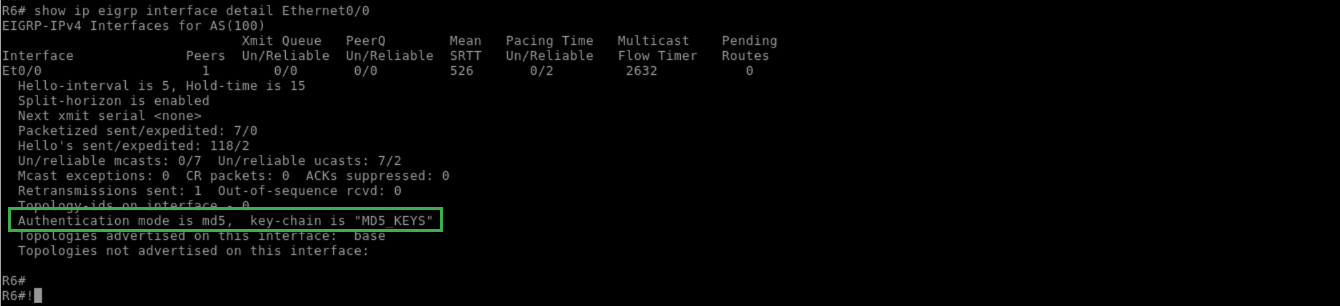
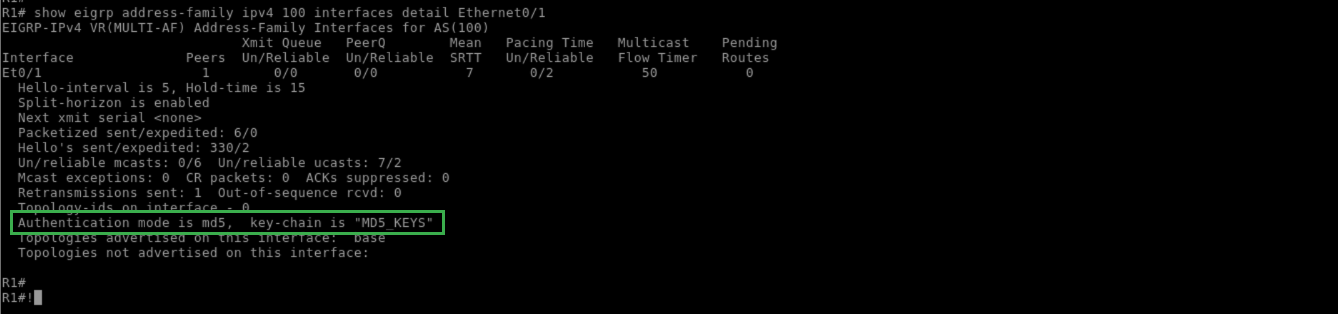
EIGRP supports MD5 authentication in Classic (Autonomous System) Mode, and both MD5 and SHA-256 in Multi-AF (Named) Mode. For MD5 authentication in both Classic and Named modes, the key chain is defined globally.
The key chain can contain multiple keys, but only the lowest active key number will be exchanged in EIGRP packets. Note that the key ID must match for authentication to occur, because this number is exchanged in the hello packets.
In Classic Mode, the authentication is applied at the link level, whereas in Named Mode it is applied at the af-interface mode under the SAFI. In either case, the authentication can be verified as seen below:
R6:
!
show ip eigrp interface detail Ethernet0/0
!
R1:
!
show eigrp address-family ipv4 100 interfaces detail Ethernet0/1
!
R6:
!
debug eigrp packet
!
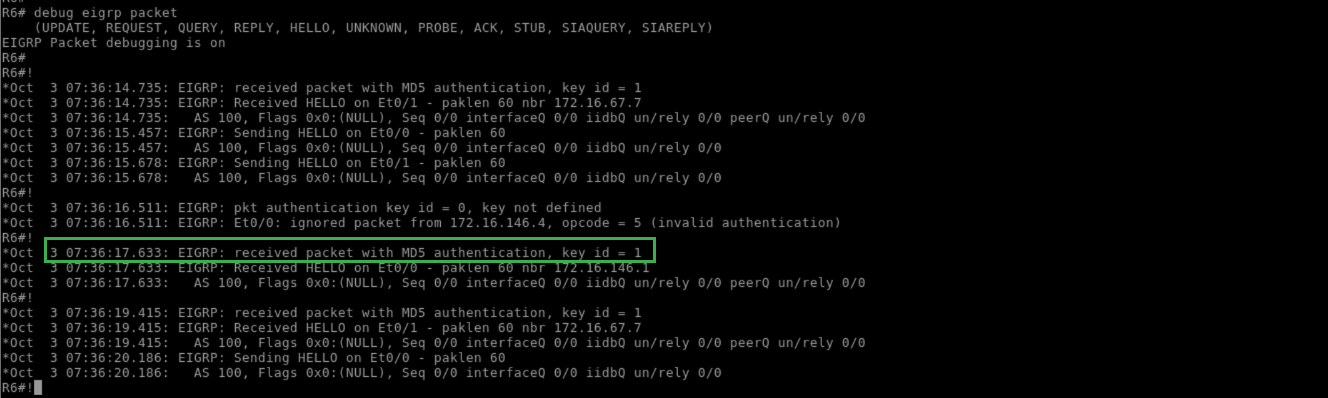
If authentication were failing, the debug output would indicate this:
R6:
!
configure terminal
interface Ethernet0/0
no ip authentication mode eigrp 100 md5
do debug eigrp packet
!
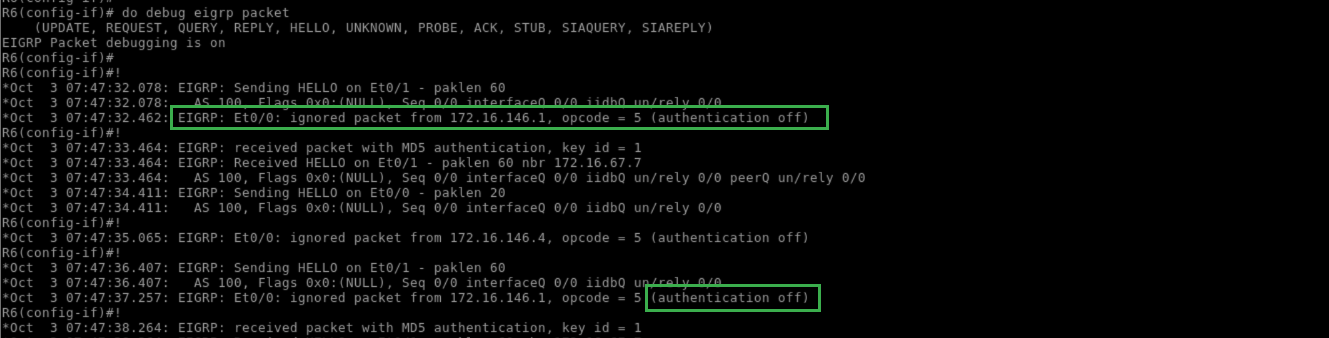
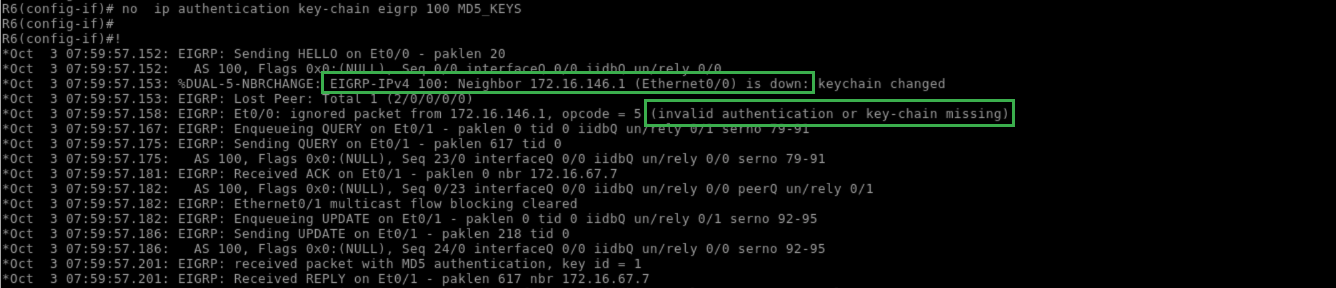
Likewise, a missing or invalid key would be indicated in this debug output:
R6:
!
ip authentication mode eigrp 100 md5
!

R6:
!
no ip authentication key-chain eigrp 100 MD5_KEYS
!
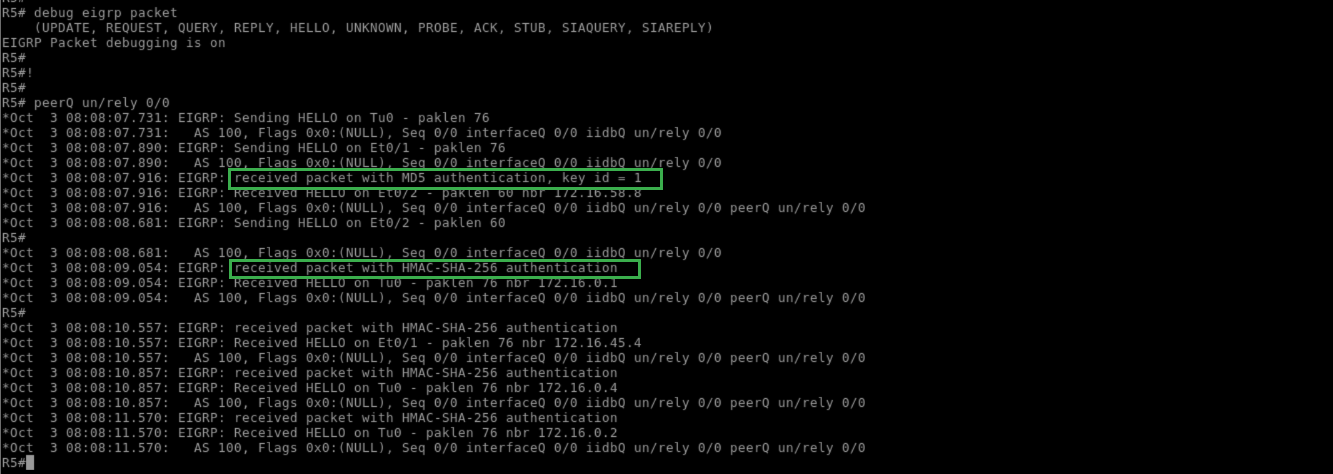
In Named Mode, SHA-256 authentication can be configured at the af-interface mode. The current implementation does not support key-chains or key IDs, which means it supports neither multiple keys nor automatic key rotation.
Another useful feature of the new EIGRP Named Mode is that options can be configured at the af-interface default, which applies to all links at the same time. Within the scope of authentication, this can be used to configure a default key for all interfaces, or a default fallback key for interfaces that do not have a specific key applied:
R5:
!
debug eigrp packet
!
Pitfall: Like RIP, a white space in the key string can cause authentication failure:
R6:
!
configure terminal
key chain MD5_KEYS
key 1
!
R6:
!
show key chain
!



