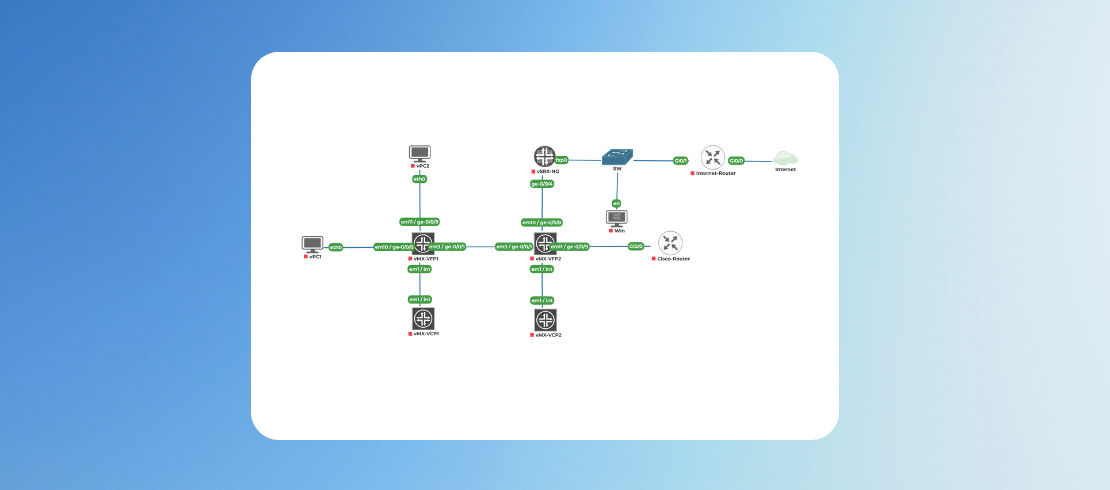
Master JNCIA-JUNOS with Hands-On Labs
Master the Junos CLI with our JNCIA-Junos virtual labs. Gain hands-on experience with real Juniper devices to pass your exam and boost your career.
in Juniper Data Center
Created by
Gautam Kumar
Last Updated: Aug/2026
Language: English
24:00 Hours
Last Updated: Aug/2026
Language: English
Duration: 40:00 Hours
What you will learn?
Master the Junos CLI navigation by efficiently moving between operational and configuration hierarchy modes.
Learn to perform basic interface configurations and restore Juniper devices to factory-default settings.
Utilize advanced configuration techniques including the commit model, configuration groups, and archival methods.
Implement system recovery using the Junos rollback feature and create permanent rescue configurations.
Perform network troubleshooting using Ping, Traceroute, and advanced "show" command pipe filters.
Secure your devices by creating custom user accounts, access classes, and login protections.
About this course
Juniper Networks is one of the leading players in the networking industry, standing as a strong competitor to Cisco. With its significant market presence, gaining expertise in configuring Juniper devices has become essential for network engineers.
This course is designed to deliver practical, lab-based training tailored for individuals preparing for the JNCIA-Junos certification. Through real-world scenarios and hands-on exercises, it strengthens your understanding of Junos OS and core networking principles, ensuring you are well-equipped for both certification and practical implementation.
Lab Features
1. Access a 100% online virtual lab environment that allows you to practice from any location at any time.
2. Experience hands-on training using real Juniper devices and industry-standard configurations rather than basic simulations.
3. Develop practical, job-related skills designed to prepare you for real-world network engineering and administration roles.
4. Benefit from a self-paced learning structure with limited instructor support to encourage independent problem-solving and technical mastery.
5. Gain certification readiness by mastering the core objectives required to pass the Junos JNCIA-Junos exam.
Who Should Take This Training Labs?
This lab series is strategically designed for IT professionals and students who want to bridge the gap between networking theory and hands-on Junos OS expertise.
● Aspiring Network Engineers: Individuals looking to build a career in network administration using industry-standard Juniper hardware.
● JNCIA-Junos Candidates: Students preparing for the Juniper Networks Certified Associate exam who need practical experience to pass.
● IT Support Technicians: Desktop or helpdesk professionals aiming to transition into high-paying infrastructure and security roles.
● Networking Students: Learners who want to supplement their academic knowledge with real-world, job-ready technical skills.
● System Administrators: Professionals managing multi-vendor environments who need to master the Junos CLI and configuration hierarchy.
Benefits of JNCIA-JUNOS Practice Lab
● Transition from theory to practice faster by troubleshooting real-world scenarios in a risk-free environment.
● Gain the technical confidence required to pass technical interviews and demonstrate proficiency in Juniper technologies.
● Bridge the gap between textbook concepts and exam objectives to significantly improve your JNCIA-Junos passing score.
● Develop the specific habits used by expert engineers, such as the "commit-confirm" workflow and configuration rollback.
● Access expensive, high-end networking hardware virtually without the need for significant personal investment in physical gear.
Suggested by top companies
Top companies suggest this course to their employees and staff.


Requirements
Basic understanding of the OSI Model and how data flows through various network layers.
Knowledge of IPv4 Addressing, including subnetting and CIDR notation.
Basic comfort using a Command-Line Interface (CLI).
Similar Courses
.png)



FAQ
What is the JNCIA-Junos virtual lab?
The JNCIA-Junos virtual lab is an online, browser-based training environment that provides hands-on access to real Juniper devices. Unlike basic simulators, this lab uses the actual Junos OS, allowing students to practice configuration, management, and troubleshooting tasks required for the JNCIA-Junos certification and real-world network engineering roles.
Does this lab use real Junos OS?
Yes, these labs utilize authentic Junos OS software running on virtualized Juniper hardware. This ensures that every command, configuration hierarchy, and output you experience is identical to what you would encounter when managing physical Juniper routers and switches in a professional enterprise or service provider data center environment.
How does this lab help with the JNCIA exam?
This lab directly aligns with the official Juniper JNCIA-Junos exam objectives. By practicing tasks like commit rollbacks, user authentication, and interface configuration in a live environment, you reinforce the theoretical knowledge needed to answer complex technical questions, significantly increasing your chances of passing the certification on your first attempt.
Can I access the labs from my browser?
The training is fully optimized for web access, requiring no complex software installations or high-end hardware. You can securely log in from any standard web browser to access the virtualized racks, making it a highly flexible solution for students who need to study on the go or from different devices.
Is there a time limit for lab access?
While the initial lab access is limited and sufficient to complete the lab. We also provide options to extend those hours, as you can pay minimal charges to gain more access for the lab.
How to access the lab?
Login to www.uninets.com and check your purchased lab course, click on it. A learning page will open in another tab where you'll have your lab guide. Here you need to click on GO TO LAB option buy to access your lab topology.
How to extend lab duration and lab validity?
On the lab course learning page when you click on GO TO LAB, there will be a popup where you see an option for lab hours and lab validity extension. Once you paid for the required amount, your additional lab hours and validity days will be added in your lab.
How to get lab support?
Email support@uninets.com (Level 1), or escalate via phone/WhatsApp at +91 8527916751 (Level 2) or at +91 9818239009 (Level 3 for corporate only), with standard support available Mon-Sat 10am-7pm IST and 24x7 corporate support.
Comments (0)
Lab Support Guidelines and Network Topology Details
2 Parts
- 0:10 Hr
Lab01: Introduction to Juniper Device Management
1 Parts
- 2:00 Hr
Introduction to Juniper Device Management
120 Min
Attachments:
Lab02: Junos Configuration Modes & Factory-Default Configuration
1 Parts
- 2:00 Hr
Junos Configuration Modes & Factory-Default Configuration
120 Min
Attachments:
Lab03: Junos CLI Basics and Configuration Hierarchy Navigation
1 Parts
- 2:00 Hr
Junos CLI Basics and Configuration Hierarchy Navigation
120 Min
Attachments:
Lab04: Exploring Junos Built-In Help Functions
1 Parts
- 2:00 Hr
Exploring Junos Built-In Help Functions
120 Min
Attachments:
Lab05: Basic Junos Interface Configuration
1 Parts
- 2:00 Hr
Basic Junos Interface Configuration
Basic Junos Interface Configuration
120 Min
Attachments:
Lab06: Using The Junos "Show" Command Filters
1 Parts
- 2:00 Hr
Using The Junos "Show" Command Filters
Using The Junos "Show" Command Filters
120 Min
Attachments:
Lab07: Managing Junos CLI Session Characteristics
1 Parts
- 2:00 Hr
Managing Junos CLI Session Characteristics
Managing Junos CLI Session Characteristics
120 Min
Attachments:
Lab08: Manipulating Junos Configuration Sections
1 Parts
- 2:00 Hr
Manipulating Junos Configuration Sections
Manipulating Junos Configuration Sections
120 Min
Attachments:
Lab09: Committing & Saving Junos Configuration Files
1 Parts
- 2:00 Hr
Committing & Saving Junos Configuration Files
Committing & Saving Junos Configuration Files
120 Min
Attachments:
Lab10: Using Ping, Traceroute & Telnet on Juniper Devices
1 Parts
- 2:00 Hr
Using Ping, Traceroute & Telnet on Juniper Devices
Using Ping, Traceroute & Telnet on Juniper Devices
120 Min
Attachments:
Lab11: Exploring Junos Configuration Groups
1 Parts
- 2:00 Hr
Exploring Junos Configuration Groups
Exploring Junos Configuration Groups
120 Min
Attachments:
Lab12: Using Junos Rollback & Rescue Configurations
1 Parts
- 2:00 Hr
Using Junos Rollback & Rescue Configurations
Using Junos Rollback & Rescue Configurations
120 Min
Attachments:
Lab13: Junos Configuration Archival
1 Parts
- 2:00 Hr
Junos Configuration Archival
Junos Configuration Archival
120 Min
Attachments:
Lab14: Creating Junos User Accounts & Classes
1 Parts
- 2:00 Hr
Creating Junos User Accounts & Classes
Creating Junos User Accounts & Classes
120 Min
Attachments:
Lab15: Protecting Simultaneous Logins in Juniper Devices
1 Parts
- 2:00 Hr
Protecting Simultaneous Logins in Juniper Devices
Protecting Simultaneous Logins in Juniper Devices
120 Min
Attachments:

4.58
3 Reviews