JNCIS Virtual Lab for Hands-On Practice
Prepare for your JNCIS Security certification with an online virtual lab that offers real world security scenarios and guided hands on practice tasks.
in Juniper Security
Created by
Amar Singh
Last Updated: May/2026
Language: English
24:00 Hours
Last Updated: May/2026
Language: English
Duration: 40:00 Hours
What you will learn?
Configuring and managing Juniper JNCIS Security topology for real-world scenarios.
Understanding firewall policies, NAT, and security zones.
Configuring authentication mechanisms and role-based access control.
Setting up Juniper SRX devices for advanced security configurations.
Analyzing security logs and troubleshooting network security issues.
Enhancing cybersecurity skills for JNCIS certification success.
About this course
This lab-intensive training program is specifically engineered to bridge the gap between theoretical security concepts and real-world implementation on Junos OS SRX Series devices. Unlike standard video courses, our JNCIS Security Lab Workbook focuses on guiding you through the CLI and J-Web configuration of 15 essential scenarios.
From Site-to-Site IPsec VPNs to High Availability (HA) Chassis Clusters, you will build a complete enterprise security architecture from scratch. Each lab is modeled after the latest 2026 Juniper exam blueprints, ensuring you are prepared for both the certification and the workplace.
Why is JNCIS Security Lab Practice Important?
Theoretical knowledge is the foundation, but hands-on lab practice is what makes you an expert. In the 2026 cybersecurity landscape, simply knowing "what" a firewall does is not enough; you must know "how" to deploy and troubleshoot it under pressure.
Here is why practical lab training is essential for your JNCIS-SEC (JN0-336) success:
1. Build Critical Muscle Memory for the CLI
The Junos OS CLI is powerful but unique. Practicing labs helps you memorize essential commands like show security flow session and monitor traffic. This "muscle memory" allows you to configure security zones and policies quickly and accurately during the actual exam.
2. Bridge the Gap Between Theory and Reality
A textbook might explain NAT (Network Address Translation), but a lab shows you exactly how traffic is translated in real-time. By configuring Source, Destination, and Static NAT in a workbook, you see how packets move through the SRX flow-based processing engine.
3. Master Complex Troubleshooting
In a live network, things rarely go perfectly. Lab practice allows you to make mistakes in a safe environment. You will learn how to:
● Use traceoptions to debug failed VPN tunnels.
● Identify why a Security Policy is dropping traffic.
● Check IDP logs to see if a legitimate application is being blocked by mistake.
4. Gain Confidence with High Availability (HA)
Chassis Clustering is one of the most challenging topics in the JNCIS-SEC blueprint. Attempting to learn this without a lab is nearly impossible. Practical practice ensures you understand how to sync redundancy groups and test failover scenarios without fear.
5. Stay Updated with 2026 Security Trends
Modern exams focus heavily on Next-Generation Firewall (NGFW) features. Our labs give you direct experience with:
● AppSecure: Identifying traffic by application, not just port.
● SSL/TLS Inspection: Decrypting traffic to find hidden threats.
● UTM (Unified Threat Management): Activating Antivirus and Web Filtering on a single gateway.
6. Prepare for Performance-Based Questions
The JNCIS-SEC exam increasingly uses scenario-based questions. If you haven't spent hours in a lab environment, interpreting a configuration snippet or a log output can be confusing. Labs train your brain to spot errors in a configuration instantly.
General Instructions for JNCIS Security Virtual Lab
● System Requirements: Ensure your system meets the minimum requirements, including a stable internet connection, a modern web browser, and a standard OS.
● Lab Duration: Enjoy 50 hours of lab access within one month. Plan your sessions accordingly for maximum learning.
● Support: Our expert support team is available to assist with technical queries and troubleshooting during lab sessions.
Benefits of JNCIS Virtual Lab
Using a lab workbook is the fastest way to master the JNCIS-SEC (JN0-336) blueprint. Research from the National Training Laboratories shows that learners retain 75% of information through hands-on practice, compared to only 10% from reading.
By practicing these 15 labs, you will gain several key advantages:
1. Master Advanced Security Features
You will move beyond theory by configuring SSL/TLS Inspection to find hidden threats. This workbook guides you through setting up IDP policies and UTM features like Antivirus and Web Filtering.
2. Sharpen Real-World Troubleshooting Skills
Practice using Security Flow Tracing and session monitoring to diagnose why packets are dropped. This lab-based approach ensures you can verify NAT functionality and resolve complex policy conflicts under pressure.
3. Build Confidence in High-Stakes Scenarios
Mastering High Availability and Chassis Clusters is essential for the 2026 exam. This workbook allows you to set up redundancy groups and test failover scenarios in a safe environment.
4. Solve Complex Security Problems
Gain the skills to implement AppSecure for application-aware policies. You will also learn to deploy Site-to-Site IPsec VPNs using IKE Phase 1 and Phase 2 policies for secure communication.
5. Efficient JNCIS-SEC Exam Preparation
Prepare for performance-based questions by mastering host-inbound traffic and security zones. This practice ensures you can navigate address-book entries and routing fundamentals like route redistribution with total accuracy.
How to Enroll in the JNCIS Virtual Lab?

Who Should Enroll in JNCIS Remote Lab
● Network Security Engineers aiming for the JNCIS-SEC specialist credential.
● IT Professionals transitioning from Cisco to Juniper (Junos OS) environments.
● Security Administrators responsible for managing SRX Series Firewalls.
● JNCIA-SEC Holders looking to advance to professional-level security tracks.
Suggested by top companies
Top companies suggest this course to their employees and staff.


Similar Courses


FAQ
How does the lab workbook prepare me for the JN0-336 exam?
Our workbook aligns with the JNCIS-SEC exam blueprint, covering every critical domain from High Availability (Chassis Clusters) to Application Security. By practicing these hands-on scenarios, you build the technical proficiency required to interpret the complex configuration and troubleshooting questions found on the actual exam.
Do these JNCIS practice labs support vSRX virtual devices?
Yes, all 15 labs are specifically optimized for vSRX virtual appliances in 2026. This allows you to simulate high-performance security tasks, such as SSL/TLS inspection and IDP policy implementation, directly from your computer without needing expensive physical Juniper SRX Series hardware.
How is the JNCIS-SEC lab environment accessed online?
Students can access the lab environment through a web browser. The workbook provides the initial configurations needed to set up hostnames, SSH access, and management interfaces, allowing you to start practicing Junos security policies within minutes.
Will this lab help me prepare for the JNCIS-ENT certification exam (JN0-346)?
Yes, the hands-on experience in the lab environment will reinforce the concepts covered in the JNCIS-ENT curriculum and help you prepare for the exam. Many courses include exam preparation guidance.
Are advanced security features like AppSecure included?
Yes. Lab 13 is dedicated to Cisco AppSecure (AppID). You will learn how to go beyond basic port-blocking by creating application-aware policies that identify and control traffic based on specific application signatures, a core requirement for modern Next-Generation Firewall (NGFW) deployments.
What troubleshooting tools are taught in the lab workbook?
The labs teach you to use professional diagnostic tools like security flow tracing and the show security session table. These commands help you analyze real-time packet processing and identify why specific traffic is being allowed or denied by your security policies.
Comments (0)
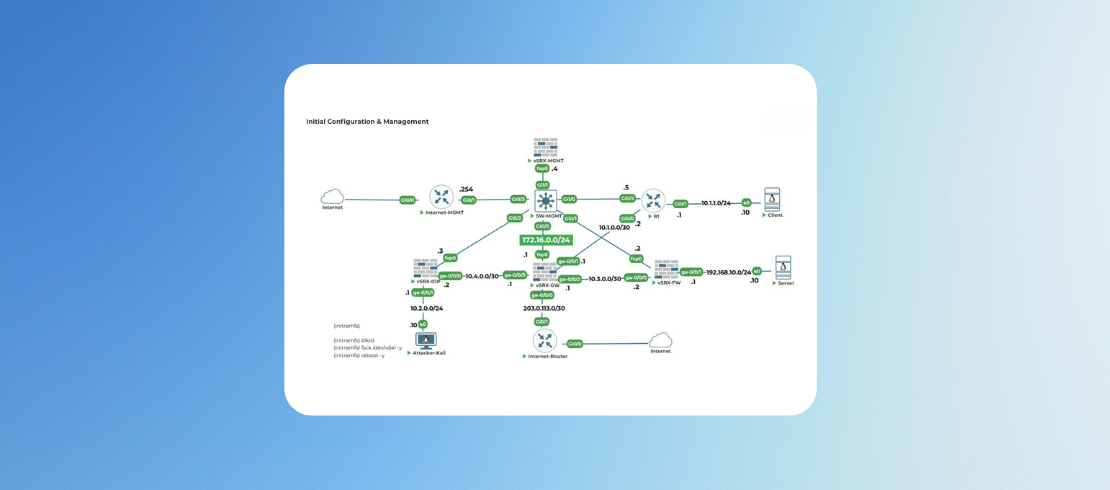
Lab 1: Initial Configuration & Management
2 Parts
- 0:30 Hr
Initial Configuration & Management
Configure basic device settings and management access.
15 Min
Attachments:
Initial vSRX-MGMT Configurations
Initial vSRX-MGMT Configurations
15 Min
Attachments:
Lab 2: Security Zones and Interfaces
1 Parts
- 0:15 Hr
Security Zones and Interfaces
Security Zones and Interfaces
15 Min
Attachments:
Lab 3: Security Policies - Basic
1 Parts
- 0:15 Hr
Security Policies - Basic
Security Policies - Basic
15 Min
Attachments:
Lab 4: NAT Configuration
1 Parts
- 0:15 Hr
NAT Configuration
NAT Configuration
15 Min
Attachments:
Lab 5: Routing Fundamentals
1 Parts
- 0:15 Hr
Configure Static and Dynamic Routing
Configure static and dynamic routing
15 Min
Attachments:
Lab 6: Screen Options
1 Parts
- 0:15 Hr
Configure Security Screens for Attack Protection.
Configure security screens for attack protection.
15 Min
Attachments:
Lab 7: Unified Threat Management (UTM)
1 Parts
- 0:15 Hr
Implement UTM Features
Implement UTM features.
15 Min
Attachments:
Lab 8: IPSec VPN - Site-to-Site
1 Parts
- 0:15 Hr
Configure IPsec VPN between two sites
Configure IPsec VPN between two sites
15 Min
Attachments:
Lab 9: SSL/TLS Inspection
1 Parts
- 0:15 Hr
Implement SSL Proxy and decryption.
Implement SSL Proxy and decryption.
15 Min
Attachments:
Lab 10: Intrusion Detection/Prevention (IDP)
1 Parts
- 0:15 Hr
Configure IDP policies on vSRX-IDP.
Configure IDP policies on vSRX-IDP.
15 Min
Attachments:
Lab 11: High Availability (Chassis Cluster)
1 Parts
- 0:15 Hr
Configure Chassis Cluster for Redundancy.
Configure Chassis Cluster for Redundancy.
15 Min
Attachments:
Lab 12: Advanced Security Policies
1 Parts
- 0:15 Hr
Implement Advanced Policy Features.
Implement Advanced Policy Features.
15 Min
Attachments:
Lab 13: Application Security (AppSecure)
1 Parts
- 0:15 Hr
Implement Application-aware Policies
Implement Application-aware Policies
15 Min
Attachments:
Lab 14: Security Monitoring & Troubleshooting
1 Parts
- 0:15 Hr
Monitor and Troubleshoot Security Events
Monitor and Troubleshoot Security Events
15 Min
Attachments:
Lab 15: Advanced Routing for Security
1 Parts
- 0:15 Hr
Implement Security in Routing Scenarios
Implement Security in Routing Scenarios
15 Min
Attachments:

5.00
1 Reviews