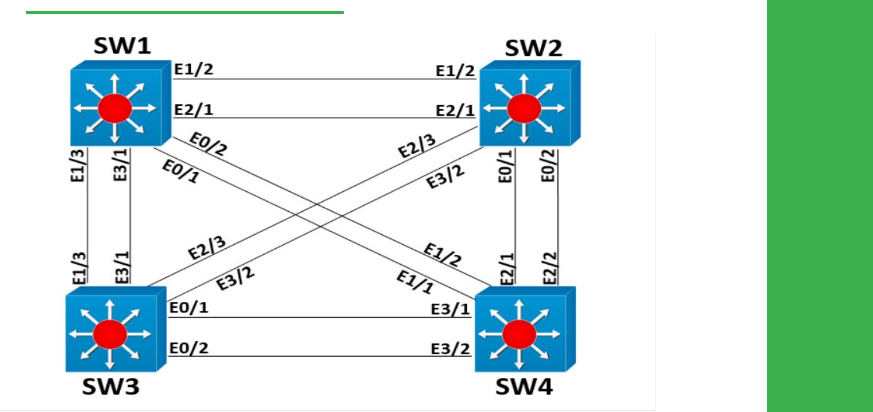
Task
● Configure SW1 to limit unicast traffic received from SW2 to 100 pps.
● Configure SW2 to limit broadcast traffic received from SW4 to 10Mbps.
● Configure SW4 to limit broadcast traffic received from SW1 to 1Mbps using a relative percentage of the interface bandwidth.
Explanation
Storm control is used to limit the amount of unicast, multicast, or broadcast traffic received inbound on a port. The most common application of this feature is to prevent broadcast storms, but it can also be used to police individual ports not to exceed a desired rate.
Depending on the version of IOS, the storm-control command may take units in percentage, packets per second, bits per second, or others. Make sure to use the question mark when implementing this command so that the units entered achieve the desired result.
SW2
show storm-control
SW4
show storm-control
Configuration
SW1:
interface range eth1/2,eth2/1
storm-control unicast level pps 100
SW2
interface range eth0/2,eth0/1
storm-control broadcast level bps 10m
SW4
interface range eth2/2,eth2/1
storm-control broadcast level 1