USD ($)
$
United States Dollar
India Rupee

EtherChannel with PAgP

Lesson 12/41 | Study Time: 60 Min
EtherChannel with PAgP

Task 

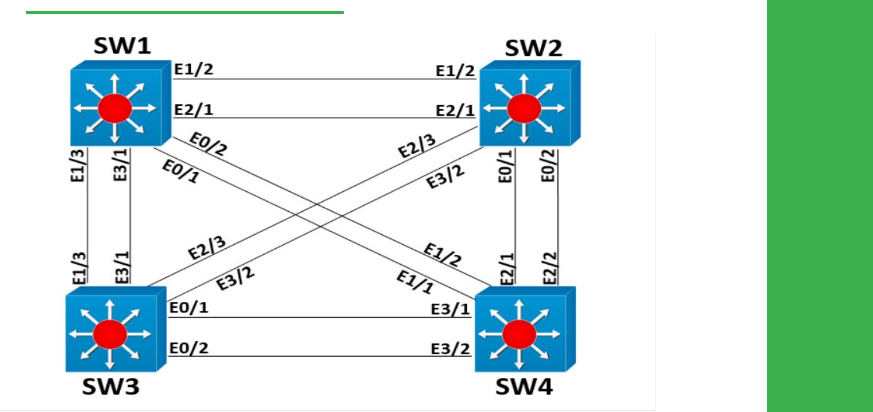
● Configure Layer 2 EtherChannel between SW1 and all other switches as follows: 

● Use Cisco's proprietary protocol for negotiation. 

● Only SW1 should actively initiate the EtherChannel negotiation. 

● SW1 should initiate 802.1q trucking negotiation. 

● Use port-channel numbers in the format of 1Y, where Y is the switch number for SW2, SW3, and SW4.

Explanation 

Port Aggregation Protocol (PAgP) is a Cisco proprietary negotiation protocol for EtherChannel links. The desirable mode of PAgP, like DTP, is used to initiate negotiation, whereas the auto mode is used to listen for negotiation.

This implies that one side running desirable with the other side running desirable or auto will result in a channel being formed, but both sides running auto will not. Verify that EtherChannel has been successfully negotiated and the protocol used is PAgP. 

SW1

show ether channel summary

Flags:  D - down        P - bundled in port-channel 

        I - stand-alone s - suspended 

        H - Hot-standby (LACP only) 

        R - Layer3      S - Layer2 

        U - in use      N - not in use, no aggregation 

        f - failed to allocate aggregator 

        M - not in use, minimum links not met 

        m - not in use, port not aggregated due to minimum links not met 
        u - unsuitable for bundling 

        w - waiting to be aggregated 

        d - default port 

        A - formed by Auto LAG 

Number of channel-groups in use: 0 

Number of aggregators:           0 

Group Port-channel Protocol    Ports 

show ether channel protocol 

Channel-group listing:  

---------------------- 

Verify that SW1 is configured for desirable mode, and all other switches for auto mode. 

SW1

show ether channel 12 port-channel  

Port-channels in the group:  

--------------------------- 

Port-channel: Po12 

------------ 

Age of the Port-channel   = 0d:00h:01m:31s 

Logical slot/port   = 16/1          Number of ports = 2 

GC                  = 0x000C0001      Hot Standby port = null 

Port state          = Port-channel Ag-Inuse  

Protocol            =   PAgP 

Port security       = Disabled 

Ports in the Port-channel:  

Index   Load   Port     EC state        No of bits 

------+------+------+------------------+----------- 

  0     00     Et1/2    Desirable-Sl       0 

  0     00     Et2/1    Desirable-Sl       0 

Time since last port bundled:    0d:00h:00m:46s    Et1/2 

Time since last port Un-bundled: 0d:00h:00m:55s    Et1/2

SW2

sh ether channel 12 port-channel

Port-channels in the group:  

--------------------------- 

Port-channel: Po12 

------------ 

Age of the Port-channel   = 0d:00h:00m:30s 

Logical slot/port   = 16/1          Number of ports = 2 

GC                  = 0x000C0001      Hot Standby port = null 

Port state          = Port-channel Ag-Inuse  

Protocol            =   PAgP 

Port security       = Disabled 

Ports in the Port-channel:  

Index   Load   Port     EC state        No of bits 

------+------+------+------------------+----------- 

  0     00     Et1/2    Automatic-Sl       0 

  0     00     Et2/1    Automatic-Sl       0 

Time since last port bundled:    0d:00h:00m:28s    Et1/2 

Verify that trucking has been negotiated and logical port-channel interfaces are used by STP 

SW1

show interface trunk 

Port        Mode             Encapsulation Status        Native vlan 

Et1/3       desirable        802.1q         trunking      1 

Et3/1       on               802.1q         trunking      1 

Port        Vlans allowed on trunk 

Et1/3       1-4094 

Et3/1       1-4094 

Port        Vlans allowed and active in management domain 

Et1/3       1,123 

Et3/1       1,123 

Port        Vlans in spanning tree forwarding state and not pruned 

Et1/3       1,123 

Et3/1       1,123

show spanning-tree vlan 1

VLAN0001 

  Spanning tree enabled protocol ieee 

  Root ID    Priority    32769 

             Address     aabb.cc00.1f00 

             This bridge is the root 

             Hello Time   2 sec Max Age 20 sec Forward Delay 15 sec 

  Bridge ID Priority    32769 (priority 32768 sys-id-ext 1) 

             Address     aabb.cc00.1f00 

             Hello Time   2 sec Max Age 20 sec Forward Delay 15 sec 

             Aging Time 300 sec 

Interface           Role Sts Cost      Prio.Nbr Type 

------------------- ---- --- --------- -------- -------------------------------- 

Et0/1               Desg FWD 100       128.2    Shr  

Et0/2               Desg FWD 100       128.3    Shr  

Et1/0               Desg FWD 100       128.5    Shr  

Et1/3               Desg FWD 100       128.8    Shr  

Et2/0               Desg FWD 100       128.9    Shr  

Et3/0               Desg FWD 100       128.13   Shr  

Et3/1               Desg FWD 100       128.14   Shr  

Et4/0               Desg FWD 100       128.17   Shr  

Po12                Desg FWD 56        128.66   Shr  

Verify the EtherChannel state on all switches. However, because switches use a negotiation protocol, if EtherChannel shows as functional on one side, it has to be functional on the other side as well.

With no negotiation protocol being used, EtherChannel may not actually be functional from the perspective of both switches, and you must verify that. 

SW2

show ether channel summary 

Flags:  D - down        P - bundled in port-channel 

        I - stand-alone s - suspended 

        H - Hot-standby (LACP only) 

        R - Layer3      S - Layer2 

        U - in use      N - not in use, no aggregation 

        f - failed to allocate aggregator 

        M - not in use, minimum links not met 

        m - not in use, port not aggregated due to minimum links not met 

        u - unsuitable for bundling 

        w - waiting to be aggregated 

        d - default port 

        A - formed by Auto LAG 

Number of channel-groups in use: 1 

Number of aggregators:           1 

Group Port-channel Protocol    Ports 

------+-------------+-----------+----------------------------------------------- 

12     Po12(SU)      PAgP      Et1/2(P)    Et2/1(P)  

SW3

show ether channel summary

Flags:  D - down        P - bundled in port-channel 

        I - stand-alone s - suspended 

        H - Hot-standby (LACP only) 

        R - Layer3      S - Layer2 

        U - in use      N - not in use, no aggregation 

        f - failed to allocate aggregator 

        M - not in use, minimum links not met 

        m - not in use, port not aggregated due to minimum links not met 

        u - unsuitable for bundling 

        w - waiting to be aggregated 

        d - default port 

        A - formed by Auto LAG 

Number of channel-groups in use: 0 

Number of aggregators:           0 

Group Port-channel Protocol    Ports 

------+-------------+-----------+----------------------------------------------- 

SW4

show ether channel summary  

Flags:  D - down        P - bundled in port-channel 

        I - stand-alone s - suspended 

        H - Hot-standby (LACP only) 

        R - Layer3      S - Layer2 

        U - in use      N - not in use, no aggregation 

        f - failed to allocate aggregator 

        M - not in use, minimum links not met 

        m - not in use, port not aggregated due to minimum links not met 

        u - unsuitable for bundling 

        w - waiting to be aggregated 

        d - default port 

        A - formed by Auto LAG 

Number of channel-groups in use: 0 

Number of aggregators:           0 

Group Port-channel Protocol    Ports 

------+-------------+-----------+----------------------------------------------- 

Verify that physical interfaces have inherited the configuration from the logical interface—for example, FastEthernet0/19 of SW1. 

SW1

show interface eth3/1 switchport

Name: Et3/1 

Switchport: Enabled 

Administrative Mode: trunk 

Operational Mode: trunk 

Administrative Trunking Encapsulation: dot1q 

Operational Trunking Encapsulation: dot1q 

Negotiation of Trunking: On 

Access Mode VLAN: 1 (default) 

Trunking Native Mode VLAN: 1 (default) 

Administrative Native VLAN tagging: enabled 

Voice VLAN: none 

Administrative private-vlan host-association: none  

Administrative private-vlan mapping: none  

Administrative private-vlan trunk native VLAN: none 

Administrative private-vlan trunk Native VLAN tagging: enabled 

Administrative private-vlan trunk encapsulation: dot1q 

Administrative private-vlan trunk normal VLANs: none 

Administrative private-vlan trunk associations: none 

Administrative private-vlan trunk mappings: none 

Operational private-vlan: none 

Trunking VLANs Enabled: ALL 

Pruning VLANs Enabled: 2-1001 

Capture Mode Disabled 

Capture VLANs Allowed: ALL 

Protected: false 

Appliance trust: none 

If configuration is done on one side of the EtherChannel only, for example, only on SW1, because PAgP negotiation will fail, the following messages will be logged: 

%EC-5-L3DONTBNDL1: eth3/1 suspended: PAgP not enabled on the remote port. 

%EC-5-L3DONTBNDL1: eth1/3 suspended: PAgP not enabled on the remote port. 

To avoid any problems in the network, physical interfaces will be logically disabled at Layer 2 and will appear in the suspended state for the EtherChannel. 

SW1

show ether channel summary 

Flags:  D - down        P - bundled in port-channel 

        I - stand-alone s - suspended 

        H - Hot-standby (LACP only) 

        R - Layer3      S - Layer2 

        U - in use      N - not in use, no aggregation 

        f - failed to allocate aggregator 

        M - not in use, minimum links not met 

        m - not in use, port not aggregated due to minimum links not met 

        u - unsuitable for bundling 

        w - waiting to be aggregated 

        d - default port 

        A - formed by Auto LAG 

Number of channel-groups in use: 1 

Number of aggregators:           1 

Group Port-channel Protocol    Ports 

------+-------------+-----------+----------------------------------------------- 

12     Po12(SU) PAgP      Et1/2(P) Et2/1(P)    

show ip interface brief | i 19|20

Ethernet3/1       unassigned      YES manual up                    down 

Ethernet1/3       unassigned      YES manual up                    down   

Configuration 

SW1: 

interface range Ethernet3/1 -1/3 
 channel-group 13 mode desirable 

interface range Ethernet0/2 -0/1 
 channel-group 14 mode desirable 

interface range Ethernet1/2 -2/1 
 channel-group 12 mode desirable 
!
interface Port-channel12 
 switchport trunk encapsulation dot1q 
 switchport mode dynamic desirable 

interface Port-channel13 
 switchport trunk encapsulation dot1q 
 switchport mode dynamic desirable 

interface Port-channel14 
 switchport trunk encapsulation dot1q
 switchport mode dynamic desirable
 no shutdown 

SW2: 

interface range Ethernet1/2 -2/1 
 channel-group 12 mode auto 
 no shutdown 

SW3: 

interface range Ethernet3/1 -1/3 
 channel-group 13 mode auto 
 no shutdown 

SW4: 

interface range Ethernet1/2 -1/1 
 channel-group 14 mode auto 
 no shutdown