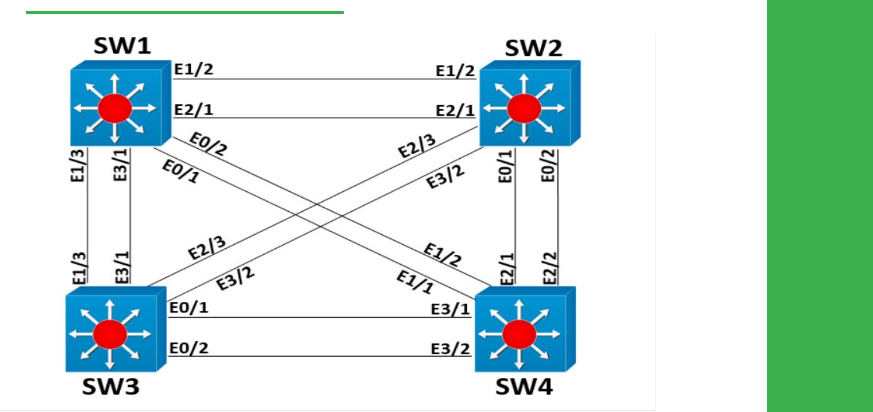
Task
● Shutdown all Ethernet links from SW4 towards SW2 and SW3.
● Shutdown ports eth3/1 and eth1/2 on SW1.
● Create an SVI for VLAN 10 on SW1, assign it the IP address of 172.16.1.1/24.
● Configure eth1/3 and eth2/1on SW1 as access ports in VLAN 10.
● Configure port eth1/3on SW3 and eth0/2 on SW2 as Layer 3 ports on with IP addresses of172.16.1.1/24, where Y is the switch number.
● Configure port protection on SW1 so that SW2 and SW3 cannot directly communicate with each other, but can communicate with SW1’s VLAN 10 interface.
Explanation
Protected ports are used to prevent traffic from being directly exchanged at Layer 2 between two or more hosts that are within the same VLAN. Traffic received in a protected port cannot be sent out another protected port, but traffic received in a protected port can be sent out a non-protected port.
This feature is a much smaller subset of the Private VLAN feature, and it cannot span between multiple physical switches; you cannot configure aprotected port on SW1 and a protected port on SW2 and expect traffic between these to be disallowed.
In this particular design, the result of port protection is that SW1 and SW2 can communicate, SW1 and SW3 can communicate, but SW2 and SW3 cannot communicate, although they are attached to the same VLAN:
SW3
ping 172.16.1.1
ping 172.16.1.2
SW2
ping 172.16.1.1
ping 172.16.1.3
Notice that ARP traffic is also not allowed between protected ports, basically all traffic is dropped:
SW1
show ip arp
SW2
show ip arp
SW3
show ip arp
Configuration
SW4:
interface range eth2/2,eth2/1
shutdown
!
interface range eth3/1,eth3/2
shutdown
SW1:
interface range eth3/1,eth1/2
shutdown
!
default interface range eth1/3,eth2/1
!
interface range eth1/3,eth2/1
switchport mode access
switchport access vlan 10
switchport protected
!
interface Vlan10
ip address 172.16.1.1 255.255.255.0
no shutdown
SW2:
interface eth2/1
no switchport
ip address 172.16.1.2 255.255.255.0
SW3:
interface eth1/3
no switchport
ip address 172.16.1.3 255.255.255.0