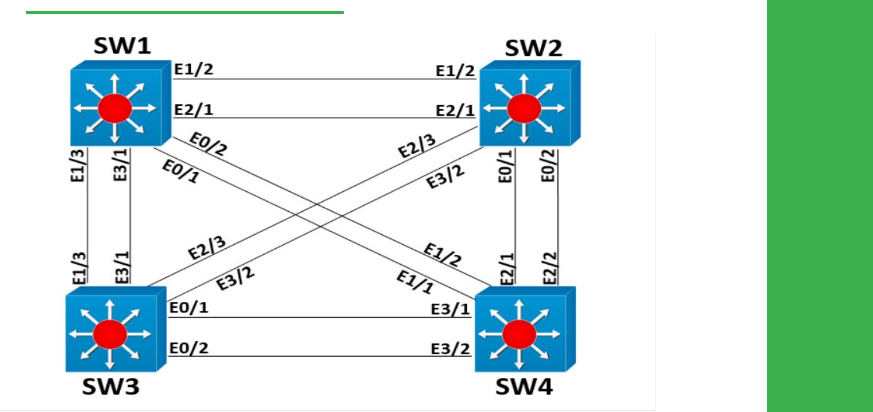
Task
● Configure Multiple Spanning-Tree on SW1 - SW4 as follows:
● Use region named MST and a revision of 1.
● Instance 1 should service VLANs 1 - 100.
● Instance 2 should service VLANs 101 - 200.
● Configure PortFast on SW1's eth0/1 so that it immediately begins forwarding when enabled.
Explanation
When MST is enabled, Rapid Spanning-Tree Protocol (RSTP) is automatically enabled. RSTP is an IEEE standard defined in 802.1w that speeds up convergence through a reliable handshaking process.
RSTP defines new port roles to automatically allow for the functionality built into Cisco proprietary features such as PortFast and UplinkFast.RSTP Edge ports behave the same as PVST PortFast-enabled ports.
However, to maintain backwardcompatible configurations, Cisco’s implementation of RSTP does not automatically elect edge ports as the standard suggests. Instead, a port must be configured as an edge port with the spanning-tree portfast command:
SW1
show spanning-tree interface eth0/1
show spanning-tree mst interface eth0/1
show spanning-tree interface Ethernet0/1 portfast
If there were a device connected to eth0/1 such as a hypervisor that could tag frames with dot1q tags, we could configure this port as a trunk port and also configure it as an Edge port. This will ensure that it immediately begins forwarding when enabled for all VLANs being trunked:
SW1
configure terminal
Enter configuration commands, one per line. End with CNTL/Z.
interface eth0/1
switchport trunk encapsulation dot1q
switchport mode trunk
spanning-tree portfast trunk
SW1
show spanning-tree interface eth0/1
show spanning-tree mst interface eth0/1
SW1
show spanning-tree interface eth0/1 portfast
Configuration
SW1 - SW4:
spanning-tree mst configuration
name MST1
revision 1
instance 1 vlan 1-100
instance 2 vlan 101-200
!
spanning-tree mode mst
SW1
interface eth0/1
spanning-tree portfast