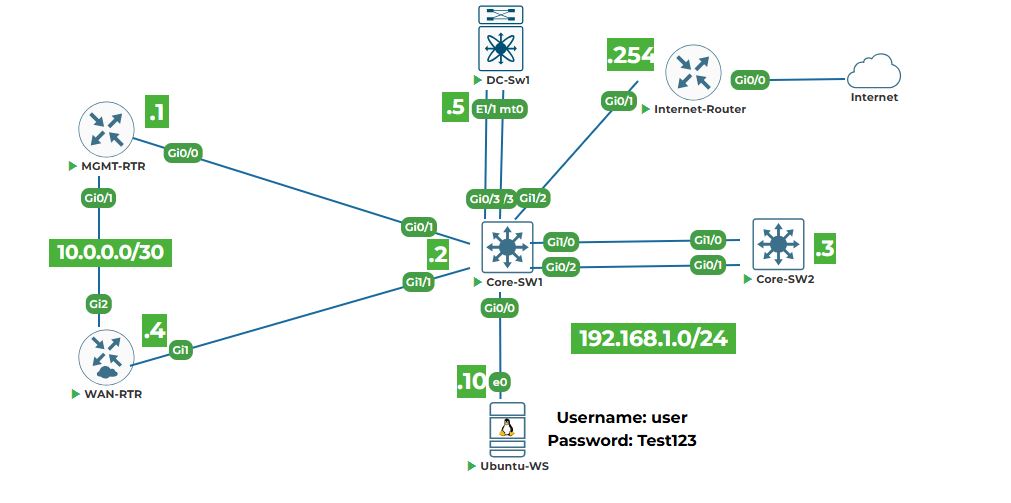
Objective: Learn the fundamentals of Python programming necessary for network automation. You will install Python, write simple scripts, work with variables and data types, use conditionals and loops, define functions and classes, and create reusable modules. By the end, you will write a small automation script that simulates retrieving device information.
Why are we doing this? Python is the primary language for network automation. It is used to interact with device APIs, parse data, and control automation tools like Ansible. A solid grasp of Python basics is essential for the rest of this course.
Task 1: Verify Python Installation and Install pip
Step 1: Open a terminal on Ubuntu‑WS (Ctrl+Alt+T).
2. Check if Python 3 is installed.
python3 --version
You should see something like Python 3.8.10 (the exact version may differ).
3. Install pip (Python package manager) if not already present.
sudo apt update
sudo apt install python3-pip -y
4. Verify pip installation.
pip3 --version
Task 2: Your First Python Script
Step 1: Create a directory for your Python labs and navigate into it.
mkdir ~/python_labs
cd ~/python_labs
2. Create a simple script using nano.
nano hello.py
Type the following:
#!/usr/bin/env python3
# This is a comment
print("Hello, Python automation!")
Explanation:
• #!/usr/bin/env python3 – Shebang line tells the system to use Python 3 interpreter (optional but good practice).
• print() – Built‑in function that outputs text to the screen.
Save (Ctrl+O, Enter) and exit (Ctrl+X).
3. Make the script executable (optional) and run it.
chmod +x hello.py
./hello.py
Or run it with Python directly:
python3 hello.py
Output: Hello, Python automation!
Task 3: Variables and Data Types
Python has several built‑in data types. We'll practice with strings, integers, floats, lists, and dictionaries.
Step 1: Create a new script datatypes.py.
nano datatypes.py
Type the following:
#!/usr/bin/env python3
# String
device_name = "CORE-SW1"
print("Device name:", device_name)
print("Type:", type(device_name))
# Integer
vlan_id = 100
print("VLAN ID:", vlan_id)
print("Type:", type(vlan_id))
# Float
version = 17.3
print("IOS Version:", version)
print("Type:", type(version))
# List (ordered, mutable)
interfaces = ["Gig0/0", "Gig0/1", "Gig0/2"]
print("Interfaces:", interfaces)
print("First interface:", interfaces[0])
# Dictionary (key‑value pairs)
device_info = {
"name": "CORE-SW1",
"mgmt_ip": "192.168.1.2",
"vendor": "Cisco"
}
print("Device info:", device_info)
print("Management IP:", device_info["mgmt_ip"])
Save and run:
python3 datatypes.py
Observe the output and how each data type is used.
Line‑by‑line explanation:
• type() – Returns the data type of a variable.
• List – Use square brackets; elements are accessed by index (starting at 0).
• Dictionary – Use curly braces; values are accessed by keys.
Task 4: Conditionals (if/elif/else)
Step 1: Create conditionals.py.
nano conditionals.py
Type:
#!/usr/bin/env python3
device_type = "switch"
if device_type == "router":
print("This is a router.")
elif device_type == "switch":
print("This is a switch.")
else:
print("Unknown device type.")
# Example with numbers
cpu_load = 75
if cpu_load > 90:
print("Critical CPU load")
elif cpu_load > 70:
print("High CPU load")
else:
print("CPU load normal")
Run and see the output. Change the values to test different paths.
Task 5: Loops (for and while)
Step 1: Create loops.py.
nano loops.py
Type:
#!/usr/bin/env python3
# For loop iterating over a list
vlans = [10, 20, 30, 40]
for vlan in vlans:
print(f"Configuring VLAN {vlan}")
# For loop with range
for i in range(5):
print(f"Loop iteration {i}")
# While loop (be careful to avoid infinite loops)
count = 0
while count < 3:
print(f"Count is {count}")
count += 1
Run it. Notice how f‑strings (formatted strings) embed variables inside curly braces.
Task 6: Functions
Functions help organize code into reusable blocks.
Step 1: Create functions.py.
nano functions.py
Type:
#!/usr/bin/env python3
def get_device_info(hostname, mgmt_ip):
"""Return a dictionary with device information."""
device = {
"hostname": hostname,
"mgmt_ip": mgmt_ip,
"status": "reachable"
}
return device
def print_device_info(device):
"""Print device details in a formatted way."""
print(f"Device: {device['hostname']}, IP: {device['mgmt_ip']}, Status: {device['status']}")
# Main part of script
dev1 = get_device_info("CORE-SW1", "192.168.1.2")
dev2 = get_device_info("CORE-SW2", "192.168.1.3")
print_device_info(dev1)
print_device_info(dev2)
Run and see the output. Functions get_device_info and print_device_info are defined and then called.
Explanation:
• def keyword defines a function.
• The triple‑quoted string is a docstring (explains what the function does).
• Functions can take arguments and return values.
Task 7: Classes and Objects
Classes are blueprints for creating objects. They bundle data and methods together.
Step 1: Create classes.py.
nano classes.py
Type:
#!/usr/bin/env python3
class NetworkDevice:
"""A simple class to represent a network device."""
def __init__(self, hostname, mgmt_ip, device_type):
"""Constructor: initializes attributes."""
self.hostname = hostname
self.mgmt_ip = mgmt_ip
self.device_type = device_type
self.reachable = True
def display_info(self):
"""Print device information."""
status = "reachable" if self.reachable else "unreachable"
print(f"{self.device_type.upper()} {self.hostname} (IP: {self.mgmt_ip}) is {status}")
def ping(self):
"""Simulate a ping (just prints a message)."""
print(f"Pinging {self.hostname}...")
# Create objects (instances) of the class
sw1 = NetworkDevice("CORE-SW1", "192.168.1.2", "switch")
rtr = NetworkDevice("MGMT-RTR", "192.168.1.1", "router")
# Use their methods
sw1.display_info()
rtr.display_info()
sw1.ping()
Run and see how the class encapsulates data and behavior.
Explanation:
• __init__ is the constructor, called when a new object is created.
• self refers to the current instance.
• Methods are functions inside the class.
Task 8: Modules
Modules allow you to organize code into separate files and reuse them.
Step 1: Create a module file device_utils.py.
nano device_utils.py
Type:
"""Utility functions for network devices."""
def ping_device(ip_address):
"""Simulate a ping (placeholder)."""
print(f"Pinging {ip_address}... (simulated)")
def get_device_model(device_type):
"""Return a model string based on device type."""
models = {
"router": "ISR 4331",
"switch": "Catalyst 9300",
"firewall": "ASA 5506"
}
return models.get(device_type, "Unknown")
Save and exit.
Step 2: Create another script use_module.py that imports and uses the module.
nano use_module.py
Type:
#!/usr/bin/env python3
# Import the module we created
import device_utils
# Use its functions
device_utils.ping_device("192.168.1.1")
model = device_utils.get_device_model("switch")
print(f"Switch model: {model}")
Run the script:
python3 use_module.py
Output shows the simulated ping and the model.
Task 9: Bringing It Together – A Simple Automation Script
Now combine what you’ve learned to write a script that manages a list of devices and prints a table of their information. This mimics the style of the sample lab.
Step 1: Create device_inventory.py.
nano device_inventory.py
Type:
#!/usr/bin/env python3
# List of devices (each is a dictionary)
devices = [
{"name": "MGMT-RTR", "ip": "192.168.1.1", "type": "router"},
{"name": "CORE-SW1", "ip": "192.168.1.2", "type": "switch"},
{"name": "CORE-SW2", "ip": "192.168.1.3", "type": "switch"},
{"name": "WAN-RTR", "ip": "192.168.1.4", "type": "router"},
{"name": "DC-SW1", "ip": "192.168.1.5", "type": "nxos_switch"}
]
# Print table header
print(f"{'Device Name':<15} {'IP Address':<15} {'Type':<12}")
print("-" * 42)
# Loop through devices and print each row
for dev in devices:
print(f"{dev['name']:<15} {dev['ip']:<15} {dev['type']:<12}")
# Add a simple function to ping each device (simulated)
def ping_all(device_list):
print("\nPinging all devices...")
for dev in device_list:
print(f"Pinging {dev['name']} at {dev['ip']} - Success")
ping_all(devices)
Save and run:
python3 device_inventory.py
You should see a nicely formatted table and simulated ping output.
Explanation:
• We used a list of dictionaries to hold device data.
• The f‑string formatting with :<15 left‑aligns text in a 15‑character column.
• The ping_all function iterates over the list and prints a message.
These skills form the foundation for the rest of the course. In the next lab, you will work with data formats (JSON, XML, YAML) and parse them using Python.


