Most wired networking infrastructures are built using Ethernet, the most popular technology in Local Area Networks (LANs). Ethernet, first introduced by Xerox in the 1970s and subsequently standardized by IEEE as the 802.3 standard, has developed to accommodate ever-increasing data speeds and more intricate networking situations.
This article explores the fundamentals of Ethernet, its working principles, and its uses. You will learn about various technical aspects of Ethernet, like frame structure, cables, color coding, etc.
What is Ethernet?
Ethernet is a wired networking technology used to connect devices in local or wide area networks for high-speed data transmissions. It defines the rules for formatting and transmitting data so devices on the same network can understand and process it.
Ethernet cables are used to connect different types of network devices. Data is transmitted in discrete chunks called frames, and each device is identified by a unique MAC (Media Access Control) address.
Compared to wireless networks, Ethernet is less prone to interference and offers better control. Since it requires physical access, it's also more secure, making unauthorized access more difficult.
Online CCNA TrainigJoin the CCNA course to start your career in IT networks.Explore course

Core Components of Ethernet
Ethernet is much more than just a cable. Let's understand the true meaning of Ethernet by looking at its components:
1. Ethernet Protocol: A standardized set of rules that governs how data is transmitted over the network.
2. Ethernet Port: A physical interface on a device (like a PC or router) that connects Ethernet cables using RJ45 connectors.
3. Network Adapter (NIC): A chip or expansion card enabling a device to communicate over Ethernet; often integrated into modern motherboards.
4. Ethernet Cable: Twisted pair or fiber optic cable that transmits data between devices. Common types include CAT5e, CAT6, and fiber optic variants.
Key Features of Ethernet
The following are the main features:
1. It supports extremely fast data transfer rates, ranging from 100 Mbps to 100 Gbps and beyond.
2. Ethernet supports a broad array of devices and operating systems.
3. Built-in error detection and correction mechanisms help ensure data is transmitted accurately and consistently.
4. Ethernet is affordable to deploy and maintain. The technology is widely available, uses standard components, and requires minimal ongoing support.
5. It uses standardized protocols to enable seamless communication between devices from different vendors, ensuring a unified and consistent networking environment.
Types of Ethernet Networks
Ethernet comes in several types, each designed for different speeds and usage needs. The most common types include:
1. Fast Ethernet
Fast Ethernet supports speeds up to 100 Mbps and is suitable for basic networking tasks in small offices or older systems.
2. Gigabit Ethernet
Gigabit Ethernet offers 1 Gbps speed and is widely used in modern homes and businesses for faster and more reliable data transfer.
3. 10-Gigabit Ethernet
This type provides 10 Gbps speed and is ideal for high-performance environments like data centers and enterprise networks.
4. Ethernet over Fiber
Ethernet over fiber uses fiber optic cables to transmit data over long distances at very high speeds, often exceeding 10 Gbps.
5. Power over Ethernet (PoE)
PoE allows both data and electrical power to be transmitted through a single Ethernet cable, commonly used for devices like IP cameras and Wi-Fi access points.
How Ethernet Works?
Defined in the IEEE 802.3 standards, Ethernet operates across both the physical layer (Layer 1) and data link layer (Layer 2) of the OSI model.
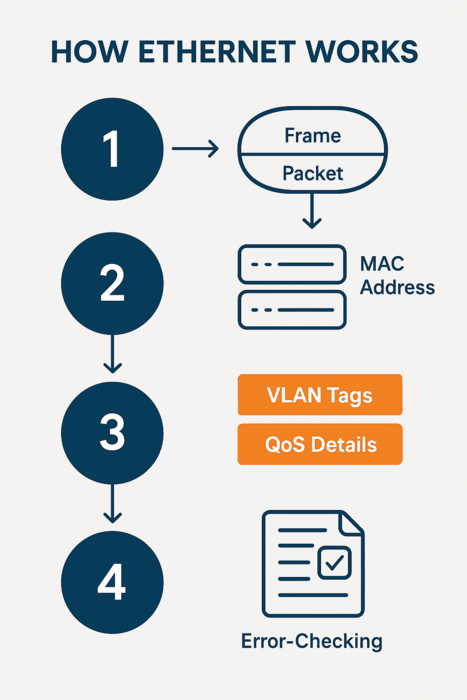
Ethernet transmits data using two units: frames and packets. A frame contains the actual data (payload), along with:
● MAC addresses of the sender and receiver
● VLAN tags and Quality of Service (QoS) details
● Error-checking information for data integrity
The frame is encapsulated within a packet, which adds control data to establish and manage communication.
Ethernet Frame Structure
Data transmitted over Ethernet is encapsulated in Ethernet frames, which follow a structured format to ensure reliable communication between devices. A typical Ethernet frame includes:
1. Preamble (7 bytes): Helps synchronize communication between sender and receiver.
2. Start Frame Delimiter (1 byte): Marks the beginning of the actual frame.
3. Destination MAC Address (6 bytes): Identifies the receiving device.
4. Source MAC Address (6 bytes): Identifies the sending device.
5. EtherType / Length (2 bytes): Indicates the type of data or its size.
6. Payload (46–1500 bytes): Contains the actual data being transmitted.
7. Frame Check Sequence (4 bytes): Uses CRC to detect transmission errors.
Note: Frames smaller than 64 bytes are called runts, and those larger than 1518 bytes are giants, both are typically considered invalid and may be dropped by the network.
Advantages of Ethernet
The following are the key advantages:
● Ethernet hardware is inexpensive and widely available.
● Simple cabling and setup make it user-friendly.
● Supports data rates up to 400 Gbps and beyond.
● Easily scaled from small networks to large data centers.
● Standardized protocols ensure compatibility among vendors.
Limitations of Ethernet
● While Ethernet is widely used, it comes with several limitations:
● The 100Base-T4 standard does not support full-duplex communication, restricting simultaneous two-way data transmission.
● High network traffic can degrade performance, making Ethernet less effective for bandwidth-heavy applications.
● Once a data packet reaches its destination, the receiver may not be able to respond or share additional information through the same transmission.
● Troubleshooting issues in Ethernet networks can be challenging, especially when trying to identify a faulty cable or device within a complex setup.
● Setting up a wireless Ethernet network requires a solid understanding of networking principles, which can be difficult for those without technical experience.
● Ethernet is not ideal for real-time or time-sensitive applications because it operates on a non-deterministic model, meaning it doesn't guarantee data delivery at a specific time.
Use Cases of Ethernet
The following are the multiple use cases involving Ethernet:
● Home Networks: Connecting routers, computers, and smart devices.
● Enterprise LANs: Structured cabling with switches and routers.
● Data Centers: High-speed Ethernet links for server-to-server communication.
● Industrial Automation: Reliable connections in harsh environments.
Ethernet vs. Other Network Technologies
| Feature | Ethernet | Wi-Fi | Token Ring |
|---|---|---|---|
| Medium | Wired | Wireless | Wired |
| Speed (modern) | Up to 400 Gbps | Up to 10 Gbps | Up to 100 Mbps |
| Interference | Low | High | Low |
| Collision Handling | CSMA/CD or none | CSMA/CA | Token-based |
| Use Case | LAN, Data Centers | Mobile devices | Legacy networks |
While Wi-Fi is dominant for mobility, Ethernet remains superior in terms of performance, stability, and latency.
Conclusion
Ethernet has continuously adapted to meet the growing demands of modern networks, evolving from 10 Mbps coaxial systems to multi-gigabit fiber deployments. It remains the standard backbone of wired networking due to its speed, simplicity, reliability, and cost-efficiency.
Whether it's connecting office desktops or forming the high-speed spine of a data center, Ethernet is an indispensable technology in computer networking. As demands for faster and more efficient networks grow, Ethernet standards will continue to evolve to meet the needs of tomorrow’s digital infrastructure.

Gautam Kumar
Linkedin Profile: https://www.linkedin.com/in/gautam-sharma-068336173/ Gautam Kumar is a senior network engineer having more than 7 years of experience in different companies in India. His work experience in network support and operation and maintaining of any network makes him one of the most valuable IT professional in industry. He has ...
More... | Author`s Bog | Book a MeetingRelated Articles
#Explore latest news and articles
 3 Dec 2025
Types of Network Hardware Devices and Their Functions
This article explains network devices in a computer network. Learn about different types of network devices, their functions and why they are important for ...
.png) 3 Jan 2026
3 Jan 2026
What are Computer Network Components? Guide to Networking Components
Learn about the networking components, both hardware and software, and how they work together to ensure efficient, secure, and reliable network performance.
FAQ
What is Ethernet and why is it used?
Ethernet is a wired networking technology used to connect devices in a local area network (LAN). It provides fast, reliable data transfer and is commonly used in homes, offices, and data centers for stable internet and network communication.
What is the difference between Wi-Fi and Ethernet?
Wi-Fi is a wireless connection that uses radio waves, while Ethernet is a wired connection using cables. Ethernet offers faster speeds and more stability, whereas Wi-Fi provides flexibility and mobility without physical connections.
What are the three types of Ethernet?
The three main types of Ethernet are Fast Ethernet (100 Mbps), Gigabit Ethernet (1 Gbps), and 10-Gigabit Ethernet (10 Gbps). Each type offers different speeds and is used based on network size and performance needs.
How many cables are used in Ethernet?
Ethernet typically uses one cable per connection, usually a twisted pair cable like Cat5e or Cat6. Inside the cable, there are 4 pairs (8 wires), but not all are always used depending on the Ethernet standard.
Comments (0)


Popular posts


What are the Different Types of Network ...
29 Jul 2026
What is the Syllabus for CCNA ...
17 Jul 2026
Transmission Media and Its Types in ...
6 Jun 2026
CCNA Exam Fees and Expenses Breakdown
25 Aug 2025Recent posts

18 Types of Cyber Crime: definition, ...
7 Aug 2026
What are the Different Types of Network ...
29 Jul 2026
Understanding Cisco Firepower - A Secure ...
23 Jul 2026
Understanding VLAN Trunking Protocol ...
23 Jul 2026
Benefits and Drawbacks of Virtualization ...
17 Jul 2026Upcoming batches






Contact learning advisor