Master Networking Lab Fundamentals
Join our free webinar to get online tutorial on our networking fundamental labs, and get quick explanations on our fundamentals lab practicals.
in Cisco Security
Created by
Sumit Kumar
Next Batch
Language: English
Duration: 2:00 Hours
Next Batch
Language: English
Duration: 2:00 Hours
What you will learn?
Basics of networking concepts and how they apply in real-world setups.
Steps to configure devices in a virtual lab environment.
Learn various network configurations of devices and protocols
Implement Access Control Lists (ACL) for network security.
About this course
This Networking Fundamentals Lab webinar is designed to introduce you to our remote fundamental networking labs, where students and professionals will get live demonstrations on our networking fundamentals lab.
The webinar will be conducted by an experienced networking professional who will demonstrate different networking configurations and setups related to NAT, DHCP, ACLs, and others in our virtual labs.
By attending this webinar, you will gain free access to our online networking fundamentals labs, where you can try these practicals yourself and gain hands-on experience on basic networking configurations with Cisco Devices.
Webinar Highlights
● Get a walkthrough on our remote networking labs.
● Watch experts do the basic networking configurations and setups.
● Get an overview of lab tools and virtual environments used for networking practice.
● Explore real-world networking scenarios and how they’re simulated in the lab.
● Understand the kind of tasks done by beginner networking professionals.
To know more about the webinar, contact our learner advisors

Reasons to Attend UniNets Networking Fundamentals Lab Webinar
1. Get a clear overview of how the lab works and what tools you'll use.
2. Get free access to the networking fundamentals lab and lab workbook.
3. Interact with experts and get your questions answered in real time.
4. See live demos of real-world networking tasks and device configurations.
Who Should Attend this Webinar?
● Aspiring Network Engineers: Individuals looking to start a career in networking.
● IT Professionals: IT professionals seeking to enhance their networking knowledge and skills.
● Students: Students pursuing degrees in computer science or information technology.
● Tech Enthusiasts: Anyone interested in learning about networking technologies.
Suggested by top companies
Top companies suggest this course to their employees and staff.


Similar Courses


.jpg)

FAQ
What will be covered in this Webinar?
This webinar will guide you through our networking fundamental lab workbook, showing each practical in live session helping you understand the concepts better.
Will I get lab access in this webinar?
No, you will not be given lab access, but we will share our discounted networking fundamental lab where you will access the workbook and virtual lab for self practice.
Are there any perks to attending this webinar?
Yes, there are a lot of perks of attending this webinar as you will get discounted lab course, our forum, and expert demonstrations on basic networking configurations and set ups.
How can this webinar help me in my career?
This webinar provides an overview of the essential tasks every network engineer performs in their daily role. You'll witness the industry experts do these tasks and learn from them.
Comments (0)
Webinar Overview
2 Parts
- 4:00 Hr
Networking Basics Live Webinar
1. Introduction to Networking | Network Basics
2. Network Devices Overview
3. OSI and TCP/IP Layer Model
4. LAN & WAN Technologies
5. VLAN Concepts | DHCP Protocol
6. NAT | ACL | Routing Concepts & Configurations
7. Summary & What is Next
4:00 Hours
28 Mar 2025 | 05:00 pm
PPTs - Networking Basics
Networking Basics Live Webinar PPTs help you to understand the topics covered in the Live session.
487.05 KB
Manual IP Configuration
1 Parts
- 0:10 Hr
Chapter 1: Basic IP Addressing and Connectivity Site 1
Configuring IP addressing and verifying the local connectivity at site 1
10 Min
Attachments:
VLAN Configuration on Switch
1 Parts
- 0:20 Hr
Chapter 2: Cisco Switch VLAN Configuration
Learn how to configure VLAN in Cisco Switches.
20 Min
Attachments:
Configure DHCP Server
1 Parts
- 0:10 Hr
Chapter 3: Configure DHCP Server on Cisco Router
Learn how to configure a DHCP server on a Cisco Router.
10 Min
Attachments:
Configure NAT and Port Forwarding
1 Parts
- 0:15 Hr
Chapter 4: Configure NAT and Port Forwarding
Learn how to Configure NAT and Port Forwarding on a Cisco Router.
15 Min
Attachments:
Basic IP addressing and Connectivity
1 Parts
- 0:15 Hr
Chapter 5: Basic IP addressing and Connectivity
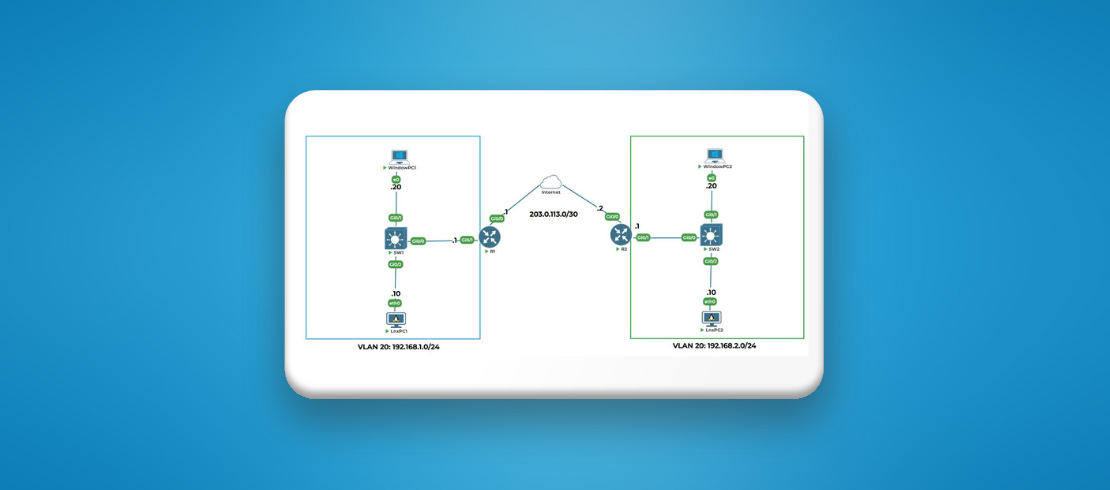
We will be doing basic IP configurations on Site 2 of the Topology.
15 Min
Attachments:
Cisco Switch VLAN Configuration for Site 2
1 Parts
- 0:15 Hr
Chapter 6: Cisco Switch VLAN Configuration for Site 2
We will do the VLAN configuration on Cisco Switch of Site 2.
15 Min
Attachments:
Configure NAT on Cisco Router
1 Parts
- 0:15 Hr
Chapter 7: Configure NAT on Cisco Router in Site 2
We will configure Network Address Translation (NAT) on the Cisco Router in Site 2.
15 Min
Attachments:
Enable SSH with ACL
1 Parts
- 0:20 Hr
Chapter 8: Enable SSH on a Switch with ACL
Learn how to enable SSH on a Cisco Switch with Access Control List (ACL) for authorized access.
20 Min
Attachments:
Inter-site Routing with Static Routes
1 Parts
- 0:20 Hr
Chapter 9: Inter-site Routing with Static Routes
We will connect Site 1 and Site 2 by setting up static routes between routers from both sites.
20 Min
Attachments:

5.00
2 Reviews